It’s a little admitted secret, but one of the biggest reasons people like Network Attached Storage drives is for Torrent downloads. They’re the easiest ways to download obscure British TV shows, for example, that can’t be easily had here in the U.S. After downloading a couple of shows, users watch them via WiFi streaming on their MacBooks or iPads.
Trouble is, Torrent downloads slow everything on the home network to a crawl. Everyone complains when the network is clogged with Torrents of Shameless or The Killing. Well, not any more. You can set up one of Iomega’s new Home Media Network Hard Drive, Cloud Edition at work and use the office’s net connection to download Torrents at night. Then you stream them over the net to your home.
I’ve been testing one of the Home Media Drives for several weeks. There’s a been a few glitches, but on the whole, it works well. Now I’ve got my own little Amazon S3 system, with none of the monthly fees.
Hardware
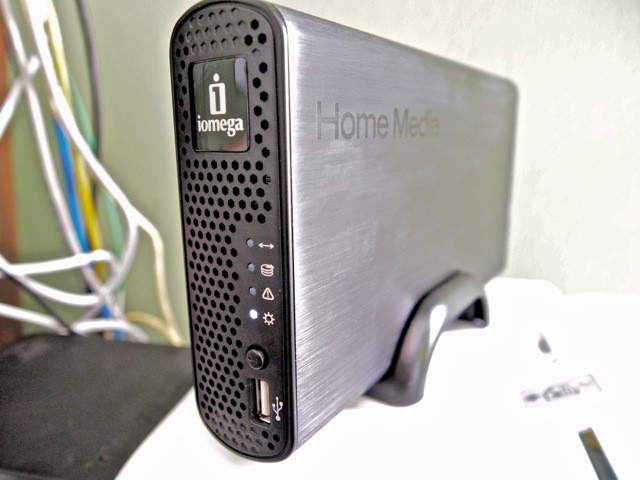
Iomega’s new Home Media Network Hard Drive, Cloud Edition, is a welcome update to Iomega’s line of home media NAS drives — but now with internet connectivity.
It’s dead easy to put the Home Media Drive on the internet and create your own personal cloud device, serving up files and media to anyone, anywhere — as long as they have password access.
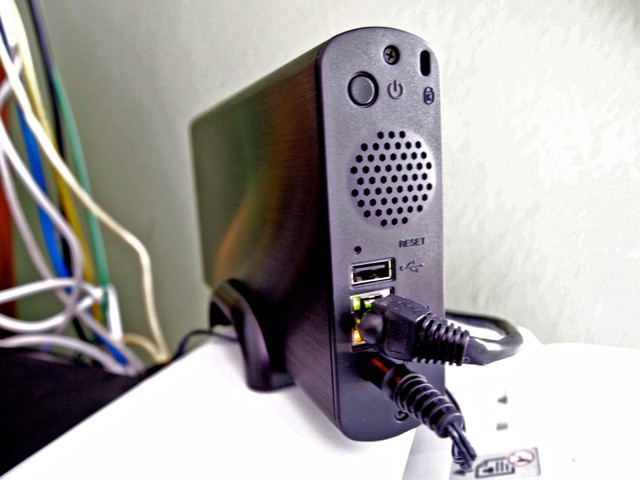
The new Home Media Drive is a compact box with a high-quality black finish. There’s a single Gigabit Ethernet port at the back and a pair of USB jacks for expanding storage with extra, external drives.
It is essentially silent. It’s a low-power, fan-less design. It comes in 1TB and 2TB and editions. The 1TB drive is listed at $169.99 but can be found for about $140 online. The 2TB is listed at $229.99 but is about $195 online. The drive is aimed at home users who want anywhere-anytime access to their files, and SMBs and workgroups who need to share files over the net.
It offers lots of storage for files and backups, and makes it dead easy to share media. It has several built-in media-sharing features, including UPnP and iTunes servers. Media shows up automatically on game consoles, other machines, network TVs and digital picture frames. Torrent downloads are also built-in.
Setup
The Home Media Drive is easy to set up. It’s a three click process. I did have an issue with my AT&T UVerse router. It’s one that doesn’t open its ports on command from Iomega’s setup software. I had to manually configure port forwarding, which required a bit of Googling — but it was fairly straightforward and it worked. Since then, the Home Media Drive has functioned pretty well, though I’ve sometimes lost connectivity and have had to reboot the device. Why it does this is a mystery to me — it could be network issues.
Invitations to join the cloud are sent by email. I sent invites to friends and family, who were granted access after downloading and quickly configuring Iomega’s Storage Manager client software. After that, shared files are accessible through the Finder — just like Dropbox or MobileMe — or through any browser or the Storage Manager software. Access can be granted to up to 250 friends or coworkers.
Usage
It’s easy to share and collaborate on files. Transfers of large files are especially easy and convenient. It’s mush easier to share large files than FTP, YouSendIt or email. File transfers can be encrypted (AES 128-bit encryption).
After that, there are no extra fees or costs associated with hosting or sharing files — except for paying your internet bill, of course. Iomega stresses this. After the initial cost of the device, there are no ongoing fees or costs. With hosted services like Dropbox, there are storage costs after the first 2GB. Apple’s $99-a-year MobileMe is limited to 10GB of free storage.
The Home Media Drive can be used for Time Machine backups. It can also be used to set up a fairly simple and low-cost offsite backup system: but you’ll need two devices. Your machines are backed up using Time Machine, which then uses device-to-device copying to synchronize the backups to another Home Media Drive at another location, say at home.
You can set up active folders to automatically upload photos or video to an online service when files are dropped onto them. It’s easy to set up a folder to upload pictures in batches for Facebook, YouTube and Flickr, for example.
iOS App
There’s an upcoming iOS app, which will stream pictures, music and movies over the internet. Very handy for traveling with an iPad, as long as you have a good 3G or Wi-Fi connection, of course. Iomega says the system can be used in reverse. You could offload all your vacations photos and video to the iPad, which in turn offloads them to the Home Media Drive, without compressing them. The iOS app should be approved anytime soon, Iomega says.
Torrents
On the downside, the Torrent system is a lot more complex and un-intuitive than Iomega’s old system, which was two clicks easy. The new system requires designating a hot folder and associating Torrent downloads with it. It is in the documentation, but it took me a while to figure this out and get it working. Granted, now that it is set up, it’s easy to add Torrents — you just drag and drop Torrents to the “Download” folder — but compared to the old way Iomega used to do this, it seems unnecessarily complex and difficult.

Leander Kahney is the editor and publisher of Cult of Mac. Leander is a longtime technology reporter and the author of six acclaimed books about Apple, including two New York Times bestsellers: Jony Ive: The Genius Behind Apple’s Greatest Products and Inside Steve’s Brain, a biography of Steve Jobs.
Leander has written for Wired magazine, Scientific American, The Guardian, The Observer, The San Francisco Chronicle, MacWeek and many other publications.

