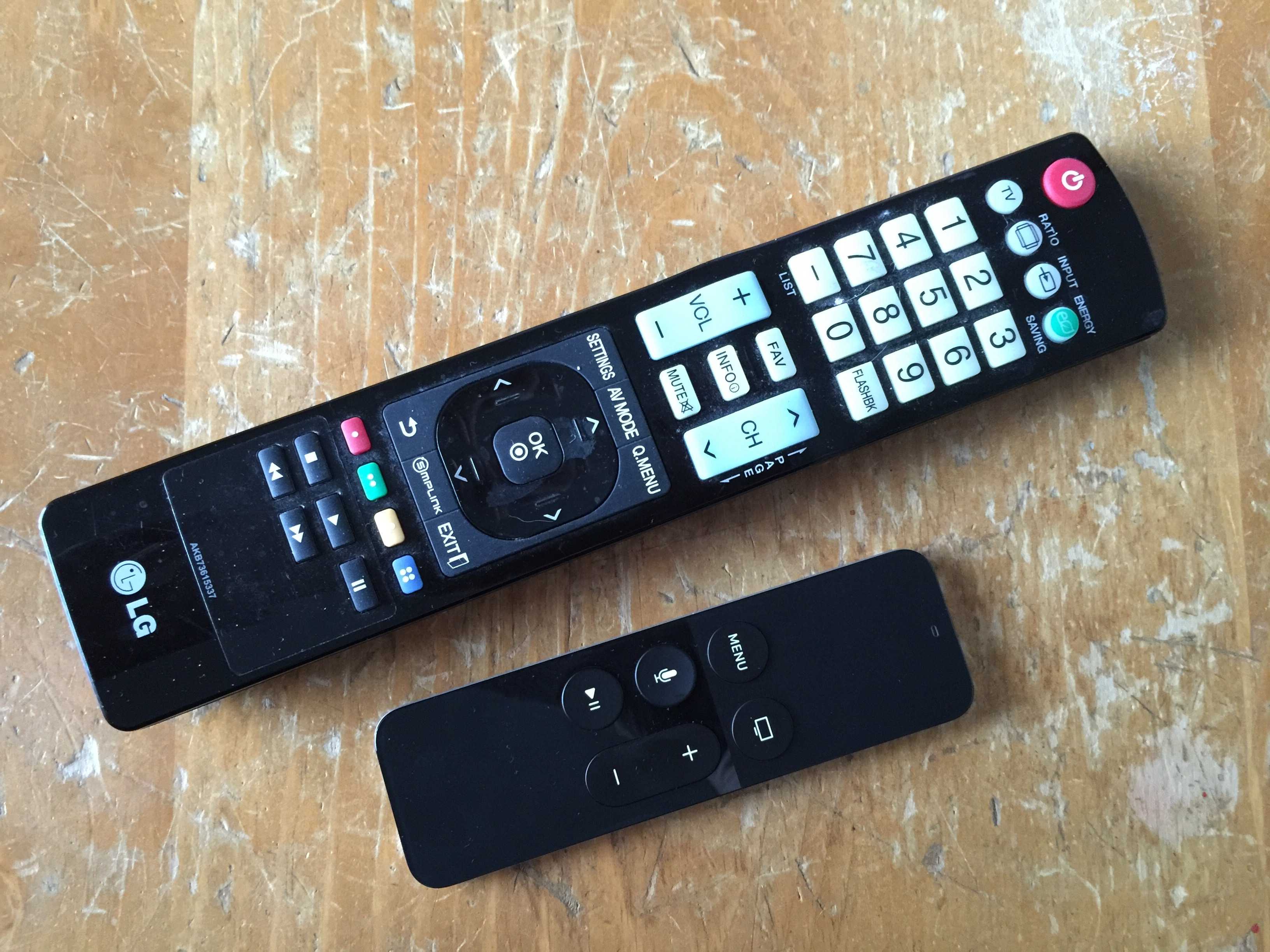
The new Apple TV remote is a wondrous touch- and motion-enabled trackpad with a few simple buttons that lets you do everything on your new black hockey puck of joy, including playing games, swiping through apps, and, well, playing and pausing your movies and TV shows.
What happens when you lose it somewhere in the depths of your couch, though? The iPhone Remote app no longer works with the new Apple TV, and unless you have an Apple Store nearby, you’re gonna want to have a backup plan in place.
Might as well take a couple of minutes and set up your regular old TV remote to work with Apple TV, right?
Here’s how.

Photo: Apple
Using the new Apple TV Remote (before you lose it!), swipe over to Settings and click on it. Navigate to Remotes and Devices, then Learn Remote. Click on it.
Choose some buttons on your old remote that don’t already control other devices, like a DVD player or an AUX device. If you don’t use a single-device remote, Apple says to choose an unused device setting on your old remote before you start.
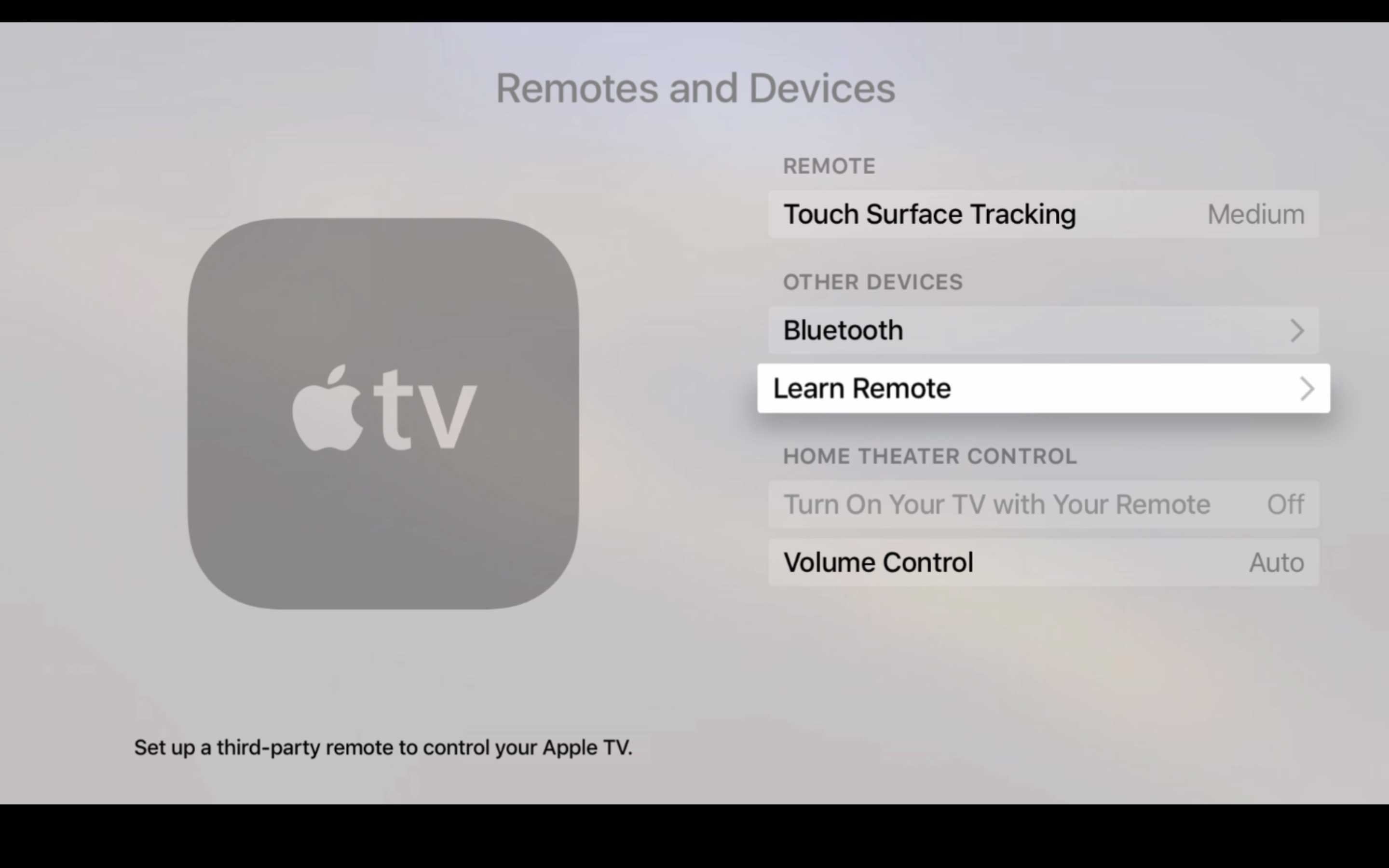
Photo: Apple
Click Start on the Apple TV screen and you’ll see several icons that represent the six buttons on the Apple Remote. It should highlight the Up or + button to start.
Using your old TV remote, press and hold the button you want to use as the Up button until the blue progress bar is completely full. Apple TV will then highlight the next onscreen button. Press and hold on the old TV remote button you want to use for the next Apple TV button, and repeat until all six buttons are mapped to the old remote device.
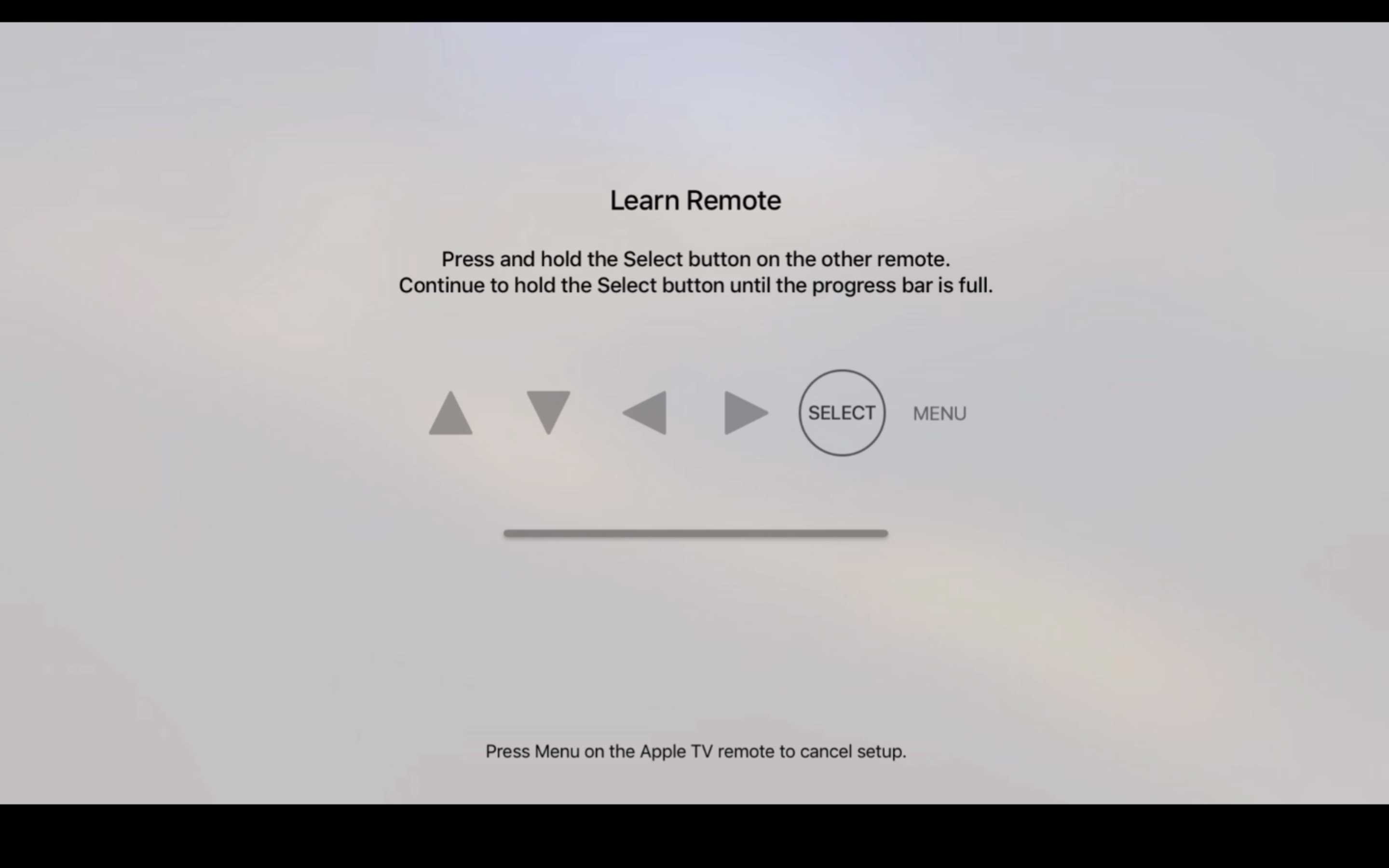
Photo: Apple
You can then name your old remote if you’re planning on using more than one to control your Apple TV. Once you’ve done so, you’ll see that remote’s name in the list of Learned Remotes int he Remotes and Devices list.
You can then dip in and map more buttons on your old TV remote to control playback of movies and music on Apple TV. Simply navigate to Settings > Remotes and Devices, and then click on the name of the remote you set up above. You’ll be able to Rename your remote here or Set up the Basic buttons again, as well as Delete the Remote from your Apple TV. Navigate to Set Up Playback Buttons and do the same click and hold on your old remote when prompted by your Apple TV for Play, Pause, Stop, Rewind, Fast Forward, etc.
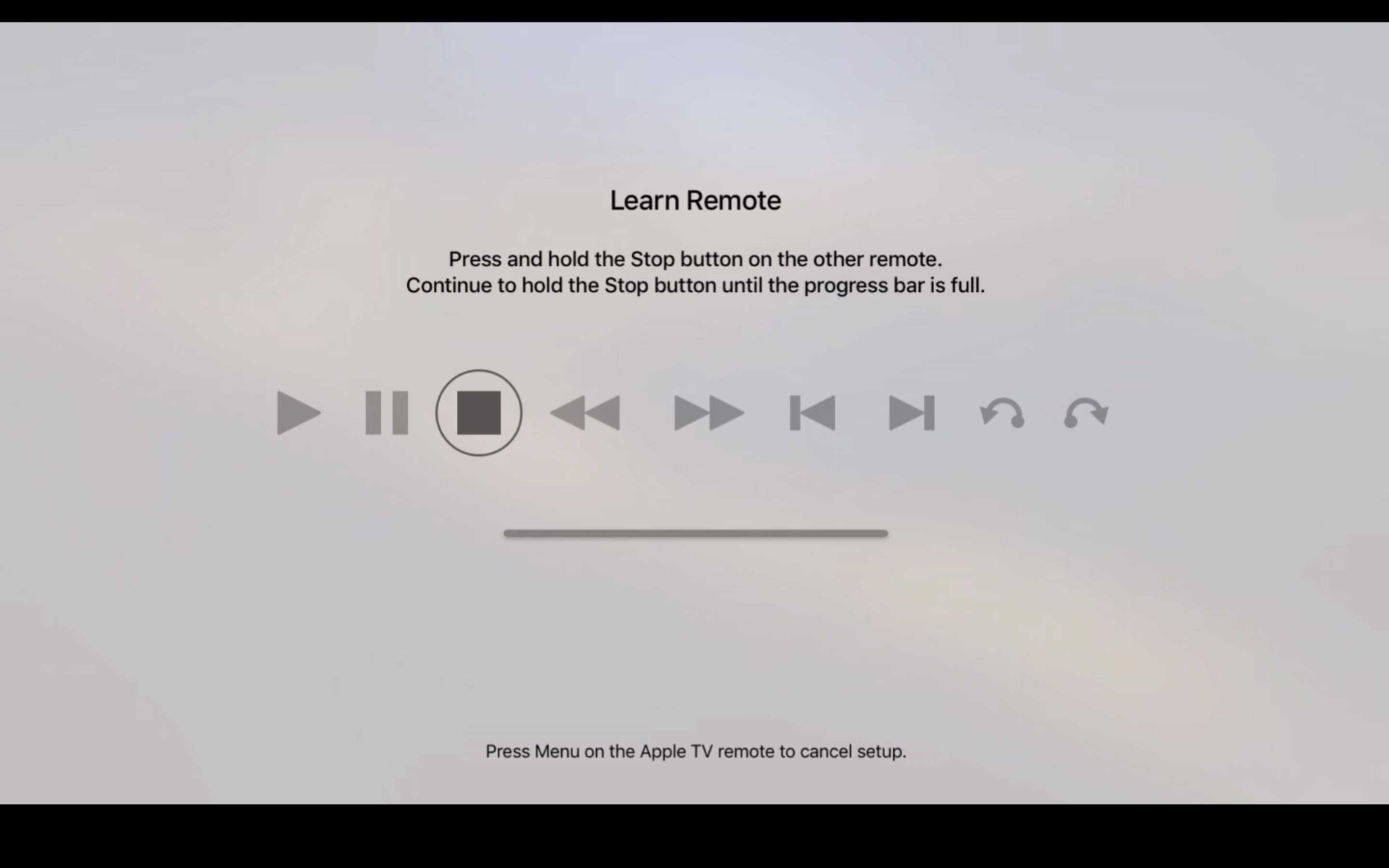
Photo: Apple
Now you’ve got at least two functioning remotes in your household that will let you use your Apple TV. Of course, you won’t be able to use a third-party TV remote for any gaming, so find that new one you lost soon. It’s probably in the last place you’ll look, anyway.

Rob LeFebvre is an Anchorage, Alaska-based writer and editor who has contributed to various tech, gaming and iOS sites, including 148Apps, Creative Screenwriting, Shelf-Awareness, VentureBeat, and Paste Magazine. Feel free to find Rob on Twitter @roblef, and send him a cookie once in a while; he’ll really appreciate it.


17 responses to “How to use your old TV remote with your new Apple TV”
On the last article you said to use your iPhone to enter text during setup but here you say the remote app doesn’t work with the new AppleTV. So how do you use your iPhone to enter text?
You will get a pop up on screen to enter your Apple ID that had nothing to do with the remote app.
yes, exactly – the iPhone is used as part of set up, but not the Remote app. Sorry for the confusion.
Apple TV can be paired with iPhone via Bluetooth. Hold your iPhone near Apple TV, and you’ll be prompted to enter your Apple ID & password on your iPhone. After you authorize the pairing, both your Apple account and WiFi settings will be copied to Apple TV. You don’t need any wireless keyboard or Remote app; you don’t even need to setup WiFi connection on Apple TV.
This feature is available since Apple TV 6 and iOS 7 (yes you can do this on Apple TV 3rd generation). But apparently it’s little known to people.
Why not make the Apple remote one of the devices that can be found on the Find My IPhone app? Having it transmit a sound when lost would be great!
That’s a fantastic idea!
Is there anyway to make the volume buttons on the apple tv remote change my TVs volume? or does that just work over HDMI link?
It is supposed to work with your TV or A/V receiver over IR but I can’t get it to work properly with my receiver. Many people have had success though.
You would go to where it says Volume Control and instead of Auto change it to IR. They it can learn your remote’s volume up and down signals.
It did it automatically for me. I’m still using Bluetooth and not infrared.
So far, mine works fine via the HDMI tech – Apple’s support page says it should work even without HDMI.
If your television or receiver doesn’t offer HDMI-CEC support
Your Apple TV (4th generation) should automatically set up your remote to control volume on your television or receiver, even without HDMI-CEC support.
If volume control doesn’t work, check that nothing blocks the path between your remote and the front of your television or receiver. If you still need help, follow these steps:
On your Apple TV (4th generation), go to Settings > Remotes and Devices > Volume Control.
Select Learn New Device.
Then follow the onscreen steps to program your remote to control volume for your television or receiver.
After reading all the reviews regarding the new Apple TV I decided to return the black box. Sounds like Apple put out a beta Apple TV, they need to get their act together at this point, I will continue using the old until I know the version it’s ready. Also I purchase a Roku 4- 4K looks amazing if you own a 4K tv, I still don’t why Apple did not add 4K, oh well.
Because the vast majority of consumers don’t have a 4K TV and there’s a dearth of content available at that resolution.
It’s sad that you think that way. It isn’t beta, but it’s your loss if you think so.
Why are there volume buttons on the remote if it won’t change the volume???
Your welcome for pointing this and 1keyboard out on your last post.
I’m incredibly disappointed to hear that the remote app for the apple tv does not work with the new generation. That’s one thing I LOVED about the app is that I never had to worry about losing the remote control because I ALWAYS have my phone on me. Allowing me to use my phone to control all three of the apple tv’s in my house was incredibly convenient. That is a minor draw back for me. I hope that Apple includes the remote app to function with the new Apple TV in the future…
Will they ever make the iPhone remote app work with the new apple tv? and how are my kids suppose to play each other on 2 player games without another remote?
I think you need to get a MFi controller for that, anyway.