Apple pays more attention to the details then anyone else. Sometimes the details they pay attention to are so small, you don’t notice them at all for a long time… but once you see what they’ve done, you can never unsee it, or accept anything less.
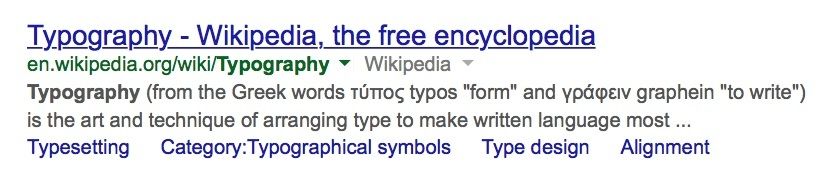
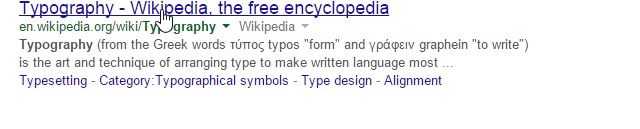
Here’s a great example from OS X Yosemite. Compare the two images above. The top is from OS X Yosemite, the bottom from Windows 7. Notice anything? One of these images has much better typography than the other. But can you tell why?
Apple has tweaked the typography in OS X Yosemite so that link underlines skup over the descenders. What’a descender? It’s the little dangling parts on letters, like the tail of the lowercase ‘p’, ‘g’ or ‘y’.
It’s a small touch, achieved by Apple by altering the default stylesheet in Safari. But it makes a difference. Instead of having descenders artlessly overlap an underlined word, they now gracefully dangle, like the tails of monkeys.
Of course, Apple has always cared about typography. It all stems from Steve Jobs’ courses at Reed College before he founded Apple, where he studied calligraphy under some of the masters. For years, Apple has been at the forefront of type rendering on computers. But obviously, they still feel there’s much to be done.
Via: Reddit

John Brownlee is a writer for Fast Company, and a contributing writer here at CoM. He has also written for Wired, Playboy, Boing Boing, Popular Mechanics, VentureBeat, and Gizmodo. He lives in Boston with his wife and two parakeets. You can follow him here on Twitter.


21 responses to “Once you see this small typography tweak Apple made in OS X Yosemite, you can’t unsee it”
I do like the little touches. However, I feel that Yosemite’s native font is too ‘light.’ I preferred the heaviness that Mavericks had and miss it. Perhaps there is a way to change the system font, but I have not (yet) discovered it.
Edit…
Found this…
http://forums.macrumors.com/showthread.php?t=1768362
Are you on a Retina Mac? It was designed with the Retina present and future in mind. Sorry to say but non-retina is considered Legacy now.
ya MBP retina late 2013 (I think). But I pretty much always use it ‘docked’ connected to a 23″ IPS display (AOC). It’s ben decent. I think it;s just my aging eyes that prefers the ‘older’ font… :) Even the font on my iPhone 6 sometimes looks too light (waiting to jailbreak that guy)…
Check out some of the accessibility settings on the iPhone. One of them is bold text. Perhaps that would help… It requires a reboot so I haven’t tried it. There’s gotta be something similar on the Mac. From my Hackintosh days there are a few terminal commands which change the text smoothing level, which would probably help some.
I thought it was the kerning.
This has nothing to do with typography, its a css mod… If you think that is cool, use ‘Stylish’ plugin in Firefox and have a blast playing with your favorite website – even this one… (you can easily get rid of all these ads)
Making type look and read better has nothing to do with typography? okay then.
This isn’t new – Mac OS and its apps have always done this. You may be comparing Google Chrome to Safari – that’s another matter altogether.
Nope, you’re wrong.
Only since Mavericks.
You might want to actually know what you are talking about before you write about it with a linkbait headline. This is not new in Yosemite, Safari did this in Mavericks.
cultofclickbait
yeah they really made a lot of money from the 15 people who chose to comment…. millions of dollars probably.
clickbait not “comment”bait, retard.
It doesn’t take much brain power to extrapolate out from 15 comments to a very low number of clicks, slower than retard.
“so that link underlines skup over the descenders”
What’s a “skup”? I take it you meant to type “skip”. How ironic that an article about attention to detail contains such an obvious typo lol.
I had the same reaction. lol
This is, of course, assuming you think the little gaps in the underline do actually look better…… Isn’t art being subjective such fun, kids?
It’s great, but not worth reading/writing an article about it.
Apple pays more attention to the details THEN anyone else? Yikes. Might be time to hire an editor with your linkbait ad impressions earnings.
Apple pays more attention to the details then anyone else, including knowing when to use “than” instead of “then”.