Apple’s release of iOS 8.0.2 brought a number of bug fixes to the new operating system, but many iPhone users have reported Bluetooth connection problems with automobiles, including some of us here at Cult of Mac.
Since the iOS 8.0.2 update, iPhone users have taken to Apple’s Support forums to report that they’re unable to initiate calls over Bluetooth. The bug seems to affect a range of iPhone models and automobile makers, but there’s a quick solution that can get you back on the road and slinging cars while you drive.
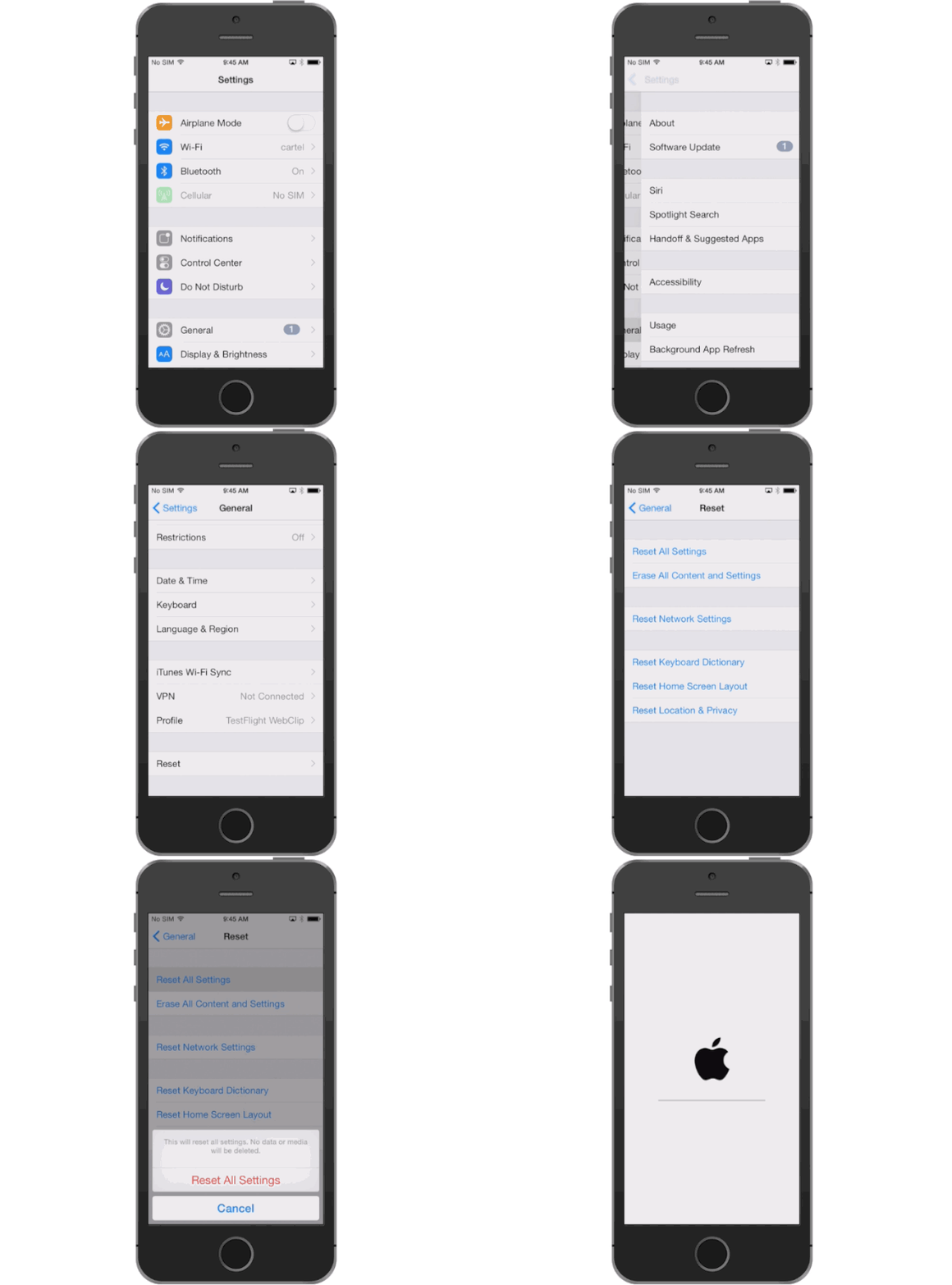
Just follow these quick steps:
Warning: This fix requires you to Reset All Settings which also has a bug that deletes all your iWork-related files in iCloud Drive. Backup documents before proceeding.
Whether you’re having difficulty pairing your iPhone over Bluetooth or answering calls, we’ve had success fixing iOS 8.0.2’s Bluetooth woes by resetting all iPhone settings. To do this, open Settings and go to General >> Reset >> Reset All Settings.
This method has been successful for all of our autos, as well as for most Apple Support forum users. There are still a number of iPhone user who report Resetting All Settings hasn’t fixed their issues. We’ve reached out to Apple for comment on the Bluetooth bug but haven’t received a comment at time of publication.

Buster Hein is a freelance writer who lives in Phoenix, Arizona. Twitter: @bst3r.


38 responses to “How to fix Bluetooth connectivity in your car after iOS 8.0.2 broke it”
What settings will I loose by doing the reset? For example will I loose my exchange connection settings that came with a profile pushed by my company on my iPhone?
On the Reset screen, you’ll have a number of options for removing your iPhone’s content.
Reset All Settings – This deletes all of your preference settings, returning them to the defaults. It will not erase any of your data or apps.
Erase All Content and Settings – If you want to fully delete your iPhone’s data, this is the option to choose. When you tap this, you’ll not only erase all of your preferences, you’ll also delete all music, movies, apps, and other data from your phone.
Reset Network Settings – To return your wireless network settings to their factory default states, tap this.
Reset Keyboard Dictionary – Want to remove all the custom words and spellings you’ve added to your phone’s dictionary/spellchecker? Tap this option.
Reset Home Screen Layout – To undo all of the folders and app arrangements you may have created and return your iPhone’s layout to its default state, tap this.
Reset Location Warnings – Each app that uses the iPhone’s GPS to be location aware asks your permission to use your location. To reset all of those warnings to their default off state, select this.
Now try soaking in salt water…. iOS Student? what grade?
lost background preferences and reset many apps to know my location…
I did “Reset All Settings” because I was experiencing this issue. It worked for a day, then it went back on to lose connectivity the next day.
Prior to having an iPhone 6, I had a 5C. The 5C worked fine using iOS7, but stopped working when I moved it to iOS8.
I have a 2014 Mazda 6 Sport Trim, and an iPhone 6.
That is exactly what happened to me. I reset and it worked for a day and half and then back to same problems. Music will play with some effort but calls are a no go. I miss my bluetooth. I switched from android and I regret it so far….
I have the same car as well and on other phone never had any issues with my car bluetooth
Yes, this will fix it, but it is only temporary. The issue will come back. I wish I knew what triggered it.
This bug also affects handoff?
Yes, handoff stopped working since I update to 8.0.2
still having problems with iOS 8.1 and YOSEMITE GM
The 8.1 b1 actually resolved my Bluetooth issues with my BMW on my iPhone 6.
Could you guys post that the damn 8.0.2 broke data on straight talk? Shit is driving me crazy. My fiances phone no longer works with any data at all. Switched the SIM to my 6 and the same issue. God damn apple.
Just delete the Bluetooth profile you’re experiencing problems with. Make a new connection. Boom, problems fixed :-)
Not true – I did that – deleted and repaired my devices – and did it twice. Still does not work – I also tried re-naming my iPhone 5 – deleting it and re-pairing it to no avail – guess I will wait for a patch or update….
Weird. I did that for 7 different devices from all of my friends. A suggestion from Apple. All with no problems. Only thing i can spot is that i didn’t try it with an iPhone 5. Alle newer devices and two devices i had te reset settings after removing profiles.
Yeah it is strange – noticed some posters had ‘temp’ success but stability eroded over time – sometimes these bugs lurk or come back and continue to corrupt interface. Hope your fix sticks – and apple should issue a new update soon. (Maybe my 2014 Toyota Prius is the problem- but Toyota referred me back to Apple) Good luck with all your devices -!
I had a similar issue in my car. Instead of resetting all settings, I simply went to the Bluetooth settings on my device and I choose to forget the car stereo. Then I reconnected the device with the stereo, and it just worked.
Whew ! Worked for me. Thanks for the great article. My Bluetooth blues are gone after “Reset All Settings”. One thing is, I guess, after that step, do not restore from old backup. Manually reconfigure all settings, If you restore, whatever was the conflicting setup will come back again !
Oh Oh – I did restore from computer back up – so I may have to do a clean re-install – darn 85 apps with data Or maybe just wait for Apple it issue fix. But ultimately if corruption spreads – I may have to completely restore or ‘nuke ’email for morbid” bummer! Here is hopping Apple has time to fix this.
Yikes Sometimes I hate autocorrect! I meant “nuke ’em for morbid”
Also, THANK GOD, I didn’t have to “Erase all contents and settings”…. tired of the restore from cloud ! Took hours and hours last time :)
I own an Audi A3 and iPhone 6 on iOS 8.0.2. I deleted the bluetooth setting in both the car and the phone, and RENAME BOTH of the bluetooth devices and that did the magic for me!! Without having to go through the reset (never knows what is gonna lost!)
The issue also involves ICloud. Prior to resetting anything, log out of icloud, reset & reboot, then repair and it will work… you can log back into icloud but if your phone needs to reboot again, the b/t breaks. Confirmed on 8.0, 8.0.2 for both a 5s and 6+ And yes, restored from 5s backup to 6+; prior to that restored from a 5 to a 5s; did not perform fresh install. I am debating trying this to avoid the issue all together.
This affect my connection with my 2014 M6 convertible
having same problem with 2014 CL550 and 2014 Panamera GTS
Does anyone actually know what they are talking about, or are y’all just throwing shit on a wall to see what sticks?
for me deleting all BT connections and setting them up again worked in a Volkswagen Sharan.
iPhone 5s iOS 8.02 works fine over Bluetooth with 2014 Audi A4 w/MMI without Navigation. The Hey Siri function and improved Maps over Bluetooth is a big step. Shame my car can’t do the whole CarPlay experience. Hundreds of iOS 8.02 users at work no Bluetooth complaints yet.
Iphone 5 8.02 , after reseting all settings it worked for a day, and i’m back to the starting position.
I updated to iOS 8.0.2 OTA and started having problems with mi iphone 6 connection to Audi A6 2011 MMI 3G bluetooth Handsfree profile.
My solution: full backup with Itunes , return your phone to factory settings and update to 8.0.2 with Itunes and later restore with your previous Itunes backup.
I think OTA corrupts some files , since then working flawlessly.
it worked but until i have to reboot my iphone. now im back to square one with all my cars
Thank you, thank you, thank you! I ended up buying an auxiliary cord for my music to sync to my car and I realized, with the mess of cables and poor audio quality, how much I miss my Bluetooth! This worked for me, so if you also have an iPhone 6, iOS 8.0.2 and are trying to sync up with a 2012 Hyundai Elantra Limited, then do the reset. Also, do it as long as you’re ok with removing your files from the iCloud and your phone settings (not your phone’s files, data, music, and pictures – they will remain on the phone).
Thanks; plugged the phone in the car and it didn’t work, so performed a reset and it works.
I reset all my settings and it worked! Until I restarted my phone to make sure it wasn’t temporary because I read in some forums it was. And it was. All for nothing. Booooo! Don’t do it.
I made the rookie mistake of jumping on IOS 8.0 with my iPhone 5 instead of waiting for the dust to settle, ultimately having to wipe out the phone and rebuild my apps, data, etc. from the ground up. Had a little better luck with my iPad 3 at least. I will now forego any minor releases until all of these little glitches get resolved & the iPhone community confirms stability.
Note to the Apple brass: It’s an old Microsoft trick to rush a major OS release to market and then scramble to patch all the bugs the release brought into the wild. I used to say Microsoft looks at their entire customer base as their beta testers, voluntarily or not. I hate seeing Apple follow the same business model. And before anyone says it’s been beta’d, blah, blah, we know these mini-patches aren’t being vetted enough before being slammed out to users.
6+ will not talk to my Flexsmart x2. I tried the reset the network settings to no avail. Contacted company and they said it is all Apple. When do we expect an update?
Turn off contacts sync for that device in Bluetooth settings and it should be able to make calls again. I had the same issue with two cars and this solved it on both