Mobile menu toggle

Apple Updates iBooks With Nighttime Reading Theme, Full-Screen Mode, And More

By

IMG_0065

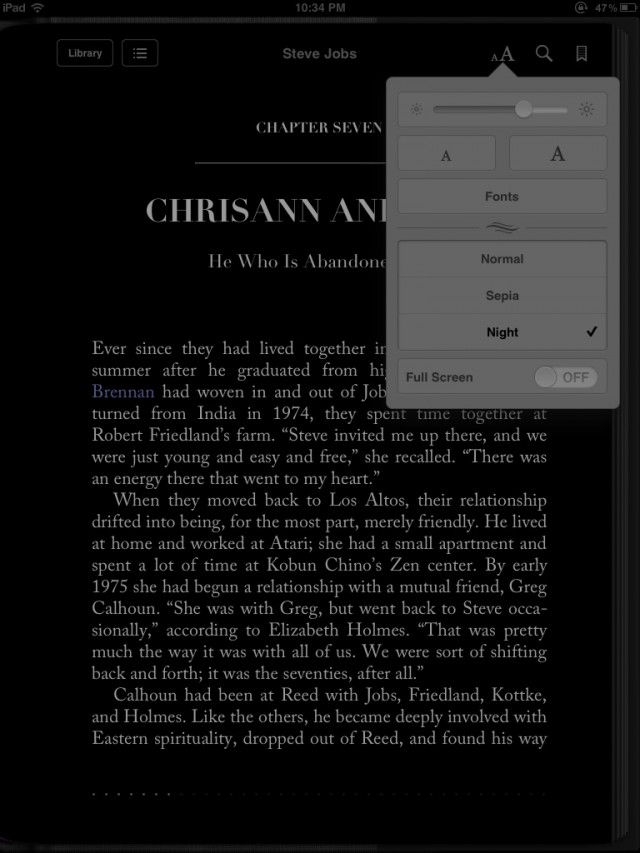
Apple has issued an update to its iBooks app on the iPhone, iPod touch, and iPad. Version 1.5 of iBooks brings two major additions: a nighttime reading theme and full-screen mode.

The update also brings several new fonts, more covers for public domain books, pop-up footnotes, and a redesigned annotation palette.

What’s New in Version 1.5

iBooks 1.5 adds the following new features as well as some stability and performance improvements:

• Nighttime reading theme makes reading books in the dark easier on the eyes.
• Full-screen layout lets you focus on the words without distraction.
• iBooks now features an improved selection of fonts, including Athelas, Charter, Iowan, and Seravek.
• Beautiful new classic covers for public domain books.
• A redesigned annotation palette makes it easier to choose a color for your highlighted text.

The new full-screen mode is great because you don’t have to turn it on or off. The app automatically hides your reading options and iOS status bar once you start reading. Simply tap anywhere on the screen to see your options in either landscape or portrait orientation.

iBooks 1.5 can be downloaded for free in the App Store.

  • Subscribe to the Newsletter

    Our daily roundup of Apple news, reviews and how-tos. Plus the best Apple tweets, fun polls and inspiring Steve Jobs bons mots. Our readers say: "Love what you do" -- Christi Cardenas. "Absolutely love the content!" -- Harshita Arora. "Genuinely one of the highlights of my inbox" -- Lee Barnett.

10 responses to “Apple Updates iBooks With Nighttime Reading Theme, Full-Screen Mode, And More”

  1. Guest says:

    still reading it too huh?

  2. alexheath says:

    What can I say, I don’t have all day to read it. ;)

  3. Guest says:

    haha your still ahead of me

  4. Guest says:

    Love it, I was waiting for it since I switched from Stanza to iBooks :)

  5. A_Constant_Reader says:

    As soon as I can highlight a word and have the definition instantly like I can with the Kindle app, I’ll think about using it.  Right now I just don’t see much upside vs. Kindle app.

  6. Image Stealer says:

    Still does not work on OSX.  What’s up Apple?  Kndle does…  Kobo does…  Others do too.

    You got no programmers?

  7. LUVS_ME_SOME_MAC says:

    Well the time to start thinking about it is NOW!!!!!! The iBook app has actually had that capability for ages now. Dictionary, copy, paste etc.

  8. A_Constant_Reader says:

    I tried it when it first came out and almost instantly discarded it and returned to whatever I was using at the time (pre-Kindle).  I will give it a shot again.  Thanks for the heads-up.

  9. LUVS_ME_SOME_MAC says:

    When your literacy is at a 2nd grade level like mine, the dictionary is invaluable!

  10. A_Constant_Reader says:

    As my username implies, I’m a voracious reader.  It has served me very well throughout the years to always look up words whose meanings I’m unsure about.  It doesn’t just build vocabulary, but gives insight into the subtleties of speech.

Leave a Reply

