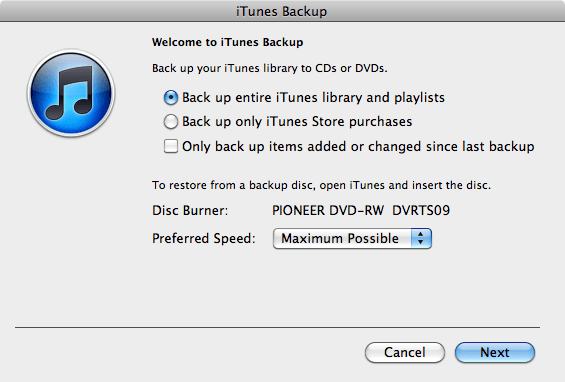
When Apple finally rolls out the iCloud this fall, you’ll be able to backup all of your music on Apple’s own iTunes servers through iTunes Match. If iTunes Match recognizes your tracks, it’ll automatically mirror them in the cloud; otherwise, you’ll be able to manually upload them. If you ever have a devastating system crash, you’ll be able to just slurp them all down again.
But what if you’ve got a massive media collection too big to mirror on Apple’s iCloud servers? What if your Internet connection can’t handle uploading and downloading multiple gigabytes at a time. Well, at least you have iTunes “Back Up To Disc” functionality to fall back on, right?
Wrong. It’s been removed in iTunes 10.4.
The feature — which allows you to back up your entire iTunes library to optical media such as CDs or DVDs while preserving the library metadata like playlists, play counts and ratings — was quietly axed in the latest version of iTunes, according to this Apple Support Article.
So what are you supposed to do if you want to back up your media locally? Apple recommends backing up your iTunes library manually to an external hard drive, or to reply upon Time Machine.
Obviously, this is just another step Apple is taking towards killing off Macs’ reliance upon optical media and replacing it with digital delivery and the cloud. First, Apple created the Mac App Store, then started exclusively selling their in-house software digitally. Then they announced iCloud and iTunes Match. Then they started shipping the Mac mini without an optical drive. The writing’s on the wall, and while we’re not entirely sure why Apple couldn’t have kept the “Backup to Disc” functionality in iTunes as a fallback option, you can’t say Cuperino isn’t consistent.
What about you? Will you miss iTunes’ “Back Up To Disc” functionality? Have you been burned by Apple removing it? Let us know in the comments.

John Brownlee is a writer for Fast Company, and a contributing writer here at CoM. He has also written for Wired, Playboy, Boing Boing, Popular Mechanics, VentureBeat, and Gizmodo. He lives in Boston with his wife and two parakeets. You can follow him here on Twitter.


74 responses to “Apple Quietly Killed Off The Ability To Back Up Your Music To Disc In iTunes 10.4”
Time Machine?
I’m not completely happy about the concept, but I also admit that I wasn’t using the option anyway. I guess I’m not peeved about it, but it is quite a disappointment to this Mac-Geek girl.
could you not add all your songs to a playlist, then burn that playlist to a cd/dvd?
Considering the size of most people’s libraries, I doubt this feature was used that much anymore anyway.
i never use it because i don’t use cd’s anymore but i’m sure there’s still a customer out there who tramps around on the bus with his cd player… like this guy: http://www.youtube.com/watch?v…
i didn’t even know about this feature. lol
Yeah, considering they are leaning away from the optical drive as well… who really cares? I don’t know a single person who backs up their library to CDs. Who has the time? Thats what external hard drives are for.
Who knew SkyNet would get started with people’s music collections?
http://www.iosempire.com/2011/…
Why would you need to burn it into a CD/DVD when they are now obsolete per Steve? ;)
I’ve never even HEARD of this feature until just now… Somehow I think I’ll be fine without it. I remember back when my library was only a few gigabytes backing up everything to CD by just burning a playlist with all my music… It took SO many CD’s to do, I can’t imagine doing that with my current library at its size.
I was not even aware of this feature! I guess I won’t miss it. To be honest it would be so impractical for me to backup all of my music to DVD
yeah, what Steve giveth the also taketh away.
Think Apple’s on a collision course with consumers and courts!!! But since they have done away with optical disks starting with OS X Lion…makes sense.
That’s what I’ve done for a few years. Especially with old podcasts I’ve listened to, but don’t want to trash. It’s nice to have a full collection of a series (like Coverville) that I can go back to and listen to every once in a while, but don’t want to take up space on my drive or add overhead to iTunes. I also have a reference “library” of university lectures, a Photoshop series, and both French and Spanish lessons.
But I don’t need iTunes to back it up. I just go to my iTunes folder and copy them.
Though I dislike Apple’s efforts to eliminate optical media (gotta have it if you want to actually play a DVD on your home entertainment system) , I do think that relying on optical, or for that matter on some cloud based service, as a viable back up is ill-advised at best.
Optical media is not appropriate for backup as witnessed by the fact that virtually everyone reading this blog has, at one time or another, found a DVD or a CD that is unreadable. These things can fail, and making more than one DVD based backup is way too time and labor intensive.
Then, consider a cloud based backup medium. Then read the disclaimers of any provider of such service, and you will find that it explicitly says that the service provider is not responsible for any loss of data as a result of its use.
So, lesson learned must be that we are responsible for our own backups, and that multiple backups are advised in the event of failure of a single backup. As previously mentioned making two sets of DVD backups is way too time and labor intensive. So what is one to do?
Apple provides a partial answer with TimeMachine, but that makes only one backup of your disk. Many people use a secondary form of backup to a second drive. I use, and have seen many others suggest, SuperDuper – a free utility which is suitable for backup, and which makes a bootable copy of your main hard drive to another drive. A cheap upgrade to SuperDuper enhances the basic functionality to include scheduled backups as well as backups which contain only newer and changed files on the backup drive.
If the data on your drive are “mission critical”, than you are advised to occasionally make a backup which is stored offsite.
It was crap anyway. It did the backup in this weird capsule form so you couldn’t just pull tracks straight off.
I won’t miss it because I never used it. All my music is on an external hard drive which is backed up to another external hard drive. I would’ve need a giant stack of DVD-DLs to back it up anyway, so it was of no use to me.
Realistically, no one with a large collection is going to back up to optical… just buy another hard drive. Or two.
But leaving features in sucks up testing and development resources. Apple’s cash may be limitless but developer talent is not.
More Apple fascism. Bleccchhhh.
You’re right, backing up 40-50 GB of music to DVD is impractical. Blu-ray however would have functioned fine…….
But alas, Apple is killing off optical media whether we like it or not…..and its motives are entirely in its own self-interest (no more ripping audio cd’s, buy from iTunes instead. No more buying software at your local software outlet, buy from the Mac App store instead where Apple get’s a 30% cut…..)
This would have been a nice option if Apple supported Blu-ray disc (25 Gigs per disc), since the size of most people’s libraries would make even DVD-DL impractical for back-up. I guess just hook up your external thunderbolt drive… oh wait they aren’t really on the market yet. Err uh, your USB3 drive, oh wait Apple doesn’t support that either. WTH Apple?
Well, since its unlikely iCloud’s music and iTunes Match will be readied for Australia (and probably the rest of the world apart from the US) we have just lost a valuable tool.
I don’t see it that way. Even a moderately sized music collection would take all day to back up to DVD’s.
They aren’t taking away the ability to burn a CD either, just the ability to slowly back up your entire library to a collection of optical disks which would be a royal pain to restore even if your backups did all fail.
Optical discs for backup of any kind has never been adviseable. It’s a last ditch kind of thing that almost no one used.
Yeah, they should just add, add and add features. Never remove anything.
This guy could still make his CD’s out of iTunes as normal.
All they are taking away is the Apple branded backup feature not the feature of making a CD out of a playlist. You could also still backup to CD’s all by yourself too.
The hell? You can still back up to disc by creating playlists… come on people think outside the box.
Not only that, there’s still Roxio Toast… it’s QUITE possible to back up to optical
tinyurl.com/2df4ccp
tinyurl.com/2a7usxg
I dragged and copied the entire Music folder to 2 different external hard drives.
tinyurl.com/2df4ccp
I never used it because it only support optical discs. If they had allowed me to backup to a HDD – it would be sorely missed.
Instead, I bought a Windows tool called SuperSync. It allowed me to sync the complete library to another PC. It also let’s you sync to another HDD. The interface is a bit hard to use because it has so many options… but who doesn’t like more options.
“When Apple finally rolls out the iCloud this fall, you’ll be able to backup all of your music on Apple’s own iTunes servers through iTunes Match.”Only if you’re in the US…
I missed floppies . . . and I was wrong. I missed cd drives . . . and I was wrong. As long as someone keeps our internet access capacity growing to match what we’re supposed to be uploading (in both bandwidth and plain old availability) it’ll work.
If.
why isn’t meta data stored in the music files themselves, or even in the folders associated with the music? It is with zune. Simply copy your media folder to backup storage and copy back on a new pc. Simple.. that and it has a proper music subscription service for unlimited music that you don’t own, rather adopting the retarded apple approach of charging you again for music that you do.
you have to lol, right? what with lion as well apple are getting far more wrong than they are right these days.
Even though the feature wasn’t that great and not very popular, there’s no reason for Apple to remove it. I mean, it worked, right?
A Seagate 2TB external HDD is $80 at Newegg. SuperDuper is $27. Partition the drive, back up your complete system to variouis partitions on different days of the week and you’re all set. When not backing up stash the drive someplace safe. I don’t care much for Apple’s high-handedness around all things relating to iTunes, iOS and iCloud generally but could care less about this one little loss of functionality. I’m far more ticked off about iTunes refusing to allow me to update my iPad 2 and iPhone, telling me they”re “not eligible for the required build”.
You’d think those jerks would at least tell people they are removing a feature such as that – that really pisses me off.
I’ll just remember not to update iTunes anymore… They really do suck as a company. That was an important feature for me.
Article: HT1382 don’t know why they even have this anymore if it does not apply. Ya it stinks.