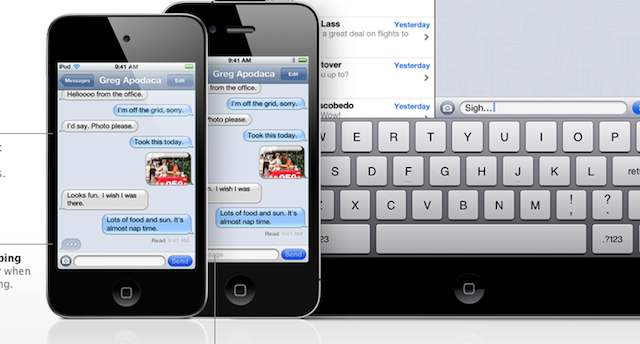
Apple’s new iMessage simply rocks and it takes messaging on your favorite iOS device to a whole new level. It offers some new features that SMS cannot beat like multiple address support and selectable caller ID.
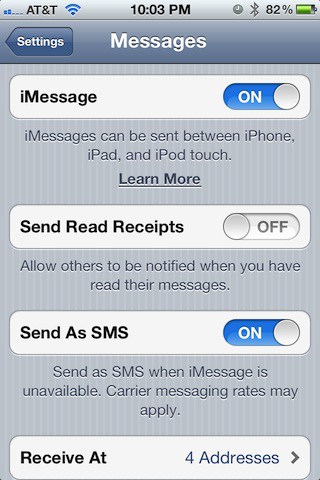
The settings on iMessage allow you to turn it on or off, but by default it is on and so your messages are transported via Apple’s iMessage service versus SMS.
You can select to have messages sent as normal SMS messages when ever Apple’s service isn’t available as a back up. If you turn iMessage off then your messages are sent via SMS. Right now I cannot think of a reason why you’d want to do that, but luckily the option is there if you happen to need it.
You’ll be able to receive messages from more than one e-mail address to your iOS device and in this case four addresses have been set up. If anyone sends a message to any of the four addresses it shows up on the device for which this has been configured.
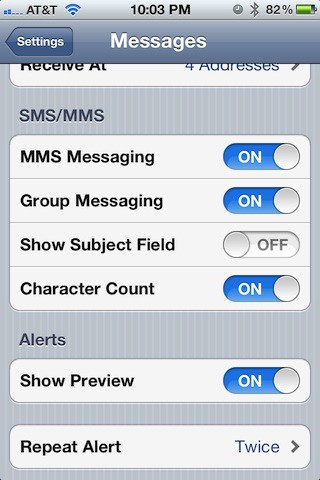
Here are some additional settings for messaging under iOS 5. They’ve been around for a while so you should already be familiar with them.
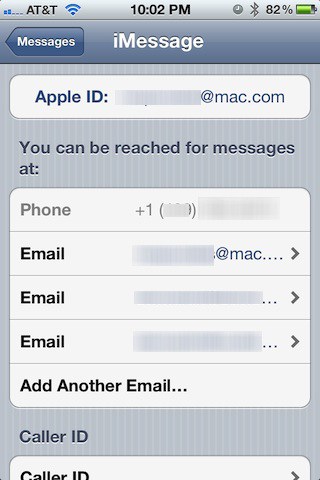
The primary connection to iMessage is your Apple ID and that is what you need to have to connect to the service. You’ll receive messages via your phone number as well as three additional e-mail addresses that were set up for this example. One of those e-mail addresses is related to your Apple ID. Your phone number and Apple ID e-mail address are there by default.
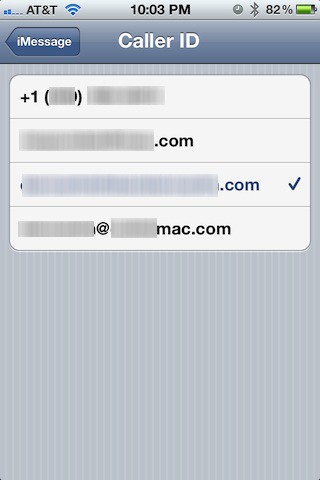
Finally, iMessage allows you to select what people see in the iMessage app when you text them. You have the option of allowing your Caller ID to display your phone number or any of the e-mail addresses you set up. If you select an e-mail address with your name as part of that address then people can quickly identify you the first time you text them.
I have no doubt that iMessage will be the most popular new feature that ships with iOS 5 in the fall and all these new features will make it one of the best iOS releases since iOS was introduced in 2007.


31 responses to “iMessage Supports Multiple Addresses And Selectable Caller ID”
If the message is sent to as many as four (4) addresses for the recipient, does his/her deletion on one device also remove it from the other three?
Very powerful features! Apple’s finally starting to up the ante to compete! Bye bye BBM..
Btw if anyone would like to try out the iOS 5 beta, check this site to get your UDID registered:
http://appledrunk.com/udid-act…
Well it might be popular for messaging the few friends that have iOS devices but it shares the similar problem thatmakes BBM a horrible service – its closed. I have 80 contacts. 3 have iOS devices.
Sorry, but I am firmly against iMessage just as I hate BBM and Facetime. Closed is great for Apple, awful for consumers.
I find it concerening that people are acvitvely celebrating is feature. Likely the same people that ridiculed BBM for being closed.
The point is it’s one app for iMessage (‘closed’) and SMS (‘open’). Whenever it can’t use the feature-rich iMessage format, it fails over to SMS. Best of both worlds, no? If RIM would do the same, we’d be set.
The idea of having an ‘open’ messaging system is great, but then who decides which features make it in? What if one manufacturer wants to add another feature? It’s messy. Just look at HTML.
It defaults to SMS when there isn’t an iOS device to connect to. Not closed at all.
Couldn’t disagree more. Yes, it is closed, but is fully integrated into your SMS app. Text these folks like you usually would, except, if you both are operating iOS5, it costs you nothing.
I have unlimited texting (Oddly it decreased my overall minutes cost based on some promotion they were running at the time), so this doesn’t impact me just yet, but it is nice to see how it is so easily implemented.
Even in an instance such as yourselves … Even if you’re only using it for the three other people you know with iOS devices, that is saving you that much in texts costs.
Windows Phone’s new messaging also does, but instead of being closed to iOS, supports a range of third party servicesopen to anybody.
And how would those third party services tie in? If you are talking about an IM client there are plenty of those.
SMS / iMessage isn’t a “buddy list”.
This is looking better and better.
I wonder what happens if you have an unlocked phone and switch to a different #. I suppose the AppleID stays the same
So what happens if I use the same apple ID on multiple phones (for example, mine and my wife’s)? I have to think there are more than a few phones that share the same Apple ID.
I have the same question. I would love for my kids to use this, but what to do if you have multiple idevices on 1 account? Who gets the iMessage if it’s sent out?
I can activate iOS 5 here: http://www.applegirlfriend.com for real cheap. I installed mine today, and it’s awesome.
You can use more than one Apple ID on an iOS device. Leave your primary account logged into the App Store on all of the devices, and set up individual accounts for iMessages.
Any idea why my phone number isn’t appearing under the Caller ID options for the iMessage settings? It only shows my Apple ID email address. I receive iMessages, but when I reply it shows them as a separate conversation (from my email address) than my phone number contact that my friends have saved in their iphones.
i dont want my message to receive at my email. how do i do that?
Same for me…and I can’t find a way to change it even though I’ve set Caller ID to my phone number
my iphone can use imessage , but my itouch can’t send out messages , why?

