If Apple releases Mac OS X 10.7 Lion at next week’s WWDC, not only could it gain its own “Find My Mac” feature, but it could allow you to remotely wipe your hard drive even if the perp who stole your Mac isn’t logged into the computer.
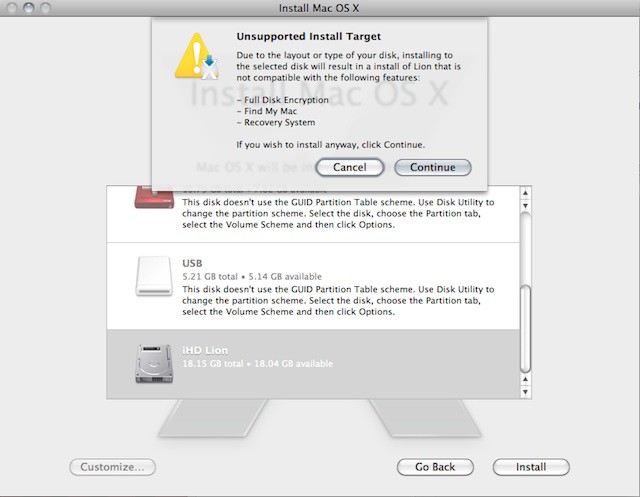
Upon trying to install the latest beta of Lion on an HFS+ journaled partition, MacRumors forum user ArmanUV was given this warning:
Due to the layout or type of your disk, installing to the selected disk will result in a install of Lion that is not compatible with the following features:
– Full Disk Encryption
– Find My Mac
– Recovery SystemIf you wish to install anyway, click Continue.
This is just speculation, but the rest of the MacRumors crew had a good idea why Lion would cough up that message: Find My Mac might have a remote wipe feature that would automatically reboot into the recovery partition to wipe the disk.
We should know next week.
[via 9to5Mac]

John Brownlee is a writer for Fast Company, and a contributing writer here at CoM. He has also written for Wired, Playboy, Boing Boing, Popular Mechanics, VentureBeat, and Gizmodo. He lives in Boston with his wife and two parakeets. You can follow him here on Twitter.


11 responses to “Lion’s Find My Mac Feature Might Allow For Sophisticated Remote Wipes”
why can’t lion just be here already. all these posts about unannounced features and there isn’t a solid date for release yet. hopefully apple gives it a date on monday.
i love it, come on apple stop teasing us
I guess this is the “Nuclear Option?” But not being compatible with Find My Mac seems self-defeating. You keep your data from prying eyes but have to sacrifice getting back your computer. Why not do remote encryption of the user file instead? This would protect your data from prying eyes and keep tracking options available. If that adds/resets a system password it would make a reinstall difficult or impossible, thus making Macs much less attractive to thieves.
I would be concerned that either a user could unwittingly start a wipe if part of a Malware attack or that a Hard disc error / app error could trigger it.
Adding a ‘backup before wipe’ option wouldnt work because the whole idea is to remotely wipe the drive
Just cautious..
‘Sophisticated’ in the way that it takes no time at all; forget the encryption key (FileVault) and all your data is now useless and in other words, ‘Wiped’.
The error is really stating it can’t create the recovery partition (around 800mb); when you lock your mac via Find My Mac; it just boots into the recovery partition with Safari.