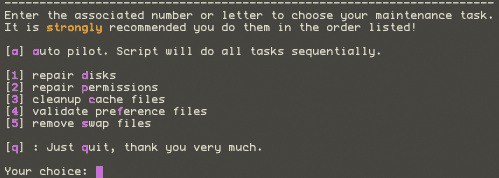
Applejack is a command-line application for rescuing your computer when disaster strikes, or threatens to strike.
Don’t let the “command-line” bit frighten you off. Applejack is probably the easiest-to-use command-line application I’ve ever seen. It was built for ordinary people to use, and won’t bamboozle you with geekspeak.
First, you need to have it installed. Download Applejack and double-click the installer – it will do what’s required. Then you can forget about it, until the day comes when something’s gone weird on your computer.
The precise nature of “weird” is hard to define. You might find applications behaving oddly, or crashing, or just not working at all. If weird stuff is happening, Applejack might be able to help.
To use it, the hardest thing you have to do is reboot into Single User Mode. To do that, restart your Mac and hold down the Command and S keys. Instead of the usual OS X desktop, you’ll end up at a scary-looking terminal prompt, plain white text on a black background.
Now all you need to do is type “applejack” and hit return.
You’ll see a simple list of commands, each with a number. Like in the screenshot above.
Hit “a” to run Applejack in autopilot mode. It will go through a series of scripts, all of them designed to clean up any mess on your hard disk, tidy up caches, fix dodgy files, and generally leave the system in good condition.
Be warned: Applejack is very useful when you’re in Single User Mode, but don’t try running it at any other time – you could do serious damage.
Applejack is free, and one day it might just save your skin. Or at least your important files. Highly recommended.
(You’re reading the 32nd post in our series, 50 Essential Mac Applications: a list of the great Mac apps the team at Cult of Mac value most. Read more, or grab the RSS feed.)

Giles Turnbull is a freelance writer in England. He also writes for the Press Association and The Morning News. You can find out more at his website, and follow him on Twitter @gilest.


18 responses to “Applejack Helps Out With Computer Emergencies [50 Mac Essentials #32]”
I tried it and the next thing that happened was that my computer died completely.
Well, Jodi, then your computer was imminently going to die anyway. Of course, you have your backup to help you move on to your next Mac, right? What?! Doh!
Thanks for an interesting article. Is there a major difference between Applejack and (or, indeed, an advantage of using Applejack over) other maintenance apps, e.g., Maintenance, IceClean, Onyx, etc.?
I’ve been using AppleJack for years. It’s a fantastic tool – great for preventative maintenance as well.
I maintain about 50 Macs in my department, and Applejack is one of my two required utilities, along with Onyx. Applejack has served me well for years.
AppleJack and Diskwarrior. Those are my two indispensable troubleshooting tools.
@Jodi, noone can tell what your Mac’s problem was, from that vague description. If your computer died, that sounds like a hardware issue. How is AppleJack supposed to fix that? If it was a harddrive, they sometimes die, especially if they’re over 5 years old. Diskwarrior is better for harddrive file problems, and might have rescued a harddrive that has suffered multiple hard reboots, which causes lots of file problems. AppleJack is good for fixing general odd behavior, by cleaning out VM, caches, bad permissions, and does a check disk.
@Stephen, the advantage of AppleJack is that you can run it from bootup.
Applejack has saved my bacon countless times, and is the one tool that works when no other will. It’s a brilliant solution.
Yep, DW is KING. Might as well not bother with anything else.
Applejack saves you from having to run disk repair from the install disk which in my book is pretty good and worth installing. There are certain disk errors that you simply cannot fix while under multi user mode. What I would like though is for Apple to release the nice tools that Apple tech use in-store. Now those are something that I would even pay a bit of money for …