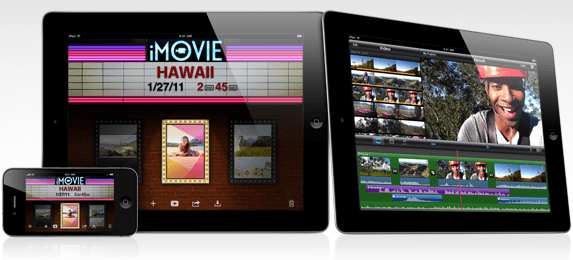
iMovie and GarageBand — two of the most exciting new applications for the iPad — went live in the App Store yesterday, and although GarageBand is supported on the first-generation iPad, iMovie unfortunately isn’t. There is a workaround, however, and you don’t need to jailbreak!
To install iMovie on your original iPad, download and install the latest version of the iPhone Configuration Utility on your Mac or PC. Open it up and select ‘Applications’ from the list of options on the left-hand side, then click the “Add” button on the top left. Navigate to the folder in which your iOS applications are stored and find iMovie, then click on the ‘Open’ button.
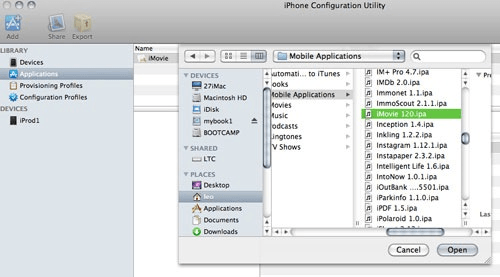
Now plug in you iPad and click on the ‘Install’ button — iMovie should now install on your iPad and run without any trouble.
It’s as simple as that — no jailbreak and no hacking required. Let us know how you get on with installing iMovie and if you run into any problems.
[via fscklog]

Killian Bell is a freelance writer based in the U.K. He has an interest in all things tech and also covers Android over at CultofAndroid.com. You can follow him on Twitter via @killianbell.


28 responses to “Use iMovie on 1st-Gen iPad Without Jailbreak [How-To]”
I can see why it is officially for iPad 2, this runs on my iPad but is a little juddery and does crash when trying to export longer videos in 720p, also it refuses to sync with iTunes as it says it is not authorised on my Mac, if i don’t authorise it deletes it from my iPad. Other than that, this is a really cool app and will take pride of place on my iPad 2 when i get it here in the UK!
Same here
http://www.ppshopping.us/
http://www.ppshopping.us/
http://www.ppshopping.us/
http://www.ppshopping.us/
http://www.ppshopping.us/
http://www.ppshopping.us/
http://www.ppshopping.us/
http://www.ppshopping.us/
In my case I just get an error from the util…
:-(
Is it because I bought the app before it became universal? I upgraded it today for sure, but maybe iTunes simply uogrades it for the iPhone and that’s different from buying the Universal app? Seems kind of strange, right?
But… how to import video into imovie. I does not recognize videos in the video library
But… how to import video into imovie. I does not recognize videos in the video library
It took a couple of attempts and a fair amount of beachball spinning but I’ve now got iMovie onto my iPad1. (I also lost it after a sync where iTunes tries to get an authorisation). Trick seems to be a re-install via iTunes config. util. everytime after syncing.
But now how do we import a movie file to play with? My iPhone 4 movies synched in iTunes don’t show and I’ve tried using an SD card and the iPad camera adapter with no luck. I’ve got the app but can’t get any material to play with :-(
Where did you get a movie from Wackygrant to find out it stutters?
Try to update the app also in your computer … Be sure you’ve got the newest version of the app in your computer and also the newest iOS version in your device (iOS 4.3)!
Hey Javier. All is upadted and nothing works.
:-(
I have iMovie in the IPCU window, but no “Install” button in sight. Only Add, Share and Export on left. Hide detail on Right.
Where is Install command?
Click on the iPad icon. Scroll down the list of apps that appear and you should see iMovie with an “Install” button next to it.
Great article, after following the instructions and trying to install imovie on my iPad, but keeps throwing an error message up. But I found this detailed post help me out, installed ok and works well:
http://www.everythingicafe.com…
BTW: I found many more tips to enjoy movies and videos on the iPad from this iPad spot, such as:
How to Backup Oscar DVD Movies on iPad 2
Get and Watch Free Movies on iPad/iPad 2
How to Play iPad Videos on TV?
http://www.ifunia.com/ipad-column/ind...
Might interest u can have a read~
Every time I hit install, it brings up an error. Not sure why. I did everything else right.
I JUST DOWNLOAD LOADED THE IPHONE THING AND IT RAN PERFECTLY BUT WHEN I GO TO APP.. IT DOESNT SHOW NOTHING AND WHEN I CLICK ADD IT DOESNT SHOW NOTHING IM AM CURRENTLY IT ON PC PLEASE HELP!!!
I’ve done everything you said but get keep getting the same error: kAMReceiveMessageError