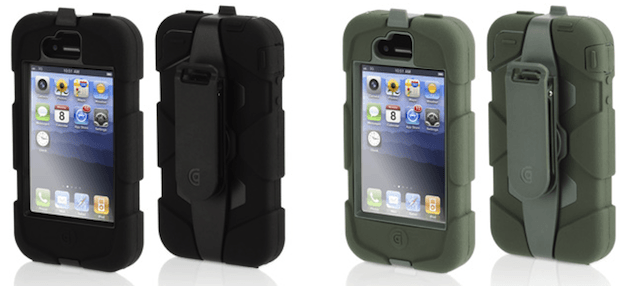
The Griffin Survivor case for iPhone 4, which retails for $49.99 and works on all iPhone 4 models, is the latest rugged case leaping out of the gate running neck and neck for top dog with the likes of the Ballistic HC and many others. I was surprised to see another new case this late after the release of the iPhone 4 with the iPhone 5 just around the corner. However, it may be that the vendors know something we don’t. Perhaps the iPhone 5 will share the same dimensions as the iPhone 4 just like the iPhone 3G and 3GS.
Griffin labels the Survivor as “Armored Ready for Anything. ” I don’t think so and I’d like to explain why I say that.
Packaging
The Survivor ships in some beautiful yet complicated packaging that enhances your expectations about what is inside the box. You won’t be disappointed right-a-way after opening that box. The case and belt clip look and feel impressive, but when you start using it with your iPhone 4 one feature on the case will make wish you weren’t using this case. Especially if you are an avid iPhone photographer.
Specifications
The case has an impressive pedigree by meeting or exceeding US Mil-STD-810F and UK Def Stan 00-35 so if you are in the U.S. or U.K. military you might enjoy having the Survivor at your disposal. If you are rough and tumble or work in a field where you need something tough to protect your iPhone 4 you cannot go wrong with the Survivor. However, while the Survivor is good at protecting your iPhone 4 it is overly good.
The most annoying thing about this case was the overly protective nature of the case. The display took some effort to operate in some instances especially at the edges of the screen and the camera was rendered completely useless for me. The issue with the touch display wasn’t something that I haven’t encountered with other cases or screen covers, but the camera issue was a big one.
Camera Cover Tries A Photographer’s Patience
The Survivor has a heavy rubber cover that goes over the camera lens and flash on the back of the iPhone 4. The problem presents itself when you try to use the camera. The cover has to be physically held away from the camera or it will flip awkwardly back into the cameras field of view thus rendering the camera practically useless.
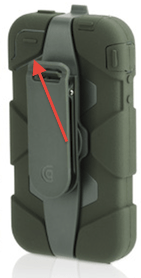
Griffin needs to redesign this feature on the case because it is going to try the patience of many avid iPhone 4 photographers. I’m considering using a utility knife to cut it off the alternative is to use both hands which normally I would not have to do. If they can fix this issue the case would be perfect, but as it is now if you take a lot of pictures or videos like I do you’ll quickly wish you hadn’t wrapped your iPhone 4 inside of this case.
Screen Cover Typing Issues
The screen cover problem mentioned above was annoying, but at least it was better than most heavy-duty screen covers that I’ve encountered before. The only problem was that sometimes I pressed one key, but unexpectedly got another for example tapping the Space Bar often resulted in other letters appearing instead. Sometimes accessing the edge of the screen was problem I had tap a little harder every so often to do what I wanted.
On The Plus Side
The problems stop there. If you don’t care about taking photos or videos then the Survivor is probably the best protective case for the iPhone 4 that you can buy. It definitely gives the other cases in this genre a run for their money.
Belt Holster
It offers a minimalist belt holster that can act as a stand for your iPhone 4. I like that feature, but what I really liked was the fact that the clip used a metal spring and rod to hold it all together. Other case manufacturers usually use a combination of metal and plastic in these clips. The latter don’t last very long — usually less than a year of use. A lot less. I think the one shipping with the Survivor has a better chance of lasting longer, but only time will tell.
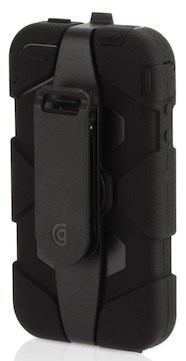
You could place the iPhone 4 facing into the holster or facing out. I like that feature that some manufacturers forget about. It’s funny that some vendors think the iPhone is protected enough to let if face out. In some cases for me that isn’t true. So I’m always glad to be able to protect the iPhone 4 by placing it facing inwards — once in a while I do some work in hazardous environments that makes that ideal for me.
Conclusion
The Griffin Survivor case offers great protection, but it might try the patience of avid iPhone 4 photographers since using the camera will involve the use of two hands. The armor protects the iPhone 4 in a variety of environments for regular use like sailing, hunting, or fishing and more professional environments like law enforcement or the military. It installs easily and it can be easily removed. The openings are accessible to people with large fingers or those who are wearing gloves. Larger cables can be used in these openings as well. Although typing was a bit awkward at times it wasn’t much different from other similar products. If Griffin can tweak this case a little bit it would end up being the perfect competitor to other cases in this genre. In the mean time this case might be “ready for anything” — except photography.
[xrr rating=3.0/5]

David W. Martin has more than 20 years of experience in the industry as a programmer, systems and business analyst, author, and consultant. David has written for CNET’s iPhoneatlas.com, MacLife.com, CultofMac.com, BYTE.com and recently for aNewDoman.net. He comes to Cult of Mac’s website with deep knowledge and passion for the all things Apple. Follow David on Twitter @david_w_martin or see what he’s up to now at davidwmartin.com.


23 responses to “Survivor Case for iPhone 4 May Not Survive Your Patience [Review]”
If your looking for an alternative check out impactband for iPhone 4! http://getimpactband.com
I always use both hands when taking a picture, how the hell can you take good photos only using one hand ?
That case looks pretty good. I like it and wouldn’t mind trying it out. It does look like it is for the AT&T iPhone though. As far as the Griffin case, I like the OD green color. But it makes the phone look like it is a 3G and not the 4.
________________________________
Computer Repair Oregon
That case looks pretty good. I like it and wouldn’t mind trying it out. It does look like it is for the AT&T iPhone though. As far as the Griffin case, I like the OD green color. But it makes the phone look like it is a 3G and not the 4.
Thanks
Computer Repair Oregon
That case looks pretty good. I like it and wouldn’t mind trying it out. It does look like it is for the AT&T iPhone though. As far as the Griffin case, I like the OD green color. But it makes the phone look like it is a 3G and not the 4.
Thanks
Computer Repair Oregon
bappa1101: iPhone 5
iPhone 5 is the latest one from apple. You may find it on :http://fms.nu/fKiL5p
Gizmodo’s new version of iphone is really very smart !
I do not think so it is nice to add this to iPhone 4, I think it is a little ugly.
By the way, it is just my own opinion!
very nice belt holster
Great protection just do not use the clip! It will come out of the clip quite often under normal circumstances!!!!!
This case is so cool, perhap, men like it so much. But i love the Bluetooth keyboard case better, you no need to carefully touch the screen keyboard and what will make you input more quick and more convenient. It’s a new product, also the price is the cheapest on earth. Check here: http://www.caseswill.com/ultra…
Damn idiot, the protective covering for the camera has a spot below to snap in and hold it away from the lens, think before you type, jackass. Best case ever beside the complete waterproof one. I hope u don’t get paid to think or write about this stuff, maybe mcdonalds is hiring. And it dosent come out of the clip, I hike and frame houses, and yet has this case has not disappointed, maybe it requires an IQ of at least 90 to operate?
I used this review at the store to decide which one to buy and based on the camera flap I went went the Otterbox. Now Im home and through more research I find out that the flap does have a spot where it holds into place. This is an apple website and the main gripe of this review is completely wrong. I’m with “burninhell” (although I don’t wish that upon you), probably an honest mistake but you are gettin paid to review this and its completely off on a major issue. I wonder if Griffen knows this is one of the 1st sites which show up when you search this product. FAIL… sorry but its true
For you all dogging on the author, he has the first gen case of the Survivor (look at his pictures) which didn’t have the new cut out where you can stick the protective flap. He prob should have put an update but oh well, you shouldn’t rely all your research on one person. I just ordered this case from verizon.com for 9 dollars.. Score!
i have had this case for months and LOVE it. my phone looks brand new after dozens of drops. this case is not for you prius driving office boys it”s for men who get dirty for a living.
Five Stars!
This is a nice case. I am really happy with mine. The silicone outer part practically stays stuck in your hand or pocket and resists slips or dropping out.
While the case quality is high and the best protection I have seen so far, the belt clip is a toy and I tossed it. So if you wear your phone on your belt in rough conditions like me, you may need another large pouch or case to hold your Survivor securly on your belt.
I just bought the Pink and White Griffin Survivor Case for my white Iphone 4. I love this case but it was ruining my pictures when I used the flash, on the back camera. My husband solved the white out issue by using a black marker on the inside of camera port hole. The pictures are near to perfect now !! Using the camera button on the iphone screen got to be alittle tough!! I now use the volume control button. It works like a charm.