Apple issued a laundry list of updates on most of its operating systems to resolve what appears to be security soft spots.
Cupertino offered few specifics but the list includes macOS, tvOS, iOS, watch OS, Safari and iTunes and iCloud for Windows.
Updates are available now for download and the Apple security updates page provides some details on what the patches will mitigate.
Apple said the macOS Sierra 10.12.6 update “improves security, stability, and compatibility” and includes fixes for SMB connections from the Finder, unexpected restarts with Xsan clients and the Terminal app.
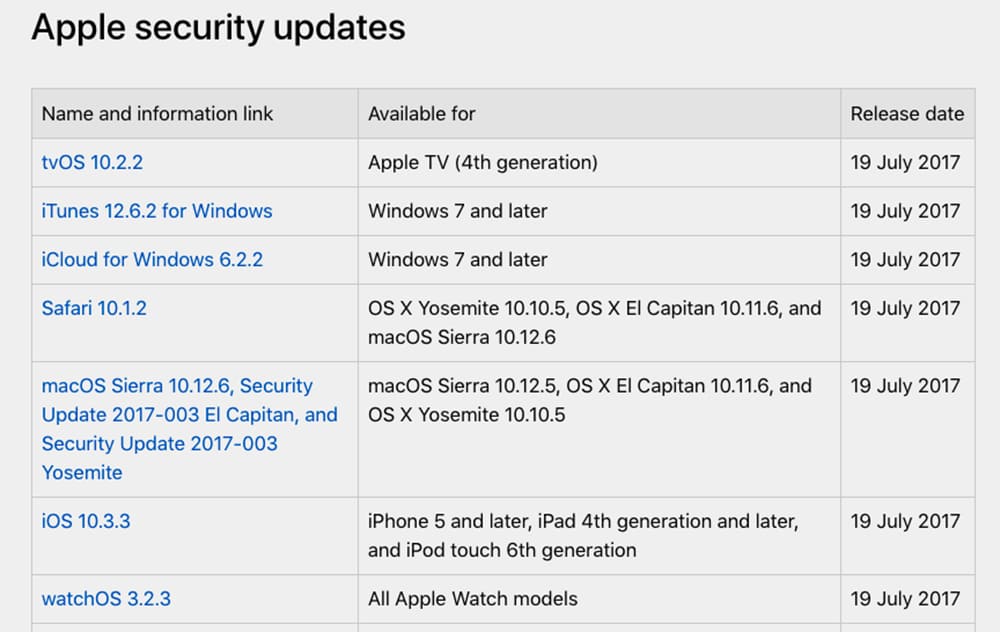
Photo: Apple
This is the sixth Sierra update and likely the last before it releases macOS High Sierra sometime this fall. iOS 11 is also due out later this year.
“For our customers’ protection, Apple doesn’t disclose, discuss, or confirm security issues until an investigation has occurred and patches or released are available,” Apple states on its updates page.
Some of the language reads rather ominously. In many cases, the updates identify holes where “a remote attacker may be able to cause unexpected application termination” or “an application may be able to execute arbitrary code with system privileges.”
Apple employés cyber security experts who routinely put software through a battery of tests to determine if there are holes that could provide entry for malicious hackers. Apple also offers a “bug bounties” to hackers and software companies who find bugs and breaches.
Apple says it can’t guarantee customer protection if users are lax in updating their devices.
Source: arstechnica

David Pierini is a former newspaper writer and long-time photographer. Considered a luddite by most of his friends, they did not believe him when he broke the news that he would be writing for a technology website. He is fascinated by human nature and would love to cultivate stories about the people driving the tech bus. Reach out to him at [email protected].


3 responses to “Apple issues security updates for all devices”
When a MacBook Pro 2017 freezes and is unresponsive to keyboard commands or to the cursor, there’s no “off” switch. That is effing absurd — there is NO WAY TO REBOOT. If I had realized this, I would NOT have dropped 3 grand on the thing. I am returning this thing to the Apple store tomorrow. If I have go back to Windows machines, so be it.
What software are you running on top of it that is causing this / what have you installed on top of what came with it?
Isn’t the Touch ID the power button?