It’s been about six months since iOS 8 came out, and the official Dropbox app has been lacking one major thing: the ability to save files to Dropbox from any app’s share menu.
Today the long-awaited feature is finally available.
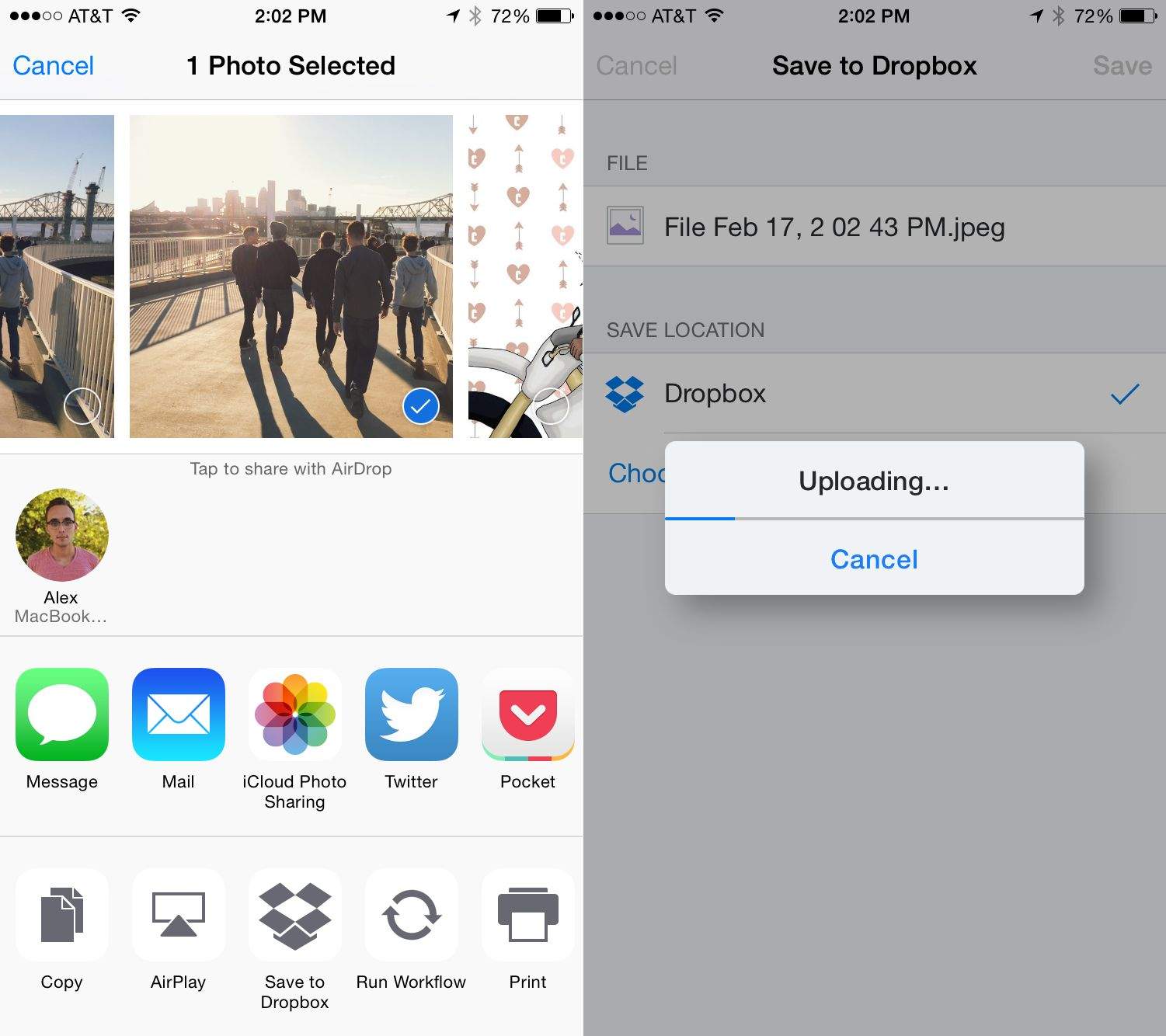
Version 3.7 of Dropbox in the App Store adds a new Action Extension for iOS 8, which allows you to “save files straight to Dropbox from your favorite apps.”
If you already thought Dropbox supported iOS 8 extensions and are a little confused, that’s understandable. When iOS 8 was first released, Dropbox added the ability to save and export files with Dropbox and certain apps. But the use case for that extension is different; it’s for opening and saving files with Dropbox in an app like Pages.
Today’s Action Extension lets you quickly save all kinds of stuff to your Dropbox account from just about anywhere. So in the Photos app, for example, you can tap the share menu and the “Save to Dropbox” action. No need to open the Dropbox app at all.
If you don’t see the new extension when you install the update, open the share menu for a photo or document you want to save, scroll to the far right of the bottom row of icons, tap “More,” and turn on Dropbox’s extension. From that window you can reorder the extensions to have the Dropbox icon anywhere in the list.
Saving to Dropbox is the perfect example of how iOS 8 extensions can be super convenient, and it’s great that the feature is finally available for everyone.

Alex Heath is a journalist who works for Tech Insider. He’s the former co-host of The CultCast. He has been quoted by the likes of the BBC, KRON 4 News, and books like “ICONIC: A Photographic Tribute to Apple Innovation.” He lives in Lexington, Kentucky. If you want to pitch a story, share a tip, or just get in touch, additional contact information is available on his personal site. Follow him on Twitter.


7 responses to “Dropbox finally adds killer feature for iOS 8”
How do you exactly open a file from Dropbox in an app like Pages or any other iWork app in iOS?
From the Dropbox app click the three dots in the upper-right corner than choose the “Open In…” option. You’ll see Pages in the carousel of apps.
Dropbox also added the ability to edit documents using MS Word with a dedicated button in the lower-left corner of all .doc/docx documents. Nice.
Too bad I’ve decided to drop Dropbox. I just can’t take the delays in syncing. It took Dropbox a full 5 days to sync a measly 20GB of data. I can download 20GB in less than 10 minutes on my 100Mbps connection and yet it’s taken Dropbox 5 days to do that same amount of data. I know more is happening than just download and upload but still, it shouldn’t take 120 hours to synchronize that small amount of data.
And I know it’s not my connection. I’ve uploaded almost the same amount to OneDrive and iCloud Drive and it took about 90 minutes between both services so my connection is fine.
I also set Dropbox to not limit down and uploads so the only conclusion is its on the vendor’s end. A few Google searches led me to other users having the same issue. As much as I love Dropbox and all the hooks they have in different apps their servers may be paying the price with some truly horrendous syncing times.
So… pardon my ignorance but what is the difference between this and the document picker extension that was already available in iOS with Dropbox installed?
I explain that in the post.
And how do you open a file stored in dropbox with any iWork app?
Finally! Now I just want Apple to natively Be A Dropbox in iCloud, like they were almost with iDisk. Eliminate Dropbox all together.
iOS apps catching up to Android?