Today Apple released the fifth developer preview of OS X Yosemite, its next major OS release for the Mac coming later this year.
Like usual, there are some noticeable and not-so-noticable changes in the new version of Yosemite. Don’t worry about spotting them yourself, though. We’ve got you covered.
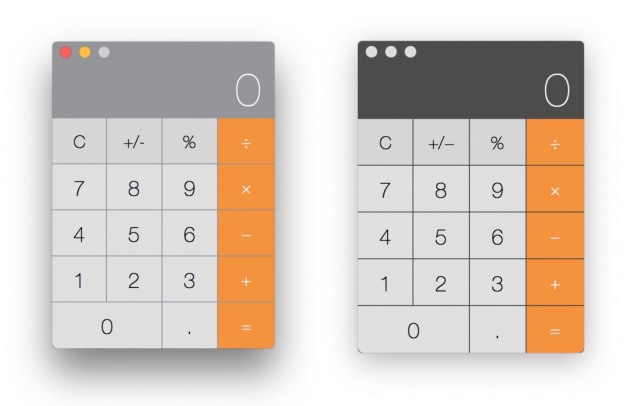
The redesigned Calculator app is more translucent:
Old and new Calculator. Same wallpaper behind each version.
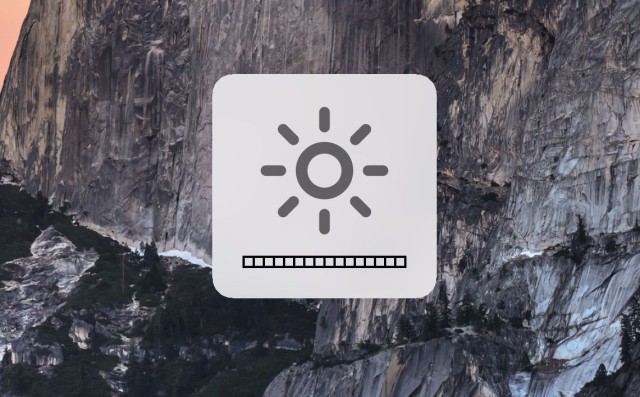
Yosemite’s screen brightness and volume indicators are shown in a more iOS-like HUD interface:
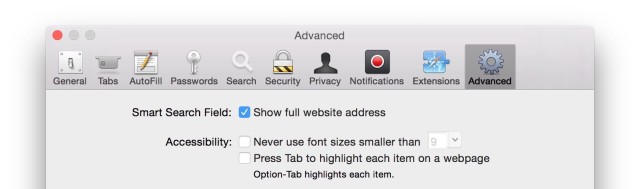
There’s an option to show the full URL of the page you’re visiting in the address bar, which is hidden in Safari by default:
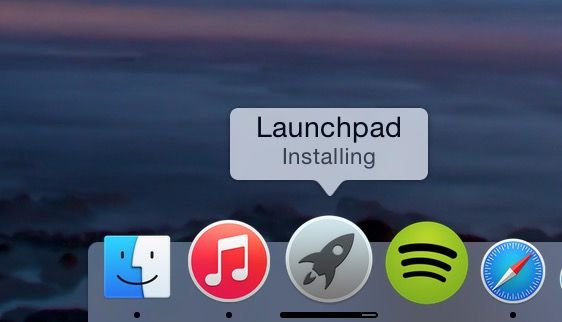
Launchpad’s dock icon now shows a little progress bar for downloading apps:
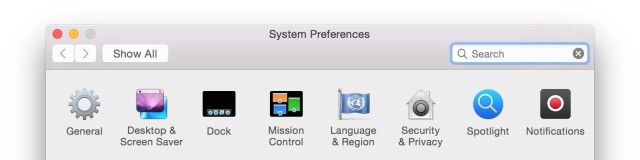
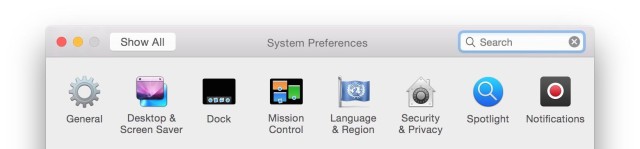
The System Preferences toolbar got slimmed down a little:BeforeAfter
If you’re on the public beta of Yosemite, you won’t see the same changes as developers do in these previews. The public release of Yosemite is slated for sometime in the next few months.
Alex Heath is a journalist who works for Tech Insider. He’s the former co-host of The CultCast. He has been quoted by the likes of the BBC, KRON 4 News, and books like “ICONIC: A Photographic Tribute to Apple Innovation.” He lives in Lexington, Kentucky. If you want to pitch a story, share a tip, or just get in touch, additional contact information is available on his personal site. Follow him on Twitter.
47 responses to “5 changes Apple made in OS X Yosemite Developer Preview 5”
I agree. I guess it’s for the idiots though. It’s such a simple thing to click and check if you have reservations about the site. For the most part, 99% of people will never get screwed online by malware etc on a Mac. But you know, at least it’s there for the guys surfing illegal porn or torrent sites :P
Illegal porn … difference. Most major pornography sites are solid. They have to be because they actually need to monetize. I used to work in the industry, so I know it’s actually not worth their while to not keep things secure and maintained. For the record, every guy who has a computer watches porn … but I can assure you of one thing, I do not ever visit illegal sites of any kind including piracy sites. I legitimately pay for every single thing I want as a consumer.
I wish they would reduce the translucency of the contextual menus. Unless your desktop wallpaper is rather bright, it has a very negative impact in text legibility.
System Preference / Accessibility. Yes they do. However, the vast majority doesn’t. So why would they cater for the minority in the main OS design? That’s what accessibility is for.
Accessibility options are very limited. I have worked WITH APPLE to try to get them better, but they simply don’t provide a good range of options. You cannot increase font size in the system, and increasing Contrast only affects a small portion of the interface and apps.
Did someone notice the icon of the FaceTime app in Yosemite? it looks nice (and I know it should match the other apps like Maps) but shouldn’t the “phone circle” be on the left?! isn’t it kinda covering the cam & messing up the design?!
Wow. Suddenly I understand why this article is actually considered an article.
There was me steadily thinking that Yosemite sounds pretty crap if these are the 5 things that they have chosen to boast about regarding the update, and lo and behold I have someone complaining about the phone sign on an icon.
They seem to have fixed the iPhoto edit graphic glitch that was present since DP1. I couldn’t edit any pictures since the video would disappear whenever I tried to edit a picture before.
Ive been using the public beta as my main OS for a few weeks now on a late 2012 i5 Mac Mini with only 4gb of RAM and so far Ive had very little issues with anything I’ve thrown at it and Im very impressed, the final release will be a great OS.
More and more like a cartoon interface. Ugh. Not to mention tiny pale grey text on grey backgrounds – do they all have perfect eyesight and total disdain of those who don’t?
Utterly nothing like a ‘cartoon’ interface. Don’t be so silly. It looks lovely. And stop mentioning about the fact that you can’t be bothered to switch on your accessibility options which completely change how the OS looks for people with impaired vision.
You cannot increase font size in the system, and increasing Contrast only affects a small portion of the interface and apps. Accessibility options are very limited. I have worked WITH APPLE to try to get them better, but they simply don’t provide a good range of options.
By dropping the resolution down to the “Larger Text” mode, on a retina you’re still running 2880×1800, but everything’s bigger. So in fact you can increase the font size. And everything else. Which is an accessibility thing just in Displays instead. So I’m unsure what else you’d need. You also have voice over mode etc. There’s plenty there. I actually have horrific vision without glasses. A very strong astigmatism and without glasses I can’t even see text on a screen. So I understand the need for those things. But they are there.
So I should screw up my otherwise beautiful iMac 27″ screen just because Apple insists on tiny & pale grey text? Computers are not airplanes that somehow need to reduce air-resistance, and grey text and flat buttons and the loss of colour seems to be ego driven by Ives-I-am-the-King-now-So-bow-down.
Seems to me you’re just not interested in helping yourself and think everyone else should work to lowest common denominator … I suggest you get a Windows machine and run it in 800×600… I believe Apple are doing everything correctly. You don’t. Well, I am happy with the system, and you aren’t. Yet you still use it. Perhaps your choice of system should have included the accessibility that suits your needs?
William… Here’s an idea, put on a pair of glasses.
New technology isn’t made for old dinosaurs like you. New technology is made for younger people. If you dont’ like OS X 10.10 don’t upgrade, it’s the simple.
Try enabling the “Use dark menu bar and Dock” option under General in System Preferences. Frankly, it has a much better design, as least better than grey text on grey backgrounds, but it still needs a lot of tweaking.
Bright White Light in IOS7 and 8, what is the problem and what are the alternatives? First the exposure of bright white to the eye at night tricks the body and the eye into thinking it is daylight, when actually darkness is in play, their have been study after study warning users to stay away from bright devices before sleep. It prevents a good nights sleep. What do I suggest? Ideally user control to determine the background color, these colors could be versions of off white combined with a gray tints. A blue-gray background with a font that is more opaque would work nicely. Some apps allow a black background with white text, that is easy on the eye, best for night reading. A sepia beige background also fits nicely in my book. For the IOS7 Photo app, one must now endure a white background against the photo. This whiteness prevents the eyes from actually focusing on the photo, the white background deters the eye and brain’s attention on the photo; any photographer will tell you this. Let us take for example , the IOS7 and OS X Maverick , Ibook, Apple took away the perfectly fine bookshelf and replaced it with a totally white bright flat background; the creativity of a 1990 UI. I do not get it, I will never get why they destroyed the Ibook bookshelf and replaced it with flat bright white. A tannish sepia would have been classier. Steve Jobs would have never allowed all this white brightness, he understood the ergonomic factors. I understand the need to change, but to change for changes sake or to all of a sudden proclaim that ‘bright white” and flatness is cool as dictated by the Apple UI gods is straining the eye; this is especially apparent when one is outside trying to read the screen with the white against the sunlight and the greyed out hard to see fonts. Give the users the choice in settings to determine their color modes, but bright whiteness as the only choice make me hate my iPhone, something I used to love and cherish.
Thanks, looked over flu.x, may help out on the late night, but other aspects of bright white light all over IOS7 still persists all over the OS, case in point iBooks and iPhotos. People I know are constantly adjusting the brightness up and down per each app’s brightness and whiteness ratios.
Our daily roundup of Apple news, reviews and how-tos. Plus the best Apple tweets, fun polls and inspiring Steve Jobs bons mots. Our readers say: "Love what you do" -- Christi Cardenas. "Absolutely love the content!" -- Harshita Arora. "Genuinely one of the highlights of my inbox" -- Lee Barnett.



47 responses to “5 changes Apple made in OS X Yosemite Developer Preview 5”
Hallelujah for full URLs!!! Hiding them is the stupidest idea.
I actually liked it..less cluttered.
I agree. I guess it’s for the idiots though. It’s such a simple thing to click and check if you have reservations about the site. For the most part, 99% of people will never get screwed online by malware etc on a Mac. But you know, at least it’s there for the guys surfing illegal porn or torrent sites :P
I hope you include yourself in that category. Any guy who claims not to look at porn is either a liar or doesn’t own a computer.
Illegal porn … difference. Most major pornography sites are solid. They have to be because they actually need to monetize. I used to work in the industry, so I know it’s actually not worth their while to not keep things secure and maintained. For the record, every guy who has a computer watches porn … but I can assure you of one thing, I do not ever visit illegal sites of any kind including piracy sites. I legitimately pay for every single thing I want as a consumer.
False.
The volume up/down sound effect can be muted in preferences, not sure if that option was available before.
Also, volume up/down sound effect has been changed.
Finally. I have truly hated that sound for the longest time. HATED! :)
The option has been available for YEARS! It’s the first thing I always turn off.
it was always available in the betas as in older osx versions. i hate it too
You’ve always been able to disable it.
This is true. I’ve always disliked the popping sound and have had it disabled.
I wish they would reduce the translucency of the contextual menus. Unless your desktop wallpaper is rather bright, it has a very negative impact in text legibility.
Everyone at Apple is apparently under 30 now, young eyes, cartoon minds. Tiny, Pale grey text on grey backgrounds.
Ugh, that’s one thing I really hate about about Apple. Don’t they realize how many of their customers have less than optimal vision?
System Preference / Accessibility. Yes they do. However, the vast majority doesn’t. So why would they cater for the minority in the main OS design? That’s what accessibility is for.
Accessibility options are very limited. I have worked WITH APPLE to try to get them better, but they simply don’t provide a good range of options. You cannot increase font size in the system, and increasing Contrast only affects a small portion of the interface and apps.
Did someone notice the icon of the FaceTime app in Yosemite? it looks nice (and I know it should match the other apps like Maps) but shouldn’t the “phone circle” be on the left?! isn’t it kinda covering the cam & messing up the design?!
I agree! Maybe have the phone icon inside the video camera icon.
I had a similar idea
I had a similar idea for my icon set.
This is really good; maybe the green could be a bit darker, but looks great actually.
Wow. Suddenly I understand why this article is actually considered an article.
There was me steadily thinking that Yosemite sounds pretty crap if these are the 5 things that they have chosen to boast about regarding the update, and lo and behold I have someone complaining about the phone sign on an icon.
Anal retentive much?
The download progress indicator appears for folders in addition to the Launchpad
“Launchpad’s dock icon now shows a little progress bar for downloading apps”
Uhmmm. Folks, this is not really a new feature. OS X has done this for quite some time.
That’s what I was trying to figure out, how is this new?
The bar itself is different from Mavericks. Different size, and color, the writer just phrased it wrong.
They seem to have fixed the iPhoto edit graphic glitch that was present since DP1. I couldn’t edit any pictures since the video would disappear whenever I tried to edit a picture before.
I’m disappointed they didn’t change the skeuomorphic icons in the System Preferences panel.
We won’t see such changes for a while. Probably closer to release. Not to mention we still haven’t gotten the new Utilities icons.
Agreed. I imagine they’re still over hauling the entire UI and won’t leave it inconsistent. (Anyone remember how bad iOS6 was? Hah )
I rarely use the launchpad, I’m still using my old standby DragThing. I will always love it especially when I can’t use it any longer.
I wish they’d just get rid of launchpad so it’s just one less thing I try to organize and still never use.
Ive been using the public beta as my main OS for a few weeks now on a late 2012 i5 Mac Mini with only 4gb of RAM and so far Ive had very little issues with anything I’ve thrown at it and Im very impressed, the final release will be a great OS.
More and more like a cartoon interface. Ugh. Not to mention tiny pale grey text on grey backgrounds – do they all have perfect eyesight and total disdain of those who don’t?
Utterly nothing like a ‘cartoon’ interface. Don’t be so silly. It looks lovely. And stop mentioning about the fact that you can’t be bothered to switch on your accessibility options which completely change how the OS looks for people with impaired vision.
You cannot increase font size in the system, and increasing Contrast only affects a small portion of the interface and apps. Accessibility options are very limited. I have worked WITH APPLE to try to get them better, but they simply don’t provide a good range of options.
By dropping the resolution down to the “Larger Text” mode, on a retina you’re still running 2880×1800, but everything’s bigger. So in fact you can increase the font size. And everything else. Which is an accessibility thing just in Displays instead. So I’m unsure what else you’d need. You also have voice over mode etc. There’s plenty there. I actually have horrific vision without glasses. A very strong astigmatism and without glasses I can’t even see text on a screen. So I understand the need for those things. But they are there.
So I should screw up my otherwise beautiful iMac 27″ screen just because Apple insists on tiny & pale grey text? Computers are not airplanes that somehow need to reduce air-resistance, and grey text and flat buttons and the loss of colour seems to be ego driven by Ives-I-am-the-King-now-So-bow-down.
Seems to me you’re just not interested in helping yourself and think everyone else should work to lowest common denominator … I suggest you get a Windows machine and run it in 800×600… I believe Apple are doing everything correctly. You don’t. Well, I am happy with the system, and you aren’t. Yet you still use it. Perhaps your choice of system should have included the accessibility that suits your needs?
William… Here’s an idea, put on a pair of glasses.
New technology isn’t made for old dinosaurs like you. New technology is made for younger people. If you dont’ like OS X 10.10 don’t upgrade, it’s the simple.
Yes. I hate it. What ever happened to Apple’s practice that function trumps form. Ives seems to have forgotten it.
Try enabling the “Use dark menu bar and Dock” option under General in System Preferences. Frankly, it has a much better design, as least better than grey text on grey backgrounds, but it still needs a lot of tweaking.
Bright White Light in IOS7 and 8, what is the problem and what are the alternatives? First the exposure of bright white to the eye at night tricks the body and the eye into thinking it is daylight, when actually darkness is in play, their have been study after study warning users to stay away from bright devices before sleep. It prevents a good nights sleep. What do I suggest? Ideally user control to determine the background color, these colors could be versions of off white combined with a gray tints. A blue-gray background with a font that is more opaque would work nicely. Some apps allow a black background with white text, that is easy on the eye, best for night reading. A sepia beige background also fits nicely in my book. For the IOS7 Photo app, one must now endure a white background against the photo. This whiteness prevents the eyes from actually focusing on the photo, the white background deters the eye and brain’s attention on the photo; any photographer will tell you this. Let us take for example , the IOS7 and OS X Maverick , Ibook, Apple took away the perfectly fine bookshelf and replaced it with a totally white bright flat background; the creativity of a 1990 UI. I do not get it, I will never get why they destroyed the Ibook bookshelf and replaced it with flat bright white. A tannish sepia would have been classier. Steve Jobs would have never allowed all this white brightness, he understood the ergonomic factors. I understand the need to change, but to change for changes sake or to all of a sudden proclaim that ‘bright white” and flatness is cool as dictated by the Apple UI gods is straining the eye; this is especially apparent when one is outside trying to read the screen with the white against the sunlight and the greyed out hard to see fonts. Give the users the choice in settings to determine their color modes, but bright whiteness as the only choice make me hate my iPhone, something I used to love and cherish.
Theres been a fix for brightness at night for ages. It’s called flu.x
Thanks, looked over flu.x, may help out on the late night, but other aspects of bright white light all over IOS7 still persists all over the OS, case in point iBooks and iPhotos. People I know are constantly adjusting the brightness up and down per each app’s brightness and whiteness ratios.
I would’ve missed most of those.