Maybe it’s just me, but I always picture someone yelling at me when I get messages and emails in all capital letters. It might just be a mistake on their end, I suppose, since it’s fairly easy to accidentally hit the Caps Lock when you’re aiming for the Shift key on today’s smaller laptop keyboards.
No worries, though, since it’s pretty easy to actually turn the Caps Lock key off on your Mac. Here’s how.
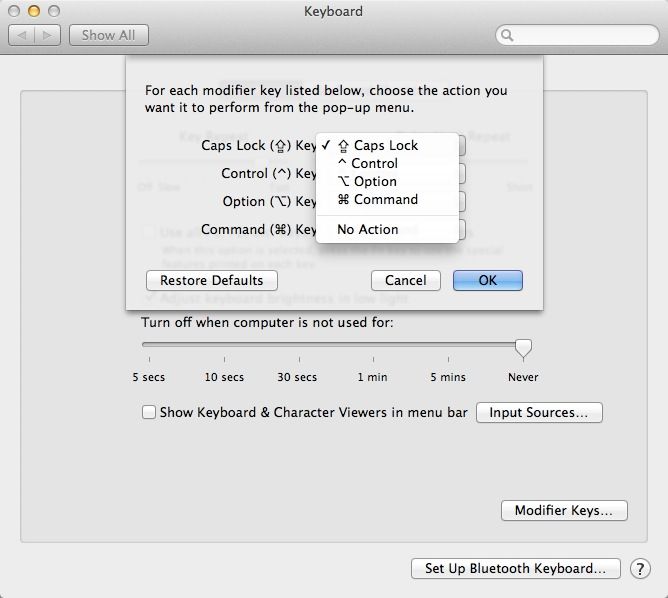
Launch System Preferences, either from the Dock, or the Apple Menu, or even the Applications menu. Once launched, click on the Keyboard icon to launch the preference pane, and then click on Modifier Keys button at the bottom right of the window.
Now, click on the drop down menu next to the Caps Lock Key title, and choose No Action. Now, whenever you hit the Caps Lock key by mistake, nothing will happen.
For some reason, you can also re-map the Caps Lock key to any of the other modifier keys, like Option, Control, and Command. You can also turn those keys off, as well, by setting them to No Action, as well. I’m not sure why you’d want to, but you can do that here.
To turn the Caps Lock key back on, simply do the above steps again, but this time set the Caps Lock Key to Caps Lock. Simple, right?
Got a great tip? Need help with your OS X Mac? Hit us up on Twitter or send us an email.

Rob LeFebvre is an Anchorage, Alaska-based writer and editor who has contributed to various tech, gaming and iOS sites, including 148Apps, Creative Screenwriting, Shelf-Awareness, VentureBeat, and Paste Magazine. Feel free to find Rob on Twitter @roblef, and send him a cookie once in a while; he’ll really appreciate it.


5 responses to “Stop Yelling – Turn Off The Caps Lock Key On Your Mac [OS X Tips]”
Didn
Didn’t work for me. Did exactly what you described and the cap lock drop-down menu still says “no action” but the key lock still works.
Weird. Works here on OS X 10.8.5. What OS are you on? What Mac?
Works just fine!
This doesn’t work for me, either, despite choosing that option. OS X Mavericks. But my MacBook Pro doesn’t pay attention to other commands, either, like not playing notification sounds, or not changing the misspelled words.