Can’t get enough of the sweet Linen pattern from the OS X Lion login window? Want to make your Launchpad look even MORE like iOS with dark gray linen goodness? Well, today’s tip is just for you.
The first thing to do is grab a copy of the image file that OS X Lion uses in the login window. Head to the Finder, and click on the Go menu. Select Go to Folder from the drop down list, then type or paste the following into the resulting field.
/System/Library/Frameworks/AppKit.framework/Versions/C/Resources/
This will open the Resources folder there. Find the file called NSTexturedFullScreenBackgroundColor.png and copy it. You can either hit Command-C on your keyboard, or drag it to the desktop holding the Option key.
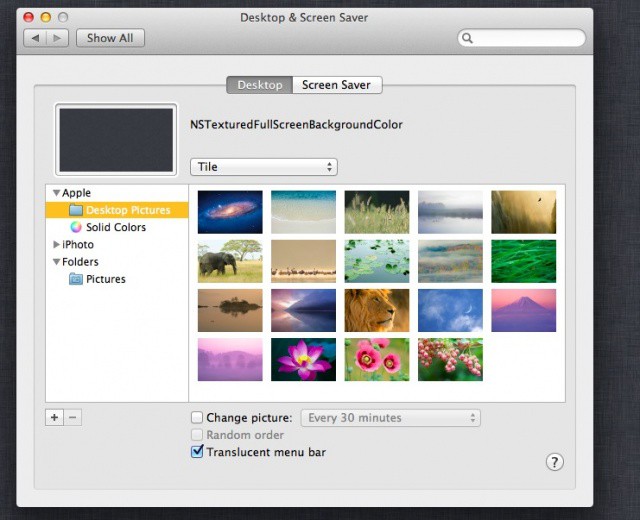
Next, either right-click on your Desktop, or head to the System Preferences and open the Desktop & Screensaver preference pane. You can now add the linen texture image file by dragging it from the Desktop to the image well in the upper left of the pane. Boom–your desktop is not all linen-y and dark grey.
Make sure you select Tile from the Desktop picture options popup menu, or it’ll look all big and pixellated. And no one wants that.
[Source: Macworld]
Got an OS X tip? Need help troubleshooting OS X? Drop me a line or leave a comment below.

Rob LeFebvre is an Anchorage, Alaska-based writer and editor who has contributed to various tech, gaming and iOS sites, including 148Apps, Creative Screenwriting, Shelf-Awareness, VentureBeat, and Paste Magazine. Feel free to find Rob on Twitter @roblef, and send him a cookie once in a while; he’ll really appreciate it.


3 responses to “Style Your Desktop Wallpaper With Login Screen Linen [OS X Tips]”
Pretty cool! thank you.
It say “The folder can’t be found”. Anything there anything that I hv done wrong?
It’d be great if the same thing could be done to use the nice new grey shade of the Mavericks login screen but that folder doesn’t contain this
(/System/Library/Frameworks/AppKit.framework/Versions/C/Resources/)