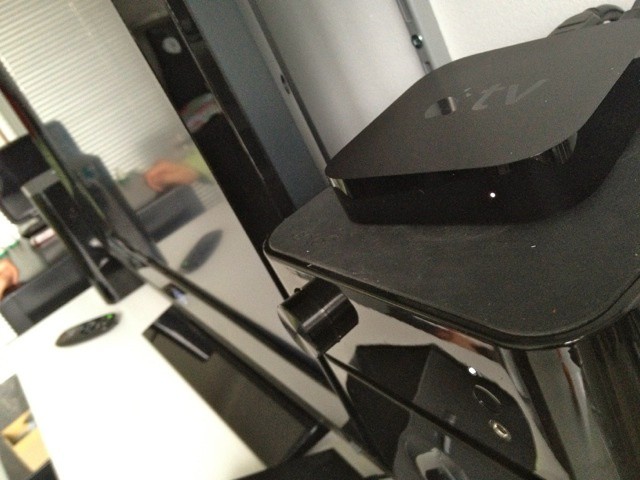
Apple has come under fire for shipping two new products that aren’t revolutionary breakthroughs, but incremental improvements on what came before.
The new iPad and Apple TV have been called underwhelming because they don’t clean your floor while also making a cappuccino. But in both cases, they are significant improvements on what came before.
The new Apple TV, now in its third generation, adds a faster A5 processor and can now stream high-def video at 1080p.
Is it worth the upgrade?
Handsome Hardware
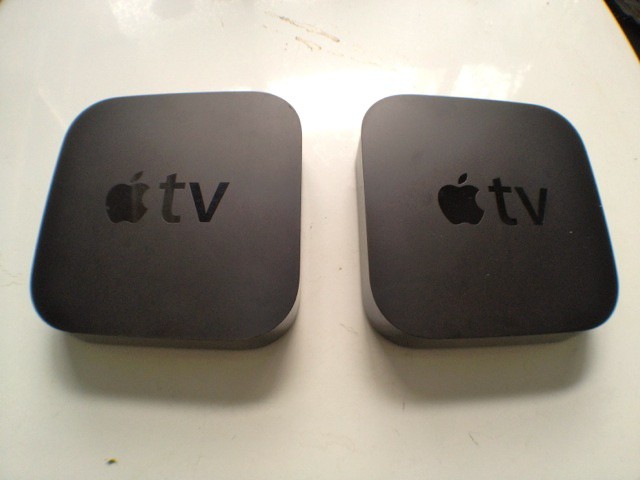
The new Apple TV looks identical to the previous version. Hey, if Apple got it right the last time, why mess with success?
It is still a small, black, 4-inch square that is just an inch in height. It’s a good-looking box and very easy to slip into a stack of home-networking components. For most setups, there will just be two cords trailing out the back — a HDMI cord to hook it to the TV, and a power cord. There’s no power brick: a blessing and a major innovation in home theater, in our opinion.

Again, for most users, the built-in 802.11n Wi-Fi will be plenty fast enough to stream high-definition video (more on this below). For those with weak or slow Wi-Fi, there’s an Ethernet jack on the back. There’s also an optical audio port for connecting the Apple TV to your stereo or home theater system.
Dead Easy Set Up
One of the joys of the Apple TV is the easy set up. Plug in HDMI and power, and that’s it. The Apple TV boots up in seconds. Select your language, identify your Wi-Fi network and enter your password. That’s it for basic setup.
To access content, you enter your Apple ID for the online iTunes store and Home Sharing to access content on your local computers. You can also enter your passwords for Netflix and YouTube, Vimeo, MLB and any other accounts you may have (See our handy set-up guide, which also talks about jailbreaking your Apple TV). The whole process takes just a few minutes, and is in stark contrast to some other digital set-top boxes, which require a lot more configuration. Of course, the Apple TV is deeply integrated with iTunes and iCloud, which some regard as a walled garden and restrictive. We disagree — convenience comes at the price of freedom. There may not as much choice of content as Boxee or Roku, but it’s a lot easier to set up and navigate.
Watching the Box

The Apple TV offers a revamped user interface that brings to mind the Home Screen of an iPad or iPhone. Instead of the text-based interface of old, the screen is now populated with icons for movies, TV shows and music.
Across the top, there are the five primary icons: Movies, TV Shows, Music, Computers and Settings. Beneath that there’s an array of apps for different content sources, including Netflix, YouTube, Flickr, internet radio and Photo Stream, and so on.
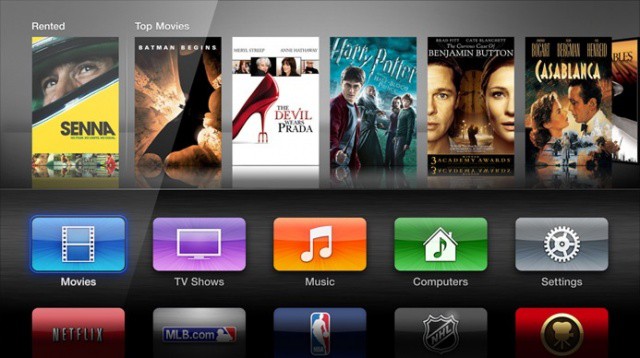
The new app-centric approach to the UI may give clues to Apple’s plans for the device — and the mythic iTV that may or may not appear this year. Apple is reportedly in negotiations with networks, studios and other content providers to provide content a la carte, as it already does with many TV shows in iTunes. Instead of paying your cable company a fortune every month for a bundle of channels just to get HBO, you’ll buy just the channels (or shows) you want. At least, that’s the dream. Everyone wants it, except the cable and content industries.
For now, the apps on the Apple TV are limited to the major sports franchises — MLB.TV, NBA, and NHL (no NFL though). And oddly, the Wall Street Journal Live, a streaming financial news service with as much live programming as the BBC in the sixties — that is, not much. Whenever we tried to tune it, we got a message saying the channel was off air.
Unfortunately, the WSJ and NHL apps can’t be removed from the Home Screen. And neither can you add channels that you might actually watch.
Beyond the home screen, functionality remains basically the same. Navigation is based on Cover-Flow style thumbnails of movies or CDs. The Movies section, for example, is broken into Top Movies, New Releases and so on, with nice, easy-to-skim thumbnails of the movies on offer. It’s not great, but it is pretty easy to skim very quickly through a lot of offerings.
BTW: The new Apple TV interface is available as a free software update for owners of the 2010 second-generation set-top box (minus the 1080p video output capability, obviously).
New UI, Same Old Annoyances
The little aluminum remote control for the new Apple TV is also unchanged from the previous incarnation and has the same limitations. Searching for songs and movies is a laborious process of iterating letters of the alphabet one by one by moving the cursor left, right, up and down on an ABC grid to left of screen, which is slow.
On the other hand, it’s easy to browse for stuff to watch. Scrolling through through lists of top movies or those sorted by genre is easy, if you’re not looking for any title in particular. Movie previews are available on the Trailers app, if you’re really stuck for ideas. The Trailers app is not searchable, incidentally.
Apple’s Remote app takes some of the pain away. Running on an iPad or iPhone, the Remote app makes it easier than the aluminum remote to play music or movies in your iTunes library. You can also use your finger to navigate around the Apple TV’s Home Screen, and it includes a full-screen keyboard for entering usernames and passwords.
Internet radio remains horrible. Trying to find good net radio is one of the big weaknesses of the box. It has a weird selection of channels (most of them crap) and from what we can tell, many of the big players — like the BBC — are missing. You can’t do a simple search, and you can’t add your own channels. It’s a pity, because the ability to pipe radio through your home theater is a must-have for any net-connected AV device.
Netflix and Other Content
Radio might be rubbish, but the Apple TV is one of the best Netflix browsers we’ve had the pleasure to use. It’s far better than the Java-based apps built into some DVD players, and on par with the desktop experience. It’s much better than browsing Netflix on an iPad, which remains painful.
It’s taken years, but finally everything you can rent or buy on iTunes is now available on the Apple TV. Your movie purchases are stored in the cloud, so the lack of local storage is not an issue. It streams purchased music, movies and TV shows, as well as songs from iTunes Match, if you are a subscriber. It can also stream content from local computers via Home Sharing.
Streaming from a Network Storage Device still remains off limits: another big hole. And it still doesn’t support popular video formats like .AVI or MKV. However, this is not as much an issue as it once was, as online content is now increasingly made available in iOS-friendly formats, and therefore the Apple TV.
Perhaps the biggest weakness of this Apple TV (and all those that came before it) is the paucity of content. iTunes isn’t the only place to get content, and all the big online content channels are missing, most notably Hulu and the apps from the networks, like ABC, which are readily available for through the App Store. Compared to Roku and Boxee, the Apple TV is a ghost town.
The Killer App — Airplay

But here’s where we get to the good part. The lack of content on the actual Apple TV box is a moot point, because anything you can play on your iOS device — and soon, on your Mac — can be beamed wirelessly to your TV via AirPlay. In fact, thanks to AirPlay, the Apple TV could be utterly devoid of native content, and it would still be $99 well spent.
Not only can you beam video or audio to the big TV, you can display whatever is on the iOS devices screen thanks to AirPlay mirroring. One of our local teachers raves how this makes classroom presentation a snap. At home, it’s great for games or watching a quick YouTube video. Even though YouTube is integrated into the Apple TV, it’s easier to throw up a video from the iPad or iPhone, especially when you’re browsing the web on an iPad while watching TV. Now everyone in the living room can enjoy hilarious cat videos.
While we were testing, we used it to make some fun Trailers in iMovie on the iPad. With iMovie mirrored on the big screen, everyone could join in the fun of editing video collaboratively. Best evening we’ve spent in front of the telly for a long time.
Better yet, the new version of OS X, Mountain Lion, includes AirPlay. That means you will be able to play whatever is on your Mac on your TV. Non-native content will play easily via AirPlay. We tested it with an old AVI movie, which worked great, as well as a couple of shows from the BBC’s iPlayer (using a VPN which gives us a UK IP address). We also beamed music from Spotify and from browser windows. Thanks to AirPlay, the TV is just a giant monitor. Whatever you can play on your Mac, you will soon be able to play on the TV.
The Underrated Photo Stream
Photo Stream is the great unheralded feature of the Apple TV. Thanks to Photo Stream, your latest pictures are automatically streamed form iCloud to your TV — no syncing, transferring, or other dicking around required. Just turn the feature on and all your latest photos are automatically displayed on your TV. It makes for a great screensaver, turning your living room TV into a big digital picture frame.
Streaming 1080p

The big tentpole new feature of this hardware update is the ability, finally, to display HD video in glorious 1080p. The previous Apple TV could output content at 720p, a crippling handicap in a world where 1080p has become the standard for high-def video. If your new iPad can capture home movies in 1080p, your Apple TV should darn well be able to display it.
And it does so handily. We watched a couple of full length movies in 1080p from iTunes, and they played almost instantaneously and without a hitch. In fact, we were shocked and awed at the startling quality and speed of the streaming video. The video was crystal clear video. It’s near Blu-Ray quality.
Streaming from iTunes was near instantaneous. It’s much faster than Netflix, which often takes a couple of minutes of buffering before the show starts. Both movies played their full length without any pauses for the data stream to catch up. (There was one pause during a streaming HD trailer. We don’t know why. Must have been a network glitch, and it hasn’t manifested itself since.)
The video looked gorgeous, but to be honest, most HD video does these days, even 720p. As a test, we watched the same video on the new 1080p Apple TV and the old 720p Apple TV, and both looked great. We used a relatively small 32-inch 1080p TV for testing. Younger people or those who have recently undergone a LASEK surgery and own a 60-inch TV will probably see a difference.
So in conclusion, the new Apple TV includes 1080p streaming functionality and an easy-to-use interface. The enhanced HD resolution is what customers have long been waiting for, and we think this satisfies all the calls for improvement.
Pros: Dead easy to set and use, handsome hardware, streams high-def content without delay, well-integrated into Apple’s online services, Airplay is the killer app, especially if you have a house full of iOS devices.
Cons: Content, content, content — you’re limited to netflix and iTunes, which is mostly mainstream fare.
[xrr rating=80%]


Alex Kahney is a freelance writer and editor. He overseas sponsored posts on Cult of Mac and Cult of Android. He’s also a musician, soccer player and runner. He lives in London.

