
Apple’s decision to shun Flash Player for its iOS devices has been well documented over the years. But with the iPhone nearly five years old now, it’s no surprise third-party developers are offering up their own solutions for accessing Flash on our iPhones, iPod touches, and iPads.
One of those developers is Skyfire Labs, which is behind Skyfire for iOS — a web browser that allows you to watch Flash videos without unauthorized jailbreak tweaks. Here’s how to get started with Skyfire.
Before we go any further, let’s just clarify a few things: Skyfire Web Browser is for watching Flash videos. It does not (unfortunately) support Flash animations, apps, or games. Many users buy Skyfire for this purpose, and then leave bad reviews on iTunes because it doesn’t do what they want.
Furthermore, Skyfire currently supports around 200,000 sites, so you may find some that aren’t supported. For example, some video players are not supported, and sites like ESPN3 do not allow third-party browsing. Be sure to bear this in mind before purchasing.
Now let’s get started. First, download Skyfire from the App Store. It’s $2.99 for your iPhone, or $4.99 for your iPad.
Once installed, open it up and tap on the settings cog just under the address bar. Change the ‘Load page as’ setting to ‘Desktop.’ This will ensure when you visit a website, you do not get the mobile version with all of the Flash videos cut out.
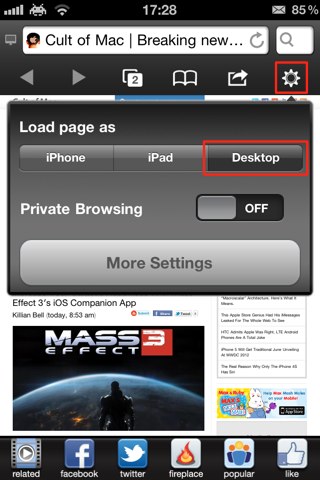
Now navigate to the webpage that holds the Flash video you’d like to watch on your iOS device. Once you’re on that page, you will find Skyfire automatically finds all the Flash videos that are present, and will display a handy popup to let you know. It will also allow you to find videos related to that subject.
Simply tap on the clip to begin playing. It may take a little while for Skyfire to optimize your clip, and the delay will all depend how long it is. But once the app has done its work, your video will begin playing.


If Skyfire doesn’t find your clip, ensure you’re on the page that includes the video you want to watch. Skyfire will only find videos on the page you’re looking at.

Killian Bell is a freelance writer based in the U.K. He has an interest in all things tech and also covers Android over at CultofAndroid.com. You can follow him on Twitter via @killianbell.


5 responses to “Use The Skyfire Browser To Watch Flash Videos On Your iOS Devices [iOS Tip]”
why, most of all the popular/most visited sites and anyone who lives in the now uses html5. With so many iOS users and adobes decision to ditch mobile flash, its html5 all the way
bbc is html5 now
firstrowsports.eu doesnt work on iOS. That’s why.
firstrowsports .eu doesn’t work on iOS. That’s why.
why watch a game on a phone and those streams are poor quality. Id rather drain my battery on infinity blade, music, chat or making phone calls. i don’t remember the last time i used flash. but anyhow. we are all diff so i see your point