
Today’s tip is a simple one, but it fixes one of the most frustrating things that can happen when you’re browsing the web — especially on an iOS device. Have you ever hit your iPad’s display accidentally while browsing the web and closed a tab that included an article you were halfway through reading?
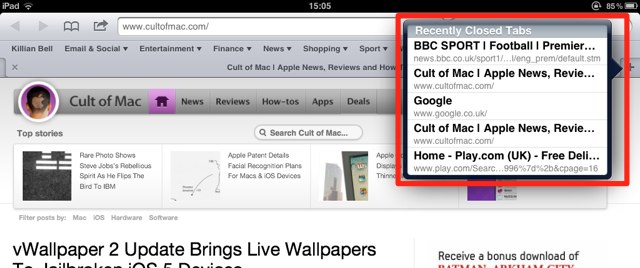
Thankfully, mobile Safari on the iPad has a handy feature that allows you to quickly access recently closed tabs.
To open a recently closed tab in mobile Safari, simply tap and hold the ‘new tab button’ that sits below the app’s address bar.

A list of five recently closed tabs will appear; simply tap on one to reopen the page. Simple!
[via Macgasm]

Killian Bell is a freelance writer based in the U.K. He has an interest in all things tech and also covers Android over at CultofAndroid.com. You can follow him on Twitter via @killianbell.

