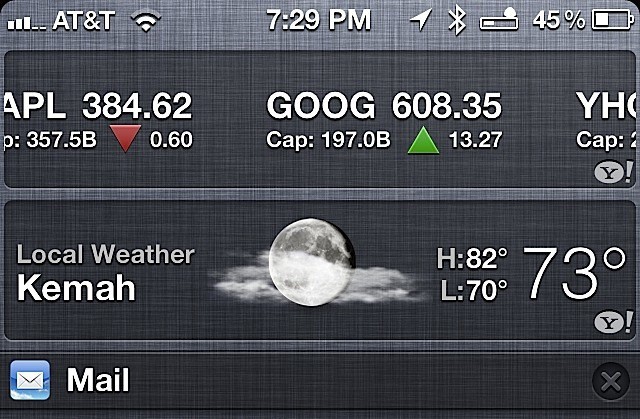

My Notification Center tends to get a bit busy. It shows me my favorite stocks, weather, five of my most recent emails and upcoming calendar appointments. Now and then I’d like to clear these items from the Notification Center.
Here is an easy way to do just that.
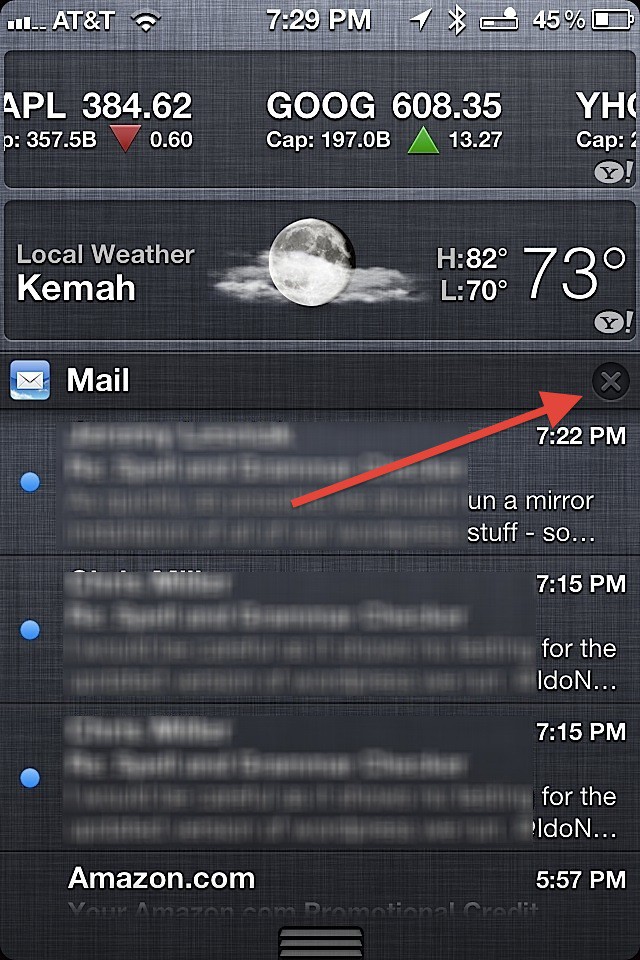
If the header for a section out of all the displayed alerts in the Notification Center has an “X” inside of a circle you can clear all the displayed messages with two taps. The example below shows this for the Mail alerts.
Just look for the “X” inside of a circle, which you will find on the right hand side of a the header bar. Tap it once and it will change to the word “Clear. ”
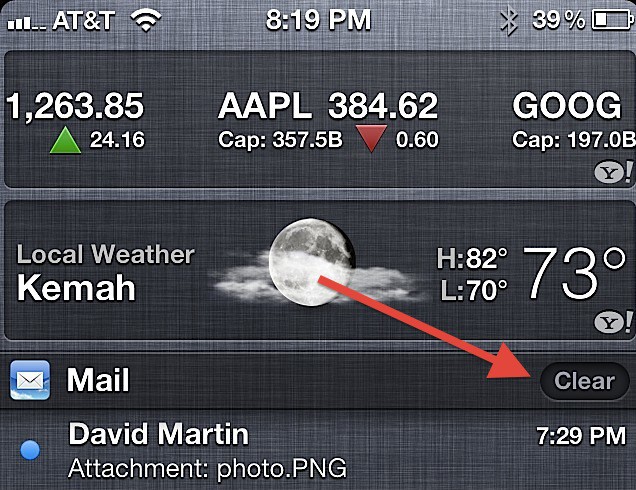
Tap it again when it reads “Clear” and that section of the Notification Center is cleared of all notifications until a new one arrives.
David W. Martin has more than 20 years of experience in the industry as a programmer, systems and business analyst, author, and consultant. David has written for CNET’s iPhoneatlas.com, MacLife.com, CultofMac.com, BYTE.com and recently for aNewDoman.net. He comes to Cult of Mac’s website with deep knowledge and passion for the all things Apple. Follow David on Twitter @david_w_martin or see what he’s up to now at davidwmartin.com.

Subscribe to the Newsletter
Our daily roundup of Apple news, reviews and how-tos. Plus the best Apple tweets, fun polls and inspiring Steve Jobs bons mots. Our readers say: "Love what you do" -- Christi Cardenas. "Absolutely love the content!" -- Harshita Arora. "Genuinely one of the highlights of my inbox" -- Lee Barnett.
What they really need is a way (gesture) to dismiss notifications without clearing all or entering the app. Like when someone texts me and my phone’s screen is off, I see it on the lock screen. If I swipe left to right it enters the Messaging app. I think they should have it so if I swipe right to left, it will dismiss the notification. No remaining reminder in the Notification Center or bubble on the app.
What’s real interesting is that the iOS apps dont actually talk back to the Notification Center. Let’s say I get a notification saying a friend has made a move in Words for Friends. I activate Words for Friends, make my move, and then check the Notification Center – that “your friend has made a move” is still there. Meebo and the Notification Center, for instance, are absolutely useless! If I get a Notification Center displaying that a friend has sent me a message via Meebo, I’ll click on it, only to have to wait for dozens of seconds, only to then see that a messagewindow has opened for my mate, but the message I saw as a banner or on the Lock Screen or in the Notification Center, is nowhere to be seen.
I’m hoping the Notification Center will be improved immensely in the next few iterations, because they’re bound to have noticed some of these issues by now.
Alas, it clears all notifications in that category, right? Which is not very useful. We need a way to dismiss individual alerts.
In addition, where, oh where, is a snooze button? Palm PDAs had that more than a decade ago, indeed they had in back in the 20th century! iCal has it, so why not Calendars and the iPhone?
I know people who have missed taking medications because they unlocked their iPhones and the alerts went away.
48 responses to “Clear Notifications In The iOS 5 Notification Center [iOS Tips]”
Thank you captain obvious! :-)
I was hoping this was going to be a way to clear all the notifications at once.Instead, it’s an obvious tip.
LOL
WAUW!!!!
is this a joke ??
The sad thing is that this is one of the more informative articles on this site.
What they really need is a way (gesture) to dismiss notifications without clearing all or entering the app. Like when someone texts me and my phone’s screen is off, I see it on the lock screen. If I swipe left to right it enters the Messaging app. I think they should have it so if I swipe right to left, it will dismiss the notification. No remaining reminder in the Notification Center or bubble on the app.
Tip: Precede articles like this with “iOS for dummies:”
Thanks
my own tip of the day: when you slide to unlock your phone, slide to the right.
8 )
wow,sometimes you guys post some tips that makes me wonder you discovered all that by yourself lol ?
Slow news day, eh?
Or allow notification center on the lock screen!
thats it, good bye cult of mac.
Can Siri understand “toothpaste”?
It always say based
What’s real interesting is that the iOS apps dont actually talk back to the Notification Center. Let’s say I get a notification saying a friend has made a move in Words for Friends. I activate Words for Friends, make my move, and then check the Notification Center – that “your friend has made a move” is still there. Meebo and the Notification Center, for instance, are absolutely useless! If I get a Notification Center displaying that a friend has sent me a message via Meebo, I’ll click on it, only to have to wait for dozens of seconds, only to then see that a messagewindow has opened for my mate, but the message I saw as a banner or on the Lock Screen or in the Notification Center, is nowhere to be seen.
I’m hoping the Notification Center will be improved immensely in the next few iterations, because they’re bound to have noticed some of these issues by now.
You can also get rid of the stocks and weather by going into the notification screen and turning them off.
What is the icon for between the bluetooth and battery percentage?
I was wondering that myself! :)
Jawbone battery meter
…Really? this is about as stupid as it gets. Thanks for making my decision to remove Cult of Mac from my daily reading material an easy one…
I feel like I should leave COM.. Posts like this make me feel like I’m reading the first graders Apple blog.. grow up COM? You were once amazing.
What is the loading bar icon in the top right corner of the screen ?
Apparently, it’s the “Jawbone battery meter”. (A response given to a previous question about what the icon was)
Alas, it clears all notifications in that category, right? Which is not very useful. We need a way to dismiss individual alerts.
In addition, where, oh where, is a snooze button? Palm PDAs had that more than a decade ago, indeed they had in back in the 20th century! iCal has it, so why not Calendars and the iPhone?
I know people who have missed taking medications because they unlocked their iPhones and the alerts went away.
