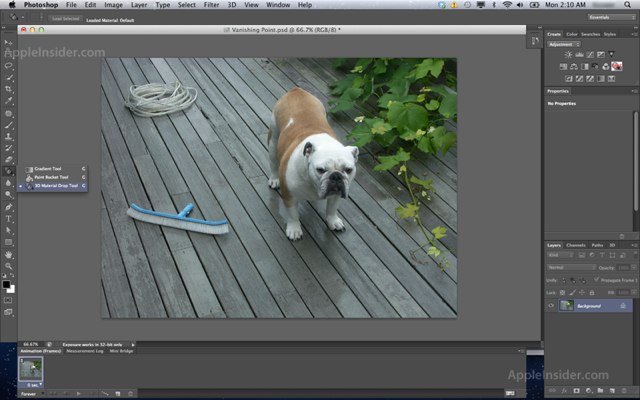
Early betas of Adobe’s upcoming Photoshop CS6 software reveal that the application has been given a complete overhaul and features a darker user interface that looks a lot like Apple’s Aperture software. In addition to the new look, the software also features new 3D capabilities, an autosave facility, and a ton of other new tools.
According to “people familiar with builds of the software compiled earlier this month,” who have passed on details and screenshots to AppleInsider, the first thing you’ll recognize when you load up Photoshop CS6 is its darker, Aperture-like UI. The new theme replaces the light platinum look found in existing versions of the application, but for those who don’t like change, you can revert back to the old look — at least in the beta, anyway.
In addition to the new look, CS6 adopter will get a number of “spruced-up” palette icons that provide an updated take on classic designs, and a ton of new features including enhancements to the 3D capabilities that first surfaces back in 2008 with CS4.
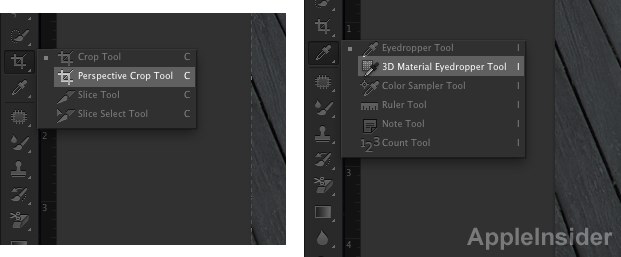
A new ‘3D Material Drop’ tool can be found in the Paint Bucket, accompanied by the ‘3D Material Eyedropper Tool’ and a new ‘3D Text’ option, amongst other new features, according to the report:
Additional 3D options are reportedly evident in the Preferences pane, where testers can presently enable or disable “Allow Direct to Screen” and “Auto-Hide Layers” options for “Interactive Rendering.” There are also new “Rich Cursor” options: “Show on Hover” and “Show on Interaction.”
Within the 3D preferences, testers can also modify “Axis Control,” where options allow for “Invert Camera Axis” and “Separate Axis controls.” Finally, a new “interactive Shadows Quality” section allows testers to choose from a range of quality options when generating shadows.
However, Adobe’s improvements are all focused on Photoshop’s 3D features; there’s also a new ‘Remix Tool’ in the healing brushed palette, and new joining tools like ‘Spot Healing Brush’, ‘Healing Brush’, ‘Patch’, and ‘Red Eye’ tools. ‘Perspective Crop Tool’ has also been added for image cropping.
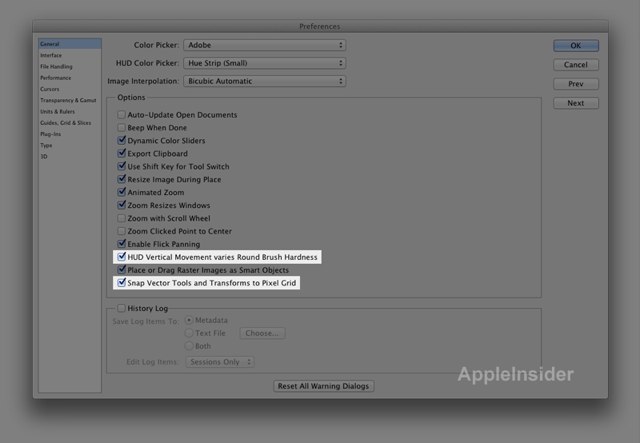
In the Preferences pane, users will find more changes, such as the ability to enable or disable ‘HUD Vertical Movement varies Round Brush Hardness’, and ‘Snap Vector Tools and Transforms to Pixel Grid’ under the General tab. In the Interface section, there’s options to ‘Show Transformation Values’ and ‘Enable Text Drop Shadows’.
Users can also access new preferences in the “File Handling” section, where “Save in Background” has been added, along with “Automatically save Recovery Information Every:” with a choice of time intervals. New “File Compatibility” preferences include “Ignore Rotation Metadata” and “Disable Compressions of PSD and PSB Files.”
Under the “Type” section of Preferences, a pair of options have been removed in the Photoshop CS6 beta: “Show Asian Text Options” and “Font Preview Size.”
The AppleInsider report — which features even more screenshots — does note that these features are in pre-release betas, and could be changed, modified, or removed entirely before the software actually ships, which is expected around May 2012. If AppleInsider’s report is accurate, though, CS6 looks like it will prove to be a staggering update for the pros.

Killian Bell is a freelance writer based in the U.K. He has an interest in all things tech and also covers Android over at CultofAndroid.com. You can follow him on Twitter via @killianbell.


23 responses to “Adobe Photoshop CS6 to Get Darker Aperture-Like Theme and New 3D Capabilities”
Seems like they’re trying to make it look more like Pixelmator.
http://www.pixelmator.com/
It’s not Aperture-like. It’s Lightroom-like. And yes, i can go thermonuclear on Aperture, because as much as I’m loyal to Apple, Lightroom is just awesome.
I use Photoshop all day long on my job on the Mac and I should to say that I hate this application. It’s buggy, slow, not user friendly and bloke Mac user habits but different hotkeys, non standard interface and other things.
I hope some day Pixelmator or something else more Mac-friendly kill Photoshop at all.
how about adding fireworks to photoshop
how about adding fireworks to photoshop
In the past the 3D elements are limited to the more expensive version of Photoshop which I’ve never been interested in. Tons of 3D tool enhancements won’t do anything for me….
If they wanted to impress me they’d drop the price of cs 5.5 by 60% when they launch this…
Lightroom like.. not aperture.
Anything to spin it apple’s way huh?
All I want is to be able to use the arrow keys to scroll through fonts in illustrator. Seriously the windows versions have had this forever.
Pixelmator gets closer with each version, check it out.
What’s with the movement towards the monochromatic UI? Google already ruined Gmail and Google Docs. We see color, not just shape.
By the way, I just discovered where to change the font preview size: Type menu > Font Preview Size (I’m on a PC).