
The tip today is a simple one that most Mac experts might already know, but I met a newbie today who didn’t have any idea why there are so many items listed in Recent Items a sub-menu on the Apple menu.
“There are just toooo many recent items under documents,” they said, and complained about the Server item being there when they didn’t have any servers.
So I showed them how to fix it, and now I’ll show you too.
Launch the System Preferences app on your Mac if you don’t have it open. Now find the preferences pane labeled “General” and click it. Now find the section labeled “Number of recent items. ”
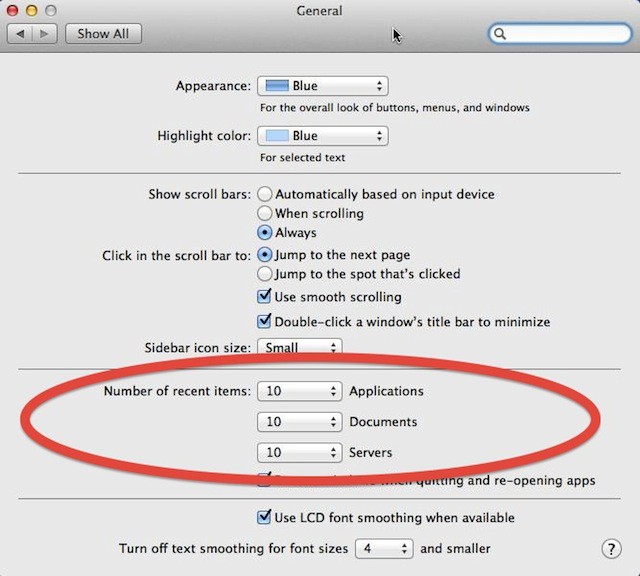
You’ll see recent items for Applications, Documents and Servers. You can have from none to between 5 and 50 items listed under the three categories. The default for all three categories is 10.
If you select “none” then that category no longer appears on the menu. The other side effect of selecting “none” is that your history under that category is erased. So even if you immediately toggled the category back on by setting the number of items to display at five or greater you won’t get your history back.

David W. Martin has more than 20 years of experience in the industry as a programmer, systems and business analyst, author, and consultant. David has written for CNET’s iPhoneatlas.com, MacLife.com, CultofMac.com, BYTE.com and recently for aNewDoman.net. He comes to Cult of Mac’s website with deep knowledge and passion for the all things Apple. Follow David on Twitter @david_w_martin or see what he’s up to now at davidwmartin.com.

