Mobile menu toggle

Apple Launches AirPort Utility App for iOS

By

AirPort-Utility-for-iOS

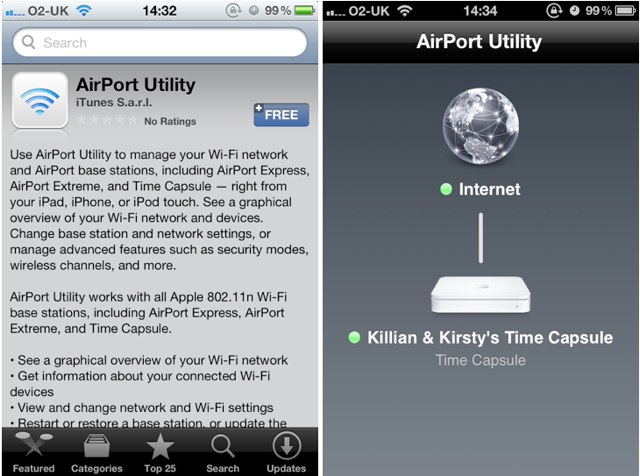
Following the release of Find My Friends just moments ago, Apple has launched a new AirPort Utility app for iOS devices that allows you to manage your wireless networks.

Like the Find My Friends app, you won’t find it in the App Store, however, you can download it using these simply steps:
  • Open the Settings app on your device, and then tap on Wi-Fi.
  • Tap the little blue arrow alongside the name of the Wi-Fi network you’re currently connected to.
  • Scroll to the bottom and tap ‘Manage this Network’.
  • You will then be asked if you would like to install AirPort Utility. If you select yes, you’ll be redirected to the App Store to download.
Once installed, AirPort Utility allows you to see which network you’re connected to, as well as your router’s its IP address, serial number, firmware version, and how many clients are connected. The app will also allow you to update the firmware on your Time Capsule.
I’m not sure whether all of these features will be available on all networks, as I’ve only been able to test the app using a Time Capsule connection, but please let us know how things work out for you in the comments!
[via 9to5Mac]
  • Subscribe to the Newsletter

    Our daily roundup of Apple news, reviews and how-tos. Plus the best Apple tweets, fun polls and inspiring Steve Jobs bons mots. Our readers say: "Love what you do" -- Christi Cardenas. "Absolutely love the content!" -- Harshita Arora. "Genuinely one of the highlights of my inbox" -- Lee Barnett.

21 responses to “Apple Launches AirPort Utility App for iOS”

  1. twitter-35124688 says:

    I’m not on my home network and I’m not seeing any option under my current WiFi network to install the Airport Utility app

  2. Ybrafi30 says:

    Same here… I guess u have to have iOS5.

  3. hunter dahl says:

    apperently it only works with time capsule? because its not working for me

  4. robpickering says:

    Only available if you are currently connected to an AirPort network (Express, Extreme, or Time Capsule). And of course, you need iOS 5 as this feature wasn’t in iOS 4.

  5. Robert Williams says:

    I’m on iOS 5 and it’s not there for me either.  I think the OS detects whether or not you’re connected to a Time Capsule or Airport device before it makes the “Manage This Network” option available.

  6. 5imo says:

    why what airport do you have? Ive got the airport extreme so ill get back to you on that.

  7. Rjp9200 says:

    Wifi sync is up and running too. I suppose that’s due to iTunes 10.5 GM. I’ve been running the beta for weeks

  8. SuomiStewart says:

    Here is the itunes store link:
    http://itunes.apple.com/us/app

  9. itshereyup says:

    ven is dezz iOS 5 cumming

  10. Bryanvickers says:

    Wifi sync has been working…

Leave a Reply

