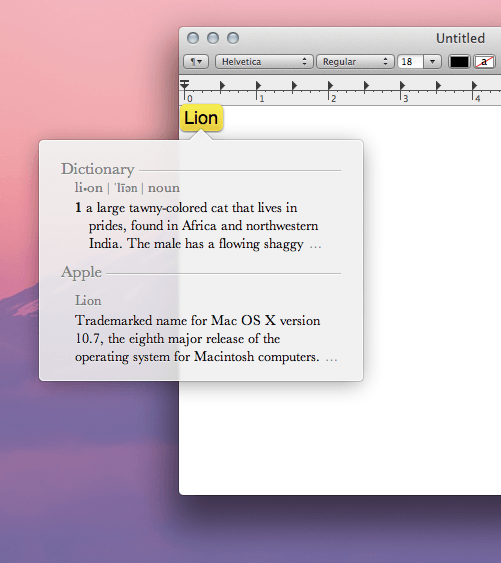
Did you know that in OS X Lion you can get a quick dictionary definition of any word with a simple trackpad gesture? In the past, you would have to look up a definition in Spotlight or through a right click menu.
In Lion, a quick definition is as easy as a three-finger double tap on your trackpad. Just mouse over any word and perform the gesture; a nice little, translucent window should pop up with a definition. No more Google searches when you’re typing in a word processor!

Alex Heath is a journalist who works for Tech Insider. He’s the former co-host of The CultCast. He has been quoted by the likes of the BBC, KRON 4 News, and books like “ICONIC: A Photographic Tribute to Apple Innovation.” He lives in Lexington, Kentucky. If you want to pitch a story, share a tip, or just get in touch, additional contact information is available on his personal site. Follow him on Twitter.


69 responses to “How to Get a Dictionary Definition Anywhere in OS X Lion”
So that’s what Lion means…
While the gesture I think is new, this feature has been available is OS X for a while with the keyboard shortcut control-command-D.
For some reason it’s not working for me, any ideas?
Before you ask, yes I have turned on the gesture in system preferences!
Does anyone think it’s because I didn’t install the supplemental update for 10.6.8 before I updated to Lion? I did install the updated migration assistant though.
For some reason it’s not working for me, any ideas?
Before you ask, yes I have turned on the gesture in system preferences!
Does anyone think it’s because I didn’t install the supplemental update for 10.6.8 before I updated to Lion? I did install the updated migration assistant though.
A three-finger-double-tap? Not the easiest move to pull off. I’ve tried it a bunch of times but only been able to make it work once.
…its works only when text is editable like text editor, mail for instance…
Weird. It works in YoruFukorou, Finder, Mail, Preferences. Almost everywhere I’ve tried. It doesn’t work in Chrome.
Yeah, that seems to be the issue. Safari does it very well, but not Chrome/Rockmelt. It must be part of the Lion optimization that developers need to implement.
Unfortunately, It doesn’t work on non-Apple browsers – which is also where I spend 96% of my time.
No, it works in all apps. It is system wide. You need to select the text first.
Does not work for me when I try it in Chrome. I thought it works “anywhere”?
not “anywhere” per say, i can’t use it when i’m reading pdf files on preview. Which is a real disadvantage
Firefox either…
-Chris
http://friendsofmac.net
http://en.wikipedia.org/wiki/P…
Nope, not working in any app. When the text is highlighted or not. This is annoying…
Thanks Ben. I don’t use a track pad for my Mac Pro. This works great!!
Oh I’m so glad other people are having this problem too…. haven’t been able to get this gesture working once since I installed Lion. All the other Gestures work fine.
Flatten your hand as you do it, not all the way, but more than a bent knuckle double tap.
It oddly does work in the chrome address bar, just not anywhere where you would encounter, you know, real words.
That is it? An entire post to say I can tap with three fingers and get a definition ? Waste of time and wrong, it doesn’t work in preview and Chrome, for example.
Super easy to do. However, make sure you’re tapping, NOT clicking. A triple-click does nothing. A triple-TAP brings up the dictionary every time. Except it still doesn’t work in Chrome. Just make sure you’re tapping (lightly), NOT clicking.
Believe me I’ve tried every which way, I just can’t get it to do it. I am using an external magic trackpad on a macbook pro (closed clamshell with external display) but I’ve just tried it on the macbook’s own trackpad and still no joy. Looking at the other responses I’m not alone, so maybe this will be fixed in the next update.
I also have tried everything and it does not work.
If you have hyper dock you’ll have to disable that for it to work
I found this new apple blog and its great!
http://applefanboynews.com/
make sure you disable any 3rd party utilities for trackpad, magic mouse and docks e.g hyperdock, magicpref, jitouch etc..
The shortcut should work on most programs coded in Cocoa. Older applications developed with Carbon don’t support it.
I found this new apple blog and its great!
http://applefanboynews.com/
Big Thank You! HyperDock seems to have been the problem for me. Just installed the latest update and now I have the dictionary gesture up and running, plus I don’t need to highlight the text first, as Connor O’Neill suggested.
control-command-d works fine all the time for getting dictionary definition. Three finger double tap sometimes does not work.
can i add other dictionary languages ??
This function seems not robust enough, cos in some build-in app such as preview, the three-finger tapping doesn’t have any response.
No, it doesn’t work in all apps. Most… but doesn’t work in chrome
No, I have been using the old shortcut for Dictionary since 10.4 and 10.5. Only the tap gesture itself is new to Lion.
It is no wonder that Firefox doesn’t support it, Firefox has never really been a Mac app. But I had higher hopes for Chrome, it feels so native overall.
Hovering over the word and pressing cmd+shift+D does the same thing, you can change the shortcut too.
just moved over to Mac from Window. More like adding another environment— anyways, I think it’s because Chrome uses sandboxing? and since dictionary may be a, i don’t know, more inner-system feature and Chrome just simply provides no protocol for giving access to it from the html displaying body?
Thank You… Just what I was looking for! Was trying two fingers Forever! and it does not appear to be in the System Preferences!