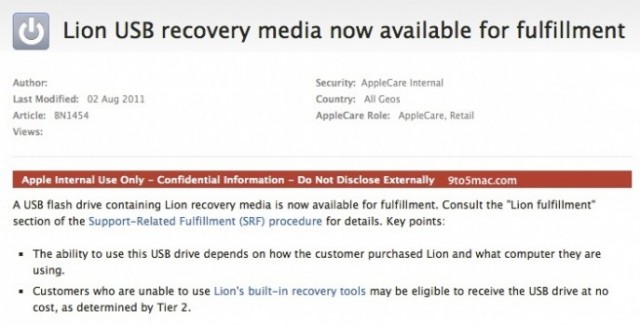
Been holding out on buying Lion until you can get it on officially sanctioned physical media? According to 9to5Mac, Lion USB recover media is now available for fulfillment… an it’ll even be handed out free to those of us who aren’t able to use Lion’s built-in recovery tools to restore their hosed Macs.
That’s interesting, because to me, it implies that if you replace your hard drive and need to perform a clean install, you may be eligible to get the normally $69 Lion USB key for free.
Of course, why spend $69 for something you can make yourself for free anyway? As long as you have a spare 4GB USB disk lying around, making your own installable OS X Lion disk couldn’t be easier.
19 responses to “USB Lion Disks Now Available For Fulfillment Through AppleCare”
I made a DVD. Took no time at all and I can replicate them no problem if i need to. But.. I could imagine that the most basic of users would be in a right mess if they didn’t do this before and their disk packed up. Apple is wise to have a solution to give them..
How did u make a DVD? I wanna make one to have just incase.
“Of course, why spend $69 for something you can make yourself for free anyway?”
USB sticks aren’t free.
Use Disk Utility to burn the esd file and it makes a bootable disk.
Do you still have the Install Lion iso that you downloaded?? well if you haven’t opened it yet, right click it and show the contents, under the shared support folder you’ll see an installesd.iso file, that’s the file you need to burn to a DVD, so right click and copy that file, then paste onto your desktop!
now go to your disk utilit in your utlities folder, click “burn” ontop with the yellow icon, and navigate to that same file on your desktop, and burn it to a dvd in disk utility and you’re done!
yeah, but a 4GB USB stick (all you need) isn’t $40 either.
Check out this awesome blog for all the up to date news on everything apple!
Even news on the new iPhone 5!
http://applefanboynews.com/
You cant use a 4GB USB stick.
The image file is 3.7GB, but thats compressed.If you attempt to restore the image file to a 4GB stick it says that it needs 4.12GB
You need to use an 8GB stick seeing as thats the next size up from 4GB.
Unfortunately these disks are only available via the genius bar, after you brought in your machine. Or after they replaced/restored your iPhone that was syncing to your machine that is running leopard
Still no retail drives
tinyurl.com/2df4ccp

