Top stories

Apple Now Accepting iPad Apps, Planning “Grand Opening” of iPad App Store

Apple is now accepting iPad apps for a “grand opening” of the iPad App Store, according to an email just sent to registered developers.
“iPad will begin shipping soon and your opportunity to be part of the grand opening of the iPad App Store starts today,” the email says.
There’s no details about when the store’s grand [...]

Security Expert: “Mac OS X Is Safer, But Less Secure”

20100319-ipwned.jpg

Tech site H-Online has an interesting story today, quoting security expert Charlie Miller about his forthcoming talk at the CanSecWest conference next week.
He says OS X is full of security holes. There are lots more than in Windows, he claims.
And yet: OS X is a safer system to use. Why? Because, in the words [...]

Apple Devotes Entire Home Page To Jerome York Obituary

20100318-york.jpg

If ever you needed a sign that Apple was a different kind of technology company, this is it.
What other computer manufacturer would remove its top-selling, hype-inducing, industry-altering new product from the prime spot on its website home page, and replace it with an obituary to an investor?
This is one of those “Here’s to the [...]

Coming Soon: Steve Jobs, the Sitcom

Fake Steve creator Dan Lyons just signed a deal to bring Steve Jobs to another small screen near you.
The half-hour series called “iCon” is billed by the presser as “a savage satire centering on a fictional Silicon Valley CEO whose ego is a study in power and greed.”
Making sure the barbs prick will be the [...]

Tip: Update Genius in iTunes 9 to Access Genius Mixes

iTunes-1

After learning of iTunes 9 becoming available by repeatedly clicking  ”Check Now” on Software Update for the past couple of hours, I installed the update and immediately went for the Genius Mixes feature.

It wasn’t there.

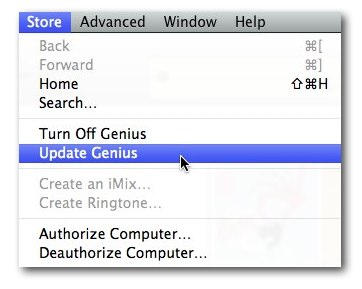
Turns out, and yes this is an obvious tip, you have to “Update Genius” in the iTunes to activate the Genius Mix.
Untitled

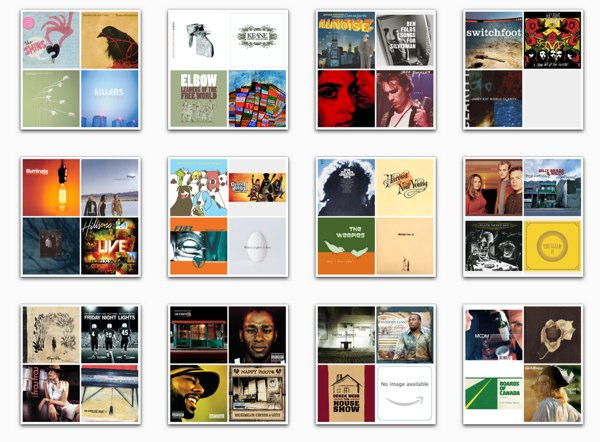
At this point, I’m not really impressed with mixes. It seems to be based off of the track music genre, so I have a mix called Blues Mix 4 including Sigur Rós, Explosions in the Sky and Frou Frou: definitely not Blues but that’s what I have listed in the track info. I’m still playing with the bubble wrap, so I’ll post more thoughts soon.

If you enjoyed this article:
Subscribe via RSS or email, or follow us on Facebook and Twitter

About the author

Tim Cox Tim Cox is the social media and communications coordinator for a private university in the Los Angeles area. He has written for a number of online and print publications and has presented on technology and social media at the national level. One of his greatest accomplishments was networking a Mac Plus with a Mac Pro. In his spare time he writes music, poetry, and trains for Street Fighter IV tournaments. He is married with 5 beautiful kitties. He encourages you to read his blog and connect with him on Twitter, Brightkite, and Facebook.

Email the author | Read more posts by Tim Cox.

19 comments

    Cool feature and Woo some Jeff Buckey, Grace in the mix

    Figured that you need to update Genius, however, it doesn’t work, I constantly get errors stating the network connection timed out.. Will try later, seems the servers Apple is using are pretty busy atm.

    Hmm, updated Genius but I’m still not seeing the Genius Mixes option — odd.

    i found that to..
    Works like a charm, and you can synch them to your iPhone to!

    Thanks for the tip, I didn’t notice that and was wondering why amen’t I presented with that option :\

    @Jesse: I have the same problem. A few people seem to be having it. For others this just runs easily through.

    Great tip, thanks! Now, to get those Genius mixes onto your device, you’ll need to choose them from the Playlists list under the Music tab when your device is connected to iTunes. Would’ve been nice if Apple documented all this!

    And why on earth do you have Sigur Rós tagged as Blues?

    @alvareo, I’ve never bothered updating the genre info for my iTunes music library. Apparently I need to get on that.

    Thank you for listening to nothing except for music which I, pitchfork.com, recommend. You are a member of an elite group of people with incredible taste in music.

    i have turn it on and off updated it and many other things. And it still does not have an icon under Genius saying ‘Genius Mixes’. Could you please help me?

    I can’t see genius mixes on the iPod Classic. Does it work on this model?

    Good tip. Obviously, from the comments here, and the Apple ipod touch discussion forum, a lot of people could not get this to work. Apple should provide a tech article with step-by-step instructions.

    -fred

    Also… If people are having the “network connection timed out” error they will have to open up Safari and search for all cookies with “apple” in it and delete.

    To sync the genius mixes, you have to ensure that you have checked the sync music tab in the device menu bar. However, this will delete all other music if you have manually managed music before.

    So this means if I have not purchased music from iTunes store I will not have Genius mix?

    i have the same thing where i updated Genius but it’s not showing up in the left sidebar. help?

    i tried that 5 times now it still hasen’t worked
    this didnt work for me but you might want to try
    1. going to the store menu
    2. clicking turn off genius
    3. turn on genius

    Genius mix looks good by Rock mix contains stuff I have genred as Blues. Can’t work out how to fix it.

Add your comment

Name(Required)

Mail (required, but not published)

Website

Comment

Buy Inside Steve's Brain Buy from Amazon.com Buy from Barnes & Noble

