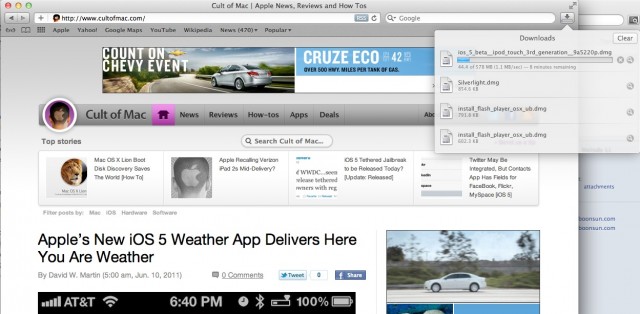
Being a Chrome man, I generally don’t pay much attention to Safari, but I just noticed a really neat new feature in Safari 5.1 under the Lion Developer Preview 4: a new downloads manager.
In previous versions of Safari, running downloads popped up in a disembodied Downloads window that tends to get lost behind your open browser windows.
In Safari 5.1, though, the second a download starts, a little icon pops up next to the search bar. Clicking on this icon reveals a very iOS-like drop down window of past and current downloads. Clicking on a download opens it, while clicking the magnifying class locates it in Finder.
I really like this a lot… more than Chrome’s status bar implementation of downloads, definitely. Safari’s new downloads manager solves the problem of losing the Downloads Manager behind a bunch of open browser windows, but doesn’t make Chrome’s mistake of solving that problem by making downloads distracting UI hogs.
I’m not sure this is new, but what a great touch.
45 responses to “Safari 5.1 Beta Gets Awesome, iOS-Like Download Manager [OS X Lion]”
that looks awesome!!
Still no tabs on top though… that is the biggest issue I have with Safari.
Apple had that feature in one of their betas, didn’t they? I could swear I remember using it.
Yep, in Safari 4 Public Beta. I liked it.
And I hate the color schemes……………
Safari is great – except for bookmarking. It’s enough to make me switch to a different browser. If you have a decade’s worth of bookmarks stored in dozens and dozens of folders – finding the correct folder to store a new bookmark in is really a chore. Why? Because all folders are expanded when you hit Cmnd + D. The ONLY reason that I still use Safari is for auto bookmark sync with iPhone/iPad. There used to be a great Safari plugin called Saft that took care of this big problem but it’s no longer updated.
Looks great! Now if they would just fix Safari to be more memory friendly and free memory when it’s done with it.
I don’t care where the tabs are. I just don’t understand why they haven’t unified address and search into a single bar yet.
Probably because of the same stupid reasons firefox won’t do it. It won’t really work with the features of the awesomebar (firefox) or in the case of safari the additional things listed in the search suggestions in safari…
Yet, omnibar which combines search and location bar is one of the most downloaded firefox addons and it works great :p
That is nice, the old window have a tendency to go and hide behind other windows :p
Makes me wonder though, why do they even have it? The progress can be seen in the downloads stack so it fills the same purpose…
Great article John. Also I’m a Chrome man too and I was wondering is Safari faster then it is in SL. I just wanna thank you guys\gals here at CoM for putting out so many articles- I dont know why people hate on this site. Still awesome article John!!!
This is old news.
I’m not seeing this in the Safari 5.1 beta on Snow Leopard. Perhaps it’s Lion only.
I much prefer Safari’s bookmarking compared to Chrome’s. No contest there IMO. As for speed, Safari’s based on Webkit and so is Chrome (5.1 is based on Webkit2). The javascript engine’s are different, but speed-wise, both browser’s are in the same ballpark.
As for tabs, I couldn’t care less honestly. There’s no screen real estate added either way. Open Safari and Chrome and view a page side by side. There’s no extra pixels of webpage goodness due to tabs being on top. It’s simply an aesthetic preference.
Having a unified address bar doesn’t sway me one way or another either. I can see beneficial aspects to both.
Regarding this article, the author’s correct. Chrome’s download manager implementation is terrible, and this update will be an improvement to Safari’s.
Color scheme? I prefer whatever I’m viewing/reading etc. to have my attention, not the browser. Eh, to each their own.
I’m running Safari 5.1 in Lion DP4 in a VMWare virtual machine and I can honestly say, it is MUCH faster than 5.0 in Snow Leopard. It’s amazing! I can browse through two pages in the time it takes to load up one in the older version and that’s running inside a virtual machine!!!
Me either, I think it’s only for Lion.
Most people didn’t like that feature and complained about it, which is why they removed it from version 4 beta.
Well, I hope they never come as default! I don’t like that kind of tab.
They need to bring back the Command+Option+L shortcut which brings up the download window. The new one might “look” prettier but functionally it a few steps back.
ok, and how you now will paste activitie links into the download window to get any content? this is not the great improvement as which it appears. nein nein…
I think I figured this out. Go to View>Customize Toolbar, then drag the downloads icon into your toolbar. Now you’ll always have access to open the Dwnld Mngr and you can paste your activity links or whatnot into it.
you can add it to toolbar but doesn’t do anything

