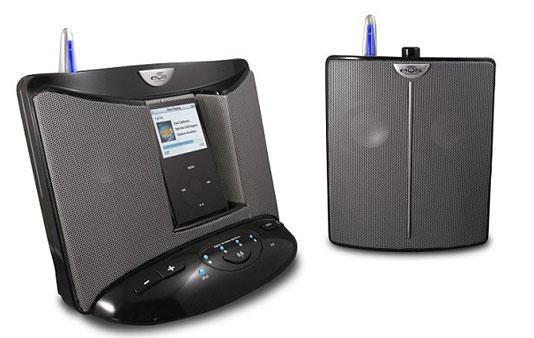
EOS Wireless has taken the iPod dock – of which there must be hundreds on the market by now – and given it a twist that may appeal to many people who’ve had the desire but not the funds to install a multi-room music system to play music from one central station throughout a home or office space.
We went hands-on with the EOS Wireless Stereo and gave it a thorough listen over the past three weeks and have our considered opinion about this ingenious set-up for you after the jump.
What it is
The Eos Wireless iPod Stereo Music System features a base station with an iPod dock similar to umpteen thousand you’ve seen in the past several years. With inputs for non-dockable iPods and other input sources like FM Radio, PC audio, and satellite radio as well, it is completely serviceable, with robust stereo sound and crystal clear highs and mids. It works just fine as a stand-alone unit.
The interesting aspects of the EOS system come into play when you consider that the core system price of $249 also includes an additional stereo speaker you can place and stream music to wirelessly up to 150 feet away from the base station. The base station supports up to three additional wireless satellites at $129 each, bringing the possibilities of much higher-priced multi-room systems into the realm of possibility.
Set up and Use
The EOS System couldn’t be easier to set up. Plug in the base station, pop in an iPod or connect to the audio out of your PC, and you’ve got tunes happening. Plug in a satellite, turn it on and it’s recognized immediately by the base station; adjust your volume and all of a sudden you got the Clash cranking in the kitchen. We had music going in the bedroom, living room, dining room, kitchen and office inside of ten minutes after cracking the seal on our review units.
All of the components are well-made and feel substantial to the touch, with wiring, connectors and modular electric plugs that don’t feel cheap or imminently breakable as others we’ve seen.
Buttons and knobs are well-labeled and give reassuring clicks when turned to the on or off positions, and groovy blue LED lights let you know the power is on and wireless connections are active.
The base station has large Volume up and down and Mute buttons, and the core system comes with a remote control that lets you adjust volume and change tracks on a docked iPod without being in arm’s reach of the base station.
A few caveats
The EOS Wireless Stereo system is truly a great idea well-executed from a fundamental perspective, but we did find a couple of things you’d do well to consider in deciding whether to make it your multi-room system choice:
Many home and office electrical outlets are at base-board level, and though the satellite plugs are modular (detachable from the main speaker unit), the cords, at only 4ft of useful length, are somewhat shorter than you might want them to be to get the satellites up on a shelf or placed on something other than a low table next to an outlet. The other alternatives are either to have the satellites hanging from a mid-wall outlet or to use extension cords, which begins to defeat the purpose of having a wireless system in the first place.
More problematic in our view are the sound limitations of such a small, easily portable system. The base station and satellites feature dual speakers and a back-firing subwoofer that do make for rich sound relative to the size of the speakers driving the music, but in the real world, the EOS is not your system if you want to crank tunes and rock throughout your house. It’s fine if you’re looking to have a nice, ambient sound flowing from room to room, but this system does not have the chops to drive a house party. We found it far too easy to overdrive the speakers and make the music coming out them sound pretty bad.
Another point worth mentioning is that this system is for iPods, not for iPhones. Your iPhone’s iPod function will work in the dock, but at least in the US, on AT&T’s network, you will get the dreaded snap, crackle, pop of GSM interference if you try and use the EOS System with your iPhone.
Conclusion
EOS Wireless has made a valiant stab at tackling a generally expensive and difficult-to-implement music solution.
In many instances, for many budgets, this system will do yeoman’s work in letting users stream music throughout a home or small office, just don’t expect it to solve the technical challenges designed to be met by other systems costing hundreds – even thousands – of dollars more.

Lonnie Lazar is a writer-musician-web designer-attorney. He writes about Apple for Cult of Mac and Mac|Life, and about VoIP and telecommunications for Voxilla. Follow Lonnie on Twitter @LonnieLazar, join the Cult of Mac on Facebook, and find Lonnie’s photos on Flickr.

