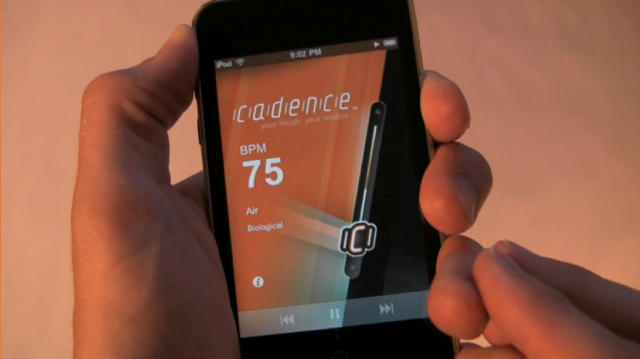
Review: Cadence for iPhone/iPod Touch
12:21 am, September 28th, 2009, Pete Mortensen

A few weeks back I provided a quick preview of Cadence, an app for iPhone that promised to allow a totally new way to browse your music collection — by tempo. It’s out in the App Store now for $2.99 (link will launch iTunes), and having spent time with it today, I can confirm that it does exactly what it promises to. Unfortunately, setup is both wonky and time-consuming, which was disappointing.
To find out whether Cadence is for you, click through.
The actual iPhone app Cadence is quite lovely: simple, intuitive, and highly functional. You’re basically presented with an image of a metronome, and you slide your finger up and down it to trigger music at various beats-per-minute rates. It’s pretty great — I discovered all kinds of songs I had more or less forgotten were in my iTunes collection (having 5,000 songs will do that; I can only imagine what those of you with 40,000 or more do about it!). I can definitely see myself using this in the future, if only to bring a sense of structured randomness to my collection.
I wish I could recommend the app without any caveats, but I really can’t. It’s nothing to do with Cadence itself, which functions as advertised. The program is let down a bit by its supporting cast. You see, the iPhone app doesn’t magically know the tempo of all of your music. Instead, it relies on metadata from iTunes to make these calculations. And if you, like me, don’t have your beats per minute sorted out in advance (and I can’t imagine how you would), you’ll need to use Cadence Desktop (currently Mac-only) to analyze all of your music, then export that data as a set of tempo-specific playlists, ranging from 70 to 200 bpm, in my experience.
This, to put it mildly, is time-consuming. The first pass through my iTunes library took 78 minutes — and I’ve got a one-year-old machine. It might be significantly more time-consuming on even a circa-2007 Mac. Worse, it couldn’t analyze about 700 of my songs correctly, so they’re just not visible to Cadence. But even after that investment of time, you’re not done yet. Then you need to sync all those playlists — and your entire music library, as iTunes won’t just add the BPM meta-data to the music on your iPhone, it replaces all of it. This took another hour-plus for me.
After all of that, then your iPhone will be ready, and…Cadence still won’t be good to go. Then you need to go into your iPod app on the iPhone and wait for it to finish updating your library. Only then will Cadence work, and brilliantly so.
But it’s a long road to get there. I’m glad I have it and will use it often. I admire what the developers have done, and I only wish the back-end didn’t have to be so kludgy.
It’s available here (App Store link).
Posted by Pete Mortensen in Software, iPhone, iPod Touch | Comment on this article
If you enjoyed this article:
Subscribe via RSS or email, or follow us on Facebook and Twitter


Its worth noting that you only need to do the setup once. For Cadence Desktop I just selected the songs I wanted it to analyze and not my entire library either, which sped things up a lot.
Gordon Asper, on September 28th, 2009 at 5:34 am
Hey, thanks for the review. Here are few responses to some questions and comments raised in the article above.
REVIEW;
“The program is let down a bit by its supporting cast. You see, the iPhone app doesn’t magically know the tempo of all of your music. Instead, it relies on metadata from iTunes to make these calculations.”
CADENCE GUY
Unfortunately , yes the program isn’t magical (although I like to think so )and requires the meta tag to be filled in. To use any kind of BPM playlist system a BPM is going to need to be determined for each song you want to use. If songs were sold with the BPM meta data intact, that would solve the problem
REVIEW;
“This, to put it mildly, is time-consuming. The first pass through my iTunes library took 78 minutes — and I’ve got a one-year-old machine. It might be significantly more time-consuming on even a circa-2007 Mac. ”
CADENCE GUY:
Analyzing can take some time, you may want to consider only selecting a group of songs that you want to use with Cadence. If you are using Cadence for running , just select music to analyze that you would like to run to. Its important to note that you only need to analyze your library once, then your done for good.
REVIEW:
“Worse, it couldn’t analyze about 700 of my songs correctly, so they’re just not visible to Cadence.”
CADENCE GUY:
Most likely these songs are DRM protected or songs without a prominent beat, Classical, Spoken word, Acoustic. DRM protected songs can not be analyzed, but you can upgrade them to iTunes plus to get around this. There also is a tap tap feature in Cadence Desktop that you can use on DRM protected music to find the BPM. Fortunately all iTunes music is DRM free now
REVIEW:
“Then you need to sync all those playlists — and your entire music library, as iTunes won’t just add the BPM meta-data to the music on your iPhone, it replaces all of it. This took another hour-plus for me.”
CADENCE GUY:
This is not the case for me, when a song exists already on your device and you are syncing the same song because you’ve updated the BPM , its very quick and only syncs the meta data.
We are working on several features to add to Cadence Desktop and Cadence app keeping this kind of feedback in mind. We much appreciate all of you giving it a try! Your feedback is important so we can make the app continually better.
best,
Cadence guy
Cadence guy, on September 28th, 2009 at 8:02 am
so cadence does not work for so-called ‘classical’ music, ruling out more than 1000 years of creativity. ooops!
Oh I am really keen to use it now.
Beats per min, who on earth thought of this as a significant way to look at music?!
ged, on September 28th, 2009 at 7:10 pm
In response to geds last comment.
I should have been more specific, Cadence will work on any music that you can find a tempo too. Often classical music doesn’t have a constant bass beat like popular music so it can be hard for the analyzer to find the BPM. By using the tap feature which is integrated into the Desktop app you can tap along to the songs beat to determine the BPM.
Thanks for your insight ged
Cadence guy, on September 28th, 2009 at 8:54 pm
I tried out the desktop app on my macbook pro. It was fast enough – even itunes takes a while with my collection. However, it could only detect the bpm on 5% of my 4400 mostly DRM free MP3s. When I did the first run it beat matched 600 but failed on the rest. When I tried again on a couple of randomly chosen tracks, it worked on a couple but failed on the rest. Why is that?
saman Jebeli-Javan, on September 30th, 2009 at 9:22 pm
A few things come to mind in response
“I tried out the desktop app on my macbook pro. It was fast enough – even itunes takes a while with my collection. However, it could only detect the bpm on 5% of my 4400 mostly DRM free MP3s. When I did the first run it beat matched 600 but failed on the rest. When I tried again on a couple of randomly chosen tracks, it worked on a couple but failed on the rest. Why is that?”
I would double check that all your files are mp3s.
Cadence Desktop can not deal with .wavs . Do the tracks it failed on have a substantial beat for the analyzer to follow? I have not had such a problem as you are seeing with only a 5% success rate. There must be either something with the files themselves or the audio content in the file that is preventing the analyzer from detecting.
You can contact me directly at support@cadenceapp.com and we can look further into the problem. Thanks for your interest and for trying it out.
Cadence guy, on September 30th, 2009 at 10:41 pm

