Restore Visual Voicemail in iPhone 3.1 Post-Tethering
1:43 am, September 21st, 2009, Pete Mortensen

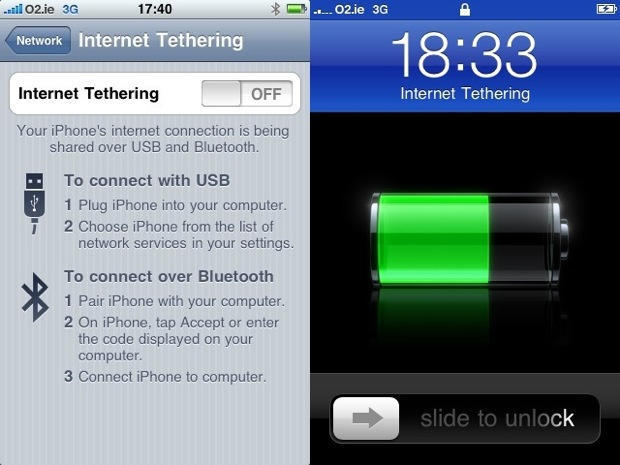
I’ll admit to it — I used and loved Internet Tethering on my iPhone with the help of the ridiculously simple hack found at Benm.at. But I also love to keep current, so I updated to iPhone OS 3.1 on day one (though I’m now wondering why, a topic for another day). Unlike some reports, my tethering menu survived the transition, but my Visual Voicemail went down in the process.
And after two weeks of living with this situation, I ultimately decided I was happier with the VVM than I was with tethering. In the same boat? It’s really easy to get things back to normal. Just go into your iPhone’s Settings, then General, Network, Profile, and remove the AT&T profile that enabled tethering. Voila! You’ll have any missing visual voicemail back on your phone in a second.
The one downside — and it is a big downside — is that tethering is a goner as soon as you sync your phone. Sure would be nice if AT&T would go ahead and release an official solution, huh?
Posted by Pete Mortensen in Hardware Hacks, iPhone | Comment on this article


well you could just bet a blackberry bold, and tether for free and have visual voicemail (and mms)
kdp, on September 21st, 2009 at 5:09 am
How did you manage to keep the tehtring after the update? Do you know about another kind of hack that can be applied over 3.1? I lost tethering just after the update, and even if the profile remains there the tethering menu dissapeared as soon as I tried to use it. Thanks in advance.
Moriz, on September 21st, 2009 at 7:18 am
An easy way to keep your visual voicemail after you enable tethering with the benm.at profile is to go under general/reset/reset network settings. The phone will reboot, and you will then have full tethering and visual voicemail.
I have 3.1 as well, I didn’t lose tethering after updating. I don’t know why, I just used the same hack everyone else used. Happy hacking!
Coty, on September 21st, 2009 at 9:24 am
The easiest tethering app that I’ve downloaded and used is the one on MMS.ifind2.com. It works the instant you run it.
djsoss, on September 21st, 2009 at 3:06 pm
You mean to tell me that ifind2.com also has tethering? WOW! I already have there MMS viewer and MMS sender. I will have to get this app to.
yachoff, on September 21st, 2009 at 3:08 pm
Yeah it look great; I saw it on youtube the other day but haven’t had a chance to download it, how is it?
sinister1, on September 21st, 2009 at 3:09 pm
How do you get to the network profile? on my 3g iphone i did the hack to enable teethering (have never tried it. I only did the hack in hopes MMS would start working) now I have updated to 3.1 and the teethering menu is still there and my VM does still work. But your instructions say “Settings, then General, Network, Profile” but my phone only goes (settings, general, network) there is no profile option or any other place to edit my network settings.
cerberus, on September 21st, 2009 at 3:41 pm
I just did this and my 3GS 32 works great again. After I spent 2.5 hours on the phone to ATT today with no results. But I also didn’t say I had the tethering hack either. All that didn’t work for me was visual voicemail, but as soon as I took that hack out she works great again. THANKS.
Gene Luth, on September 21st, 2009 at 8:51 pm
Can anyone tell me if the mms.ifind2.com hack works with iTunes v 9.0?
I have OS 3.0.1 on the iphone but upgraded to iTunes v 9.0 and now the tethering no longer works.
Please can someone get back to me as I really need tethering back!
Craig, on September 22nd, 2009 at 5:30 am
so. i did the tethering hack, and then updated to 3.1, I wanted to be safe and take delete the internet tethering. followed the instructions to remove the profile, settings > general > network > profile? wait there is no profile, the profile that i installed to get tethering is gone, so i must have already deleted it right?….well i still have tethering…just tried the voicemail and i have visual voicemail. I dunno what happened, during the install i got an error and had to restore my phone. Could this possibly be legit tethering enabled (not the hacked around version)?
Tim, on September 22nd, 2009 at 11:31 am
So I had the benm.at tethering hack on my iphone 3g prior to 3.1 and then after. I too lost visual voicemail and found out the hard way because I had someone leave me a message that I didn’t get for 2 days because I didn’t think VVM was broken and never thought to manually check VM. It was an important call too!
Now all is ok with that, and I have removed the benm.at hack. My VVM works again, yay.
“The one downside — and it is a big downside — is that tethering is a goner as soon as you sync your phone.”
It’s too not bad. I only need tethering on road trips when I am at a hotel that does not have free wi-fi. For that situation I’ll simply re-install the benm.at profile from their website before leaving for the trip. Tethering will still work, but I will also know and be aware that VVM will broken as long as I have that profile.
Rindu Muncie, on September 23rd, 2009 at 1:12 am
The MMS.ifind2.com is just the help.benm.at hack file. Don’t waste your money. It doesn’t work!!!!
Taken by MMS.ifind2.com, on September 23rd, 2009 at 6:22 am
Thanks so much for this info! I was having this issue and a colleague on Twitter pointed me to your site. You’re a lifesaver!
Nicole Black, on September 30th, 2009 at 3:32 pm
How to fix, restore and re-enable VVM and MMS in iPhone, and most importantly, keep the Internet tethering service intact? The solution is indeed very simple. Just go to Settings -> General -> Reset on iPhone, and tap Reset Network Settings. The iPhone will reboot. After the restart, MMS, VVM and tethering should be working fine again.
Alternatively, go to Settings -> General -> Network -> Cellular Data Network, and set the APN for Visual Voicemail to acds.voicemail. However, doing so will disable Tether and the option to tether will disappear.
name, on October 3rd, 2009 at 10:22 am
I wrote a profile that enables tethering, and doesn’t kill the AT&T VVM.. resetting your network settings won’t fix the problem.
Read this http://appadvice.com/appnn/2009/10/31-tethering-visual-voicemail-fixing-the-benm-mobileconfig-file/ for the fix
Nic Elder (w1kedZ), on October 22nd, 2009 at 3:56 pm
I don’t have this att profile option in the network setting on my phone. Nor can I adjust the APN, I don’t have the cellular data network option.
thanks for you input.
BD
brian, on November 8th, 2009 at 7:24 pm
Guys the http://mms.ifind2.com TETHERING DOES WORK, It has many different options. I just did it. Also, if you are having issues with Visual Voicemail afterwards, do this:
How to fix, restore and re-enable VVM and MMS in iPhone, and most importantly, keep the Internet tethering service intact? The solution is indeed very simple. Just go to Settings -> General -> Reset on iPhone, and tap Reset Network Settings. The iPhone will reboot. After the restart, MMS, VVM and tethering should be working fine again.
Alternatively, go to Settings -> General -> Network -> Cellular Data Network, and set the APN for Visual Voicemail to acds.voicemail. However, doing so will disable Tether and the option to tether will disappear
Yashua, on January 14th, 2010 at 4:10 pm
Also if you want to have your OWN iPhone App and Your OWN iPhone Icons, I tried http://iFace.us and that’s fricking cool, too.
Yashua, on January 14th, 2010 at 4:13 pm

