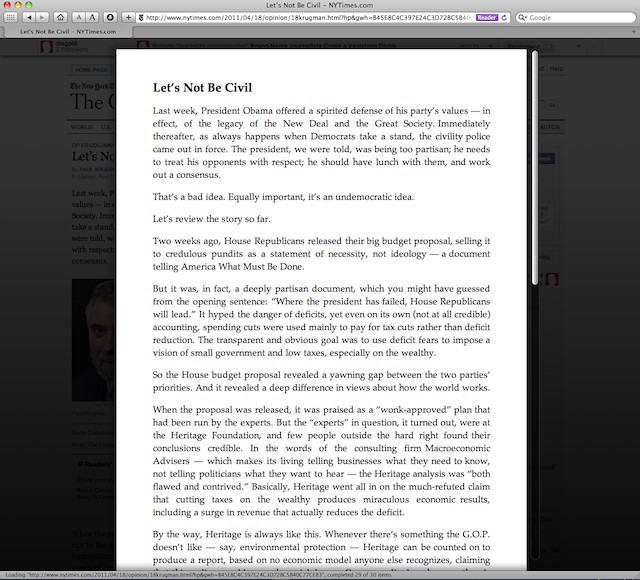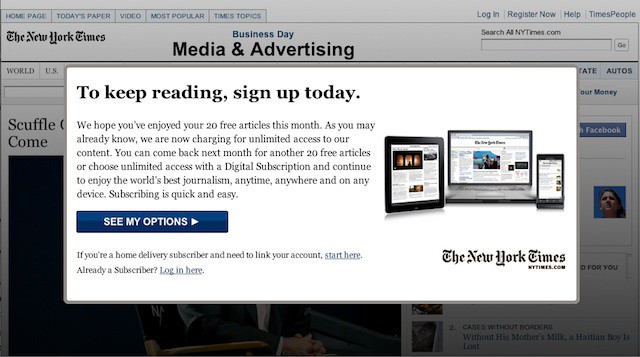
Leander Kahney is the editor and publisher of Cult of Mac.
Leander is a longtime technology reporter and the author of six acclaimed books about Apple, including two New York Times bestsellers: Jony Ive: The Genius Behind Apple’s Greatest Products and Inside Steve’s Brain, a biography of Steve Jobs.
He’s also written a top-selling biography of Apple CEO Tim Cook and authored Cult of Mac and Cult of iPod, which both won prestigious design awards. Most recently, he was co-author of Cult of Mac, 2nd Edition.
Leander has been reporting about Apple and technology for nearly 30 years.
Before founding Cult of Mac as an independent publication, Leander was news editor at Wired.com, where he was responsible for the day-to-day running of the Wired.com website. He headed up a team of six section editors, a dozen reporters and a large pool of freelancers. Together the team produced a daily digest of stories about the impact of science and technology, and won several awards, including several Webby Awards, 2X Knight-Batten Awards for Innovation in Journalism and the 2010 MIN (Magazine Industry Newsletter) award for best blog, among others.
Before being promoted to news editor, Leander was Wired.com’s senior reporter, primarily covering Apple. During that time, Leander published a ton of scoops, including the first in-depth report about the development of the iPod. Leander attended almost every keynote speech and special product launch presented by Steve Jobs, including the historic launches of the iPhone and iPad. He also reported from almost every Macworld Expo in the late ’90s and early ‘2000s, including, sadly, the last shows in Boston, San Francisco and Tokyo. His reporting for Wired.com formed the basis of the first Cult of Mac book, and subsequently this website.
Before joining Wired, Leander was a senior reporter at the legendary MacWeek, the storied and long-running weekly that documented Apple and its community in the 1980s and ’90s.
Leander has written for Wired magazine (including the Issue 16.04 cover story about Steve Jobs’ leadership at Apple, entitled Evil/Genius), Scientific American, The Guardian, The Observer, The San Francisco Chronicle and many other publications.
Leander has a postgrad diploma in artificial intelligence from the University of Aberdeen, and a BSc (Hons) in experimental psychology from the University of Sussex.
He has a diploma in journalism from the UK’s National Council for the Training of Journalists.
Leander lives in San Francisco, California, and is married with four children. He’s an avid biker and has ridden in many long-distance bike events, including California’s legendary Death Ride.
You can find out more about Leander on LinkedIn and Facebook. You can follow him on X at @lkahney or Instagram.
36 responses to “Read New York Times For Free, Courtesy of Safari [Easiest Method Ever]”
Unfortunately (for some; I do pay) this doesn’t work on The Times website here in the UK. The login prompt appears prior to the full article loading/being displayed so therefore is not displayed and the Reader function does not activate.
You can use Adobe BrowserLab and get around with it, since their servers are in the US.
Or of course, you can get a VPN to a location there or a proxy, whichever is easier to get.
Or, you can lose the silly mindset that everything you can get over the interweb is or should be FREE, and you can subscribe and support the businesses in question.
Still don’t get the big upset as a simple clearing of your browser history does the trick…
Fuck Rupert Murdoch and fuck the NYT
Or you can delete everything to the right of the question mark in the URL, and reload.
It’s the same effect as using Google but without having to go to another website.
And it works on Mobile Safari.
Another option is to stop loading just after the article’s text appears but before the whole page loads. This also works on all browsers (but may require a slower connection like that over Wi-Fi).
clearing the history works just fine… or not logging in at all…
the way they’ve done it is plain stupid..l The Wall Street Journal are a lot cleverer… just lock (completely) some of the contemt only…
completely agree. IF they revise their subscription plans… their current plans are ridiculous….
Or, you can buy the Sunday Only subscription plan for $3.75 and get the always awesome Sunday Times delivered to your door plus complete online access for free. Might go up to 6-7 bucks after the first 12 weeks. Still worth it.
I’ve been using this for weeks selfishly keeping it to myself. I hope you didn’t just ruin the good thing I had going.
Assuming you live in the right geographic location, where millions of readers of the times don’t live.
I use Firefox and what I do is go into Preferences>Privacy>Show Cookies, then find and remove all cookies containing “nyt”, then you’re good to go for another 20 articles. (I haven’t bothered to find out if there’s one particular nyt cookie that tracks read articles). Alas on iOS Safari doesn’t allow you to remove selected cookies, you have to delete them all, but that works too.
Their subs prices are absurd, pay more to read it on an iPad than an iPod touch?, yeah that’s going to work. Get real NYT, stop trying to prop up the print version with crazy complicated iDevice pricing and price it for the internet (daily/weekly/monthly/yearly prices, no limits on which devices you can use, etc.) not dead trees. Better still drop the whole dumbed-down individual app approach and build an HTML 5/Javascript website/webapp that works on any device or OS with a modern browser.
I wouldn’t read the anti american leftist, communistic NYT is they paid ME to do do. Don’t use this tip. The fewer people who read this tripe, the better.
There seems to be an even easier way. Simply turn on the InPrivate browsing option before pulling up the times and you can read away. I’ve yet to have any restrictions pop up using this option
That’s the method my non-techie wife came up with.
The way NYT is implementing this it’s almost like they want it to fail – overly complex pricing structure and easily defeated paywall. It’s like someone was told to do it and is going to go back to their boss in 6 months time and say “see, it didn’t work”.
If you use the iCab Mobile browser on an iPad, there is a Readability setting available which does the same thing. Also, iCab supports tabbed browsing.