Top stories

Apple Now Accepting iPad Apps, Planning “Grand Opening” of iPad App Store

Apple is now accepting iPad apps for a “grand opening” of the iPad App Store, according to an email just sent to registered developers.
“iPad will begin shipping soon and your opportunity to be part of the grand opening of the iPad App Store starts today,” the email says.
There’s no details about when the store’s grand [...]

Security Expert: “Mac OS X Is Safer, But Less Secure”

20100319-ipwned.jpg

Tech site H-Online has an interesting story today, quoting security expert Charlie Miller about his forthcoming talk at the CanSecWest conference next week.
He says OS X is full of security holes. There are lots more than in Windows, he claims.
And yet: OS X is a safer system to use. Why? Because, in the words [...]

Apple Devotes Entire Home Page To Jerome York Obituary

20100318-york.jpg

If ever you needed a sign that Apple was a different kind of technology company, this is it.
What other computer manufacturer would remove its top-selling, hype-inducing, industry-altering new product from the prime spot on its website home page, and replace it with an obituary to an investor?
This is one of those “Here’s to the [...]

Coming Soon: Steve Jobs, the Sitcom

Fake Steve creator Dan Lyons just signed a deal to bring Steve Jobs to another small screen near you.
The half-hour series called “iCon” is billed by the presser as “a savage satire centering on a fictional Silicon Valley CEO whose ego is a study in power and greed.”
Making sure the barbs prick will be the [...]

Possible Work-Around For Snow Leopard Creator Code Weirdness

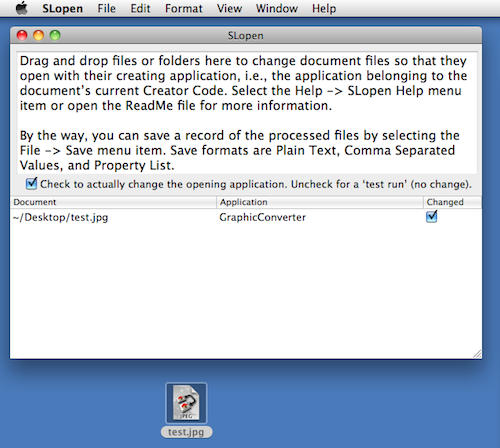
20091104-slopen.png

Some readers might remember the fuss a few weeks ago, when Snow Leopard came out and people noticed that it did something screwy to the way files behave.

By removing support for Creator Codes in 10.6, Apple also removed the system’s hitherto built-in ability to distinguish which application created a file, and re-open it in that application every time it’s double-clicked in future.

For a lot of people this is no big deal, but for some it matters a lot. For example, someone who builds web sites for a living will probably want HTML files they’ve created in a text editor to re-open in that same editor, and HTML files they’ve saved from the web to open in Safari.

The big change in 10.6 is that, as far as the system was concerned, there is no longer any difference. Every HTML file will open in a browser when double-clicked, be it created or downloaded or anything else. And that annoys a handful of people who used to depend on the old behavior to, you know, get shit done. (For lots more technical detail plus all the ins-and-outs and possible workarounds and arguments about how annoying it all is, see these posts by John Gruber, Chris Suter and Matt Neuberg.)

Australian developer Vincent Tan decided to do something about this, and has created a simple app called SL Open.

Using it is simple: drag a document into the SL Open window, and it’s metadata will be changed so that henceforth, it always opens in the app that created it. All the app is doing is changing the file’s “Open With…” criteria; the main benefit is that SL Open makes it possible to amend a large number of files very quickly, and much faster than you or I could manage using the Finder and Get Info.

As Vincent makes clear in the release notes, this is really just another work-around, not a fix. He strongly urges users to backup any documents before changing their metadata with SL Open, and to do a trial run with some test documents first, just to be sure.

If you enjoyed this article:
Subscribe via RSS or email, or follow us on Facebook and Twitter

About the author

gilest

Giles Turnbull is a freelance writer in England. He is a columnist for PA, and has written for the BBC, Guardian, Daily Telegraph, MacUser, Macworld, and The Morning News. He has a blog you can ignore and a Twitter account you needn't follow.

Email the author | Read more posts by Giles Turnbull.

2 comments

    They didn’t just do away with app-level file associations. They simply improved on the original four-letter creator code with UTIs. It’s all explained here – http://www.roughlydrafted.com/2009/09/22/inside-snow-leopards-uti-apple-fixes-the-creator-code/

    Uh, not really, according to John Gruber:
    “So, after claiming at the outset that Apple has ‘fixed’ creator codes by ‘inventing a superior alternative’, followed by 3,000 words of muddled technical information regarding a technology that is unrelated to binding files to applications, Dilger admits that there is no replacement for creator codes in Snow Leopard, but it’s good news anyway because he never liked the previous behavior in the first place. His closing paragraph is technically accurate, but is completely at odds with the article’s title and opening premise — unless he meant that Apple has ‘fixed’ creator codes in the same sense that one ‘fixes’ a dog.”
    http://daringfireball.net/2009/10/congrtlns-osx

Add your comment

Name(Required)

Mail (required, but not published)

Website

Comment

Buy Inside Steve's Brain Buy from Amazon.com Buy from Barnes & Noble

