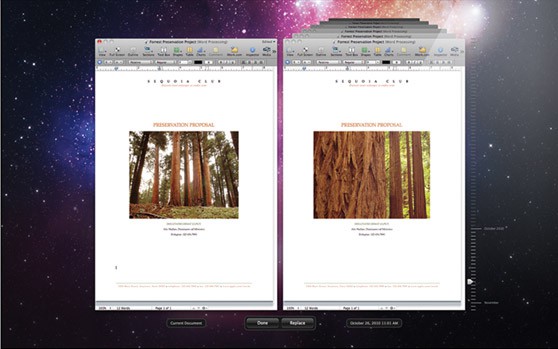
Apple is adding several auto-saving features to Lion, including Auto Save, Versions and Resume.
“Mac OS X Lion automatically saves your work — while you work — so you don’t have to,” says the company.
One of the most interesting implications is that you may never have to quit an application again, or go hunting for the file you were working on.
Auto Save
OS X Lion’s Auto Save automatically saves documents as your working on them — no more Command/S. And instead of making multiple copies, which eats up disk space, changes are saved in the working document. There’s also a lock feature, to prevent inadvertent changes, and “revert” feature, which reverts a document to the state it was in when i t was last opened — that means you can mess with it as much as you want, and it’ll open the way it was if the changes are a disaster.
Versions
Versions is like Time Machine for individual documents — it automatically saves document snapshots every hour while your working on it. It even looks like Time Machine: the current document cascades next to previous version. You can revert to a previous version, or just copy/paste chunks from earlier documents. “Versions records the evolution of a document as you create it,” Apple says.
Resume
OS X Lion’s “Resume” allows you to pick up where you left off after quitting an app or restarting the machine. Instead of saving all your work, shutting down all apps and reopening them when the machine boots up, Resume takes of all that, restoring the workspace to its previous state. Same with individual apps: whenever an app is closed, it reopens its files the way they were when the app was quit. “you never have to start from scratch again,” Apple says.
As a result, users behavior should change quite a bit. The rituals of working on a desktop machine — saving, quitting, relaunching applications and finding documents — will no longer apply.
Now if only the next version of Safari would automatically reopen all your tabs, Lion would be complete.

Leander Kahney is the editor and publisher of Cult of Mac.
Leander is a longtime technology reporter and the author of six acclaimed books about Apple, including two New York Times bestsellers: Jony Ive: The Genius Behind Apple’s Greatest Products and Inside Steve’s Brain, a biography of Steve Jobs.
He’s also written a top-selling biography of Apple CEO Tim Cook and authored Cult of Mac and Cult of iPod, which both won prestigious design awards. Most recently, he was co-author of Cult of Mac, 2nd Edition.
Leander has been reporting about Apple and technology for nearly 30 years.
Before founding Cult of Mac as an independent publication, Leander was news editor at Wired.com, where he was responsible for the day-to-day running of the Wired.com website. He headed up a team of six section editors, a dozen reporters and a large pool of freelancers. Together the team produced a daily digest of stories about the impact of science and technology, and won several awards, including several Webby Awards, 2X Knight-Batten Awards for Innovation in Journalism and the 2010 MIN (Magazine Industry Newsletter) award for best blog, among others.
Before being promoted to news editor, Leander was Wired.com’s senior reporter, primarily covering Apple. During that time, Leander published a ton of scoops, including the first in-depth report about the development of the iPod. Leander attended almost every keynote speech and special product launch presented by Steve Jobs, including the historic launches of the iPhone and iPad. He also reported from almost every Macworld Expo in the late ’90s and early ‘2000s, including, sadly, the last shows in Boston, San Francisco and Tokyo. His reporting for Wired.com formed the basis of the first Cult of Mac book, and subsequently this website.
Before joining Wired, Leander was a senior reporter at the legendary MacWeek, the storied and long-running weekly that documented Apple and its community in the 1980s and ’90s.
Leander has written for Wired magazine (including the Issue 16.04 cover story about Steve Jobs’ leadership at Apple, entitled Evil/Genius), Scientific American, The Guardian, The Observer, The San Francisco Chronicle and many other publications.
Leander has a postgrad diploma in artificial intelligence from the University of Aberdeen, and a BSc (Hons) in experimental psychology from the University of Sussex.
He has a diploma in journalism from the UK’s National Council for the Training of Journalists.
Leander lives in San Francisco, California, and is married with four children. He’s an avid biker and has ridden in many long-distance bike events, including California’s legendary Death Ride.
You can find out more about Leander on LinkedIn and Facebook. You can follow him on X at @lkahney or Instagram.


31 responses to “OS X Lion Brings Host Of Auto Save Features”
Mistake!
Change ‘your’ to ‘you’re’ in the following: hour while your working on it
Hmm, Resume will definitely take some getting used to. I don’t anticipate wanting a program to open up the last document I was working on all the time, and that is almost definitely something I don’t want from Safari, but will only know for sure once I get in there and start using the feature.
how petty…
Who cares about a stupid grammatical error. Just read the article
If you want your Safari Tabs to reopen after a crash or a launch, check out “Manage sessions” as a Safari Extension. Rocks hard, I wouldn’t use Safari without it.
Previous comment, should have been “Sessions 1.1.4” by David Yoo
If you want to reopen all your Safari tabs from the last session just go to ‘History’ and click ‘reopen all windows from last session’
totally agree…. i dont want anyone see my porn lol
People who write for a living probably care about it. Too many grammatical errors change the meaning of the words written… so to “just read the article” would mean to be misinformed or confused if attention isn’t given to grammar.
I’m not saying that happened here, but a writer shouldn’t be lax about writing properly.
I like what I’m reading. Has anyone ever read Jef Raskin’s book ‘The Humane Interface’? These features sound very much like stuff he would of approved of. I think he’d quite like ‘Resume’ as it’s in line with the ideal he envisioned that people should not have to be distracted by opening things, when they turn on the computer they should be able to immediately get to work with whatever is the locus of their attention.
Interesting and useful post
Sorry, I’m new to Macs, but… How is Auto Save something to get excited about? Haven’t word processors done that for the past 20+ years?
Well it’s been pretty much been word processors. I think the benefits is (presumably) all productivity applications will have autosave as a feature and that it’ll work at a system level which all applications can take advantage, rather than all word processors having different ways of implementing it.
I get versions and resume, but how is auto save a feature of Lion? Doesn’t that depend on the software you’re using? As you say, versions is like time machine, which is a utility included with the operating system. And resume is something that could be handled by the operating system (like putting a mini-virtual machine to sleep that the program resides in). But the autosave feature? I don’t see how the operating system would know how to reach into a particular program and manipulate a document.
I also see this creating a whole new set of problems because there is going to be a whole group of people who prefer the save feature. Right now a person can go in and tinker with a document and close out without worrying about losing the original. But what if you forget to use the “lock” feature?
Well auto-save might work as a system level API which software can tap into if I was to speculate. In which case the impetus would largely fall on software makers to adopt it, which many will I think. I can certainly see the celebrated apps like Pixelmator making use of it.
And presumably to your second point, that’s where version forking comes into play.
Course I have no doubt some people don’t like the idea of auto-saving, but personally saving is something of a bygone era. When a person word process, their content (the data) is the most important thing ever and is at the centre of their locus of attention. The data should never be lost and the person writing should not have to break their locus of attention (even if it’s briefly pressing cmd + s), so the data should always be retrievable in those ultra rare moments a power outage happens.
One imaginable benefit of having continuous saving is unlimited undo I hope. It’s silly now for there to be a limit to the number of undos that can take place. A lot of the limitations of files existed in a time limitation, especially on hard drive space, but now we’ve got gigabytes of it.
Lots of articles about it (auto save), but I have Lion installed and I see no way to turn it on or off. Help is no help in the GM release. Can anyone say?
Auto Save simply doesn’t work and breaks editing documents. That is if your documents are on any network volume or stored on a non HFS+ filesystem. This makes any application that supports Auto Save useless as you can’t edit and save documents. Worst feature ever as it breaks a critical feature called “Save”.
Auto Save give the following error message: The document “mytest” is on a volume that does not support permanent version storage.The document “mytest” could not be autosaved. Your changes will not be saved until the problem is resolved. You can also duplicate the document or discard your changes to close it.