Top stories

Apple Now Accepting iPad Apps, Planning “Grand Opening” of iPad App Store

Apple is now accepting iPad apps for a “grand opening” of the iPad App Store, according to an email just sent to registered developers.
“iPad will begin shipping soon and your opportunity to be part of the grand opening of the iPad App Store starts today,” the email says.
There’s no details about when the store’s grand [...]

Security Expert: “Mac OS X Is Safer, But Less Secure”

20100319-ipwned.jpg

Tech site H-Online has an interesting story today, quoting security expert Charlie Miller about his forthcoming talk at the CanSecWest conference next week.
He says OS X is full of security holes. There are lots more than in Windows, he claims.
And yet: OS X is a safer system to use. Why? Because, in the words [...]

Apple Devotes Entire Home Page To Jerome York Obituary

20100318-york.jpg

If ever you needed a sign that Apple was a different kind of technology company, this is it.
What other computer manufacturer would remove its top-selling, hype-inducing, industry-altering new product from the prime spot on its website home page, and replace it with an obituary to an investor?
This is one of those “Here’s to the [...]

Coming Soon: Steve Jobs, the Sitcom

Fake Steve creator Dan Lyons just signed a deal to bring Steve Jobs to another small screen near you.
The half-hour series called “iCon” is billed by the presser as “a savage satire centering on a fictional Silicon Valley CEO whose ego is a study in power and greed.”
Making sure the barbs prick will be the [...]

One Less Thing To Remember: Airlines Adopting Electronic Boarding Passes

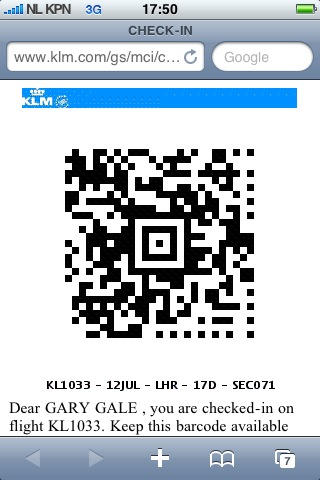
D101372C-1F14-47D7-BE60-6A7FB99E7808.jpg

Cult reader Gary Gale recently blogged about his positive experience of using an iPhone as an electronic boarding pass during a flight from Amsterdam to London.

It seems that this is now a standard option from KLM:

“KLM’s online check-in system offered me the option of having my boarding pass on my iPhone, which duly arrived as a link in an email,” wrote Gary.

This isn’t a new idea – airlines all over the place have been conducting tests and experiments with electronic boarding passes for a year or more – but this is the first report I’ve seen of the system actually working smoothly.

In the past we’ve read about various experiments that individuals have tried elsewhere – usually by displaying a PDF of their boarding pass on their phone, and usually with very mixed results. But airline and airport staff have found themselves suffering a certain amount of inertia. It seems that the entrenched process of checking, monitoring and auditing paper boarding passes is one that’s hard to change. But as more smart phone users demand this as an option, pressure will grow on the airlines to change the processes.

Even so, the best advice for anyone trying this on almost any trip with any airline is: take a printed copy of the pass too (see the comment here). If you’re lucky, you won’t need it; but if you don’t take it, officialdom might just get in the way and force you to miss your flight.

Have any Cult readers tried using an electronic boarding pass on their iPhones? We’d love to hear your stories – positive and negative.

If you enjoyed this article:
Subscribe via RSS or email, or follow us on Facebook and Twitter

About the author

gilest

Giles Turnbull is a freelance writer in England. He is a columnist for PA, and has written for the BBC, Guardian, Daily Telegraph, MacUser, Macworld, and The Morning News. He has a blog you can ignore and a Twitter account you needn't follow.

Email the author | Read more posts by Giles Turnbull.

10 comments

    Both Delta and Air France offered me the option on a recent overseas trip. However, what really grabbed my attention was the electronic option of e-mail barcoded tickets to Major League Baseball games. They just scan the barcode on the e-mail attachement and you are through the gate.

    Air Canada has been using iPhone passes for about two years. I’ve encountered no problems and Air Canada uses the same new-style bar code shown above.

    I have used this on my iphone, It works GREAT!! Only down side is it only works in some airports right now.

    Not on my iPhone but on my Touch I have with Air Canada. They have even released an App to make it easier.

    Lufthansa is offering it for 2-3 years already. First on old phones via SMS and since two years it also works perfectly on the iphone… easy thing and surprised you hear “that it works now”…

    Air NZ have this ability also, but only on Domestic flights within New Zealand. we call it an e-Pass, and it’s been up and running since Oct 2008. A passenger without bags can proceed straight to the boarding gate and have thier phone scanned by the gate reader which then automatically checks them in and boards them. This can be done right up to five minutes before departure thereby saving the passenger time at the airport.

    Air New Zealand have been using this system for about a year… mPass … works seamlessly.

    Continental Airlines has offered browser-based boarding passes for at least a year. They’ve rolled the system out slowly – first to their hubs, then to high-traffic spoke cities. I use the electronic boarding pass every time I fly out of Newark.

    I’ve only come up against two problems:
    1) TSA screeners who were unaware of the electronic boarding pass system; this was only a problem at the beginning – since Terminal C is Continental’s east coast hub, training was pretty quick, and TSA has rolled out pedestal-based scanners at all of the checkpoints that are faster and easier for the screeners to use than the old handheld scanners.

    2) Your flight is ‘unofficially’ delayed. About 4 months ago, a flight I was boarding was still ‘on-time’ in the system, but waiting for an aircraft in real-life. Once your flight ‘departs’, the boarding pass link expires, and because Safari wants to refresh your current page every time you restart the application, when the flight finally boarded, I couldn’t bring up my boarding pass. I had to wait for the gate agent to be freed up (essentially, after everyone else had boarded) to print a hard copy boarding pass so I could get on the plane. Thankfully, it was a regional jet and I was in an aisle seat.

    Overall, tho, the system works really well.

    Also a Continental e-boarding pass user.

    Not sure that printing out a paper boarding pass works. My understanding is that the bar codes are unique (as in when you reprint your paper boarding passes, the prior codes don’t work). May work as evidence to the ground crew, but the paper pass probably won’t scan at the gate if your e-boarding pass is more current and if you print a paper boarding pass after issuing the e-boarding pass link, the code on your PDA is invalidated.

    My basic problem is that the TSA scanners have read my pass but the Continental scanners don’t seem to read my iPhone. Maybe the screen protector is too reflective?

    WestJet Airlines has been using mobile checkin for the past two years. The system is incredibly simple too. Any mobile device that can receive a text email can use it. The boarding pass is literally just text, no barcode to scan or PDF to download/open. At the end of the day keeping it simple let’s Westjet reduce the headaches passengers may have in their travels.

Add your comment

Name(Required)

Mail (required, but not published)

Website

Comment

Buy Inside Steve's Brain Buy from Amazon.com Buy from Barnes & Noble

