
Top stories

Microsoft’s My Documents Folder Makes Triumphant Return – On iPad

20100209-mydocuments.jpg

Earlier today, I was reading Infoworld’s article, The iPad questions Apple won’t answer. The first question they listed was “Can you save and transfer documents to the iPad?”, and their assumed answer was “No”; they suggested that the only way to do this would be to open a document from an email message.
I read that [...]

Top 5 Things To Check Out at Macworld 2010

Macworld 2010 opens today. It is the 25th annual gathering of Mac users. That’s right, 25 years!
But thanks to the absence of Apple this year, this “Mecca for Mac Heads” may be the last. So check it out while you can.

The show runs for 5 days. The Expo showfloor opens on Thursday at noon.
For the [...]

Opinion: MacBook, or iMac + iPad?

20100208-imacipad.jpg

The announcement of the iPad has done a lot of things: it’s stoked up excitement in the Mac using community, it’s got a bunch of developers feverishly coding exciting new stuff, and it’s got retailers and cell phone companies the world over drooling over the money they can make from it.
And it’s also somewhat upset [...]

In Depth: 30 Days with the Nexus One

It’s been a month since my review of Google’s “SuperPhone”, the Nexus One. Since that time, we’ve surfed, updated facebook, navigated, called, played endless hands of cribbage and even tried to freeze it to death on a trip to Dayton Ohio. Follow me after the jump to find out does the “SuperPhone” stand the [...]

Kirikae: Jailbreak App Switcher for iPhone, iPod Touch

taskmanagerKirikae, a free jailbreak app switcher/launcher for the iPhone, is yet another forbidden app that shows exactly how simple power features can drastically improve the iPhone user experience. With two clicks of the home button you can switch between apps while automatically backgrounding the app you leave. Kirikae was initially released on September 7, and the recent update (version svn.r49) adds more great features to an already killer app switcher.
IMG_0016

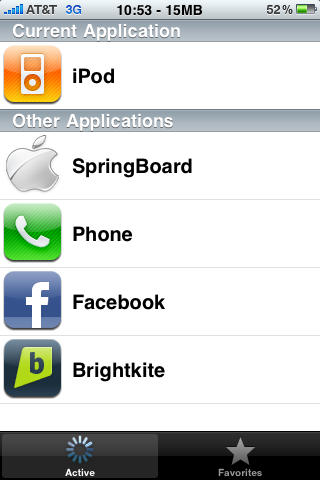
Kirikae works just like you think it should. Double click your home button to bring up the app switcher, select the app that you want to switch to, and Kirikae keeps everything active thanks to Backgrounder. You can use Kirikae to quickly access backgrounded apps from the home screen as well. The app itself is light on system resources which is always a concern when you’re dealing with Mobile Substrate.
IMG_0018

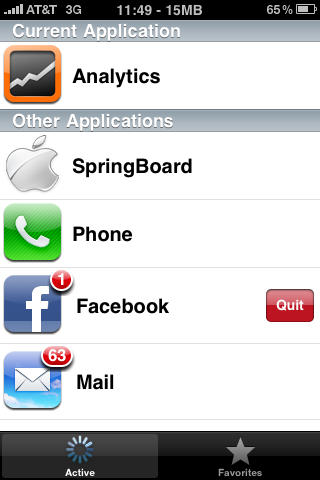
Another handy feature is the ability to quit apps from within Kirikae. Just select the application that you want to quit with the customary finger  slide, then hit quit. As it should, sliding your finger over SpringBoard gives you the option to respring.
IMG_0019

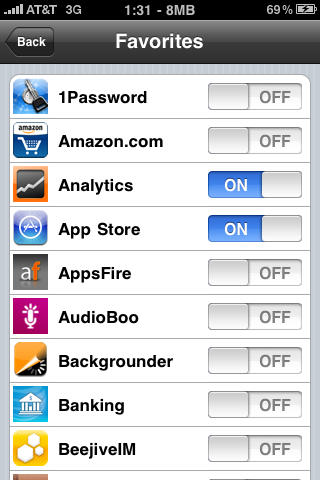
Kirikae’s newest feature adds a favorites tab to the app switcher. To select apps to add to the favorites tab, open up the Kirikae app from SpringBoard (not using the home double tap). Similar to apps like Poof!, just turn on the apps you want to show up in the favorites tab.
IMG_0015

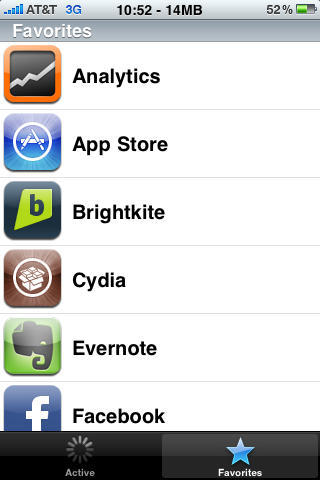
The favorites tab is a great addition to Kirikae, but I would love to see the next update let me order my favorite apps in a non-alphabetical sequence. Also, Kirikae opens immediately which is a problem when invoking during the opening of another app. The task switcher window pops up for a second then switches back to the opening app which seems glitchy. But trust me, I’m not complaining.

Kirikae is a free download available through Cydia.

About the author

Tim Cox Tim Cox is the social media and communications coordinator for a private university in the Los Angeles area. He has written for a number of online and print publications and has presented on technology and social media at the national level. One of his greatest accomplishments was networking a Mac Plus with a Mac Pro. In his spare time he writes music, poetry, and trains for Street Fighter IV tournaments. He is married with 5 beautiful kitties. He encourages you to read his blog and connect with him on Twitter, Brightkite, and Facebook.

Email the author | Read more posts by Tim Cox.

8 comments

    Kirikae, BTW, means ’switch’ in Japanese.

    That looks great. If only it would move to the normal OS!

    This cannot possibly work better than Springboard. If anything could possibly be better than Springboard, then Apple would have incorporated the features right there into Springboard. Apple always optimizes the user experience, every time.

    How could you for a process switcher in the itunes app store when Apple won’t even let you background without jailbreaking?
    You understand why Apple doesn’t allow backgrounding, right? Its to save users from themselves. Can you imagine the Apple helpdesk calls after some idiot drops twitter,facebook, ipod, mlb baseball, youtube in the background and says my iphone is running slow?

    “You understand why Apple doesn’t allow backgrounding, right? Its to save users from themselves. Can you imagine the Apple helpdesk calls after some idiot drops twitter,facebook, ipod, mlb baseball, youtube in the background and says my iphone is running slow?”

    Those people should have bought palm pre :)

    So are launcher applications forbidden by apple? Or is it just that this application lets them run in the background? I’ve been trying to figure out what types of things gets an app rejected and all I have so far is trademark problems and duplicating existing functionality. Would another app launcher duplicate springboard?

    @iGenius wow really. Apple is that perfect. If that were so they would never have had to release updates to their firmware!

    As a jailbreaker since day one (running apps before appstore was ever even unveiled) I must say there is always room for improvement.

    I would like to download kirikae. Where do I find it and go about downloading it

Add your comment

Name(Required)

Mail (required, but not published)

Website

Comment

Buy Inside Steve's Brain Buy from Amazon.com Buy from Barnes & Noble

