Mobile menu toggle

Jailbreak Tweak Brings Lock Screen Camera Button to iOS 4

By

ios-5-lock-screen-camera-button.JPG

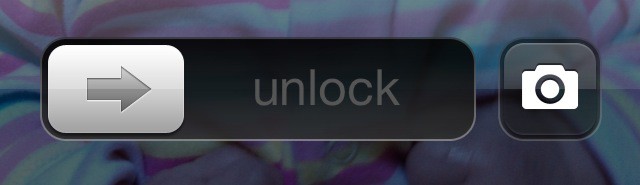
As we await the launch of iOS 5, jailbreak developers are creating new tweaks for the existing iOS 4 software that aims to provide us with a taste of the goodies we’ll be getting our hands on this fall. The latest is CameraLock — a great little utility that introduces a camera button to your lock screen.

From veteran jailbreak developer Filippo Bigarella, the guy behind other great tweaks such as UnFolder, CameraLock adds a little button next to the unlock slider on your home screen that provides quick and easy access to the device’s camera app. Sounds like the new feature in iOS 5, doesn’t it? Except this is better!

Unlike iOS 5, the button introduced by CameraLock is customizable, so you can modify its functionality to suit you. For example, rather than launching your device’s built-in Camera app, you can launch a third-party app, such as Camera+, Camera Genius or Instagram instead. Additionally, you can have the button displayed continually in the lock screen so that there is no need to double-tap the home button to use it.

You can download CameraLock from Cydia now by adding the source: https://filippobiga.me/repo/

[via iDB]

  • Subscribe to the Newsletter

    Our daily roundup of Apple news, reviews and how-tos. Plus the best Apple tweets, fun polls and inspiring Steve Jobs bons mots. Our readers say: "Love what you do" -- Christi Cardenas. "Absolutely love the content!" -- Harshita Arora. "Genuinely one of the highlights of my inbox" -- Lee Barnett.

35 responses to “Jailbreak Tweak Brings Lock Screen Camera Button to iOS 4”

  1. Darrell Talastas says:

    I think the source is messed up, had a bunch of errors

  2. Darrell Talastas says:

    Never mind, entered it in wrong.  ha

  3. Alex4809 says:

    did it, did not add the camera.

  4. pditty357 says:

    You know once you add the repository you then need to add the tweak right?  Once you add the tweak you have to double tap on the home button to access this feature.  Works great on my jailbroken iPhone4 firmware version 4.3.3

  5. POG says:

    Didn’t work for me either. I’ve got a 3GS.

  6. POG says:

    OK – Double-tap the home button does work. Thanks for the tip.

  7. Silal says:

    Probably a silly question, but where are the App Settings?

  8. steven says:

    Great tweak. Thanks for pointing this out.

    By the way, you have to tap the home button once, then tap it twice again to bring up the button, if anyone is having trouble. This is how it works in iOS 5 too.

  9. steven says:

    Not a silly question.

    Go to the main Settings screen and scroll down to find “CameraLock”.

  10. randall says:

    Got it, works great. Thanks!

  11. Gheedsgreed says:

    SWEEEET!

  12. SavedByTechnology says:

    Very slick!  Thanks Killian :)

  13. Asdflkjhasdflkjasdf says:

    kinda messy is you have a passcode on ur iOS device

  14. Asdflkjhasdflkjasdf says:

    kinda messy if you have a passcode on ur iOS device 

  15. Dacoolkid011 says:

    It doesn’t shows up on my settings :-/

  16. J Namnun says:

    Awsome! Thanks! Works perfect iOS 4.3.3 iPhone 4.

  17. RodgerSButler says:

    Has anyone else notice that the camera icon is slightly misaligned, but the screenshot here shows the camera icon perfectly. Can somebody fix this?

  18. ziv says:

    great, easy use. bypass the lockscreen but dont let u use the phone on exit unless u type in ur code. nice thinking.

Leave a Reply

