Top stories

Journalists Cover Microsoft, Using Macs

It’s not an easy time for Microsoft — with Steve Ballmer having to field questions about being “buffoons” and an “evil empire”  at the shareholder’s meeting (.doc) — so when they get together “the world’s most influential technology pundits and online writers” (nb: we weren’t invited) for Mobius to discuss super-secret mobile tech you’d think [...]

Guide To Black Friday Apple Bargains: Cheap MacBooks, iPods and Accessories Galore

Here’s a guide for finding the best bargains on Apple-related gear during the infamous Black Friday sales on November 27. We’ve compiled a comprehensive list of gear from leaked photos of sales flyers and descriptions of sales.
The bargains include a 2.26 GHz MacBook + $150 gift card at Best Buy for $999.99 ; a 32GB [...]

Review: Voices Is Today’s Best Thing Ever, Grab It Now While It’s Cheap

New on the App Store is Voices from the clever folk at Tap Tap Tap. You can guess what it does.

Open it up, pick a silly voice. Helium is pretty silly. A microphone appears and the app even clears your throat for you (try it, you’ll see what I mean). Now speak your brains, and [...]

Review: Sony Walkman S540 Series Video MP3 Player

Press releases, you will hardly be surprised to hear, are rarely very interesting. But one arrived in my inbox a couple of weeks ago that made me double-take.
“Sony’s S Series Walkman,” it chattered, “is a serious challenger to the iPod Nano.” Gosh, really? Perhaps the Cult had better have a look at one, then, despite [...]

How To: Jailbreak Your iPhone/iPod Touch Using Blackra1n

blackran1n-mac-0

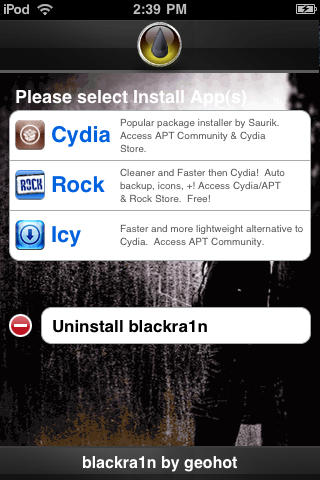
George Hotz a.k.a GeoHot has released the Mac version of blackra1n, his 1-click jailbreak solution. Just like the Windows version, it is pretty easy to use and worked perfectly with my iPod Touch 2G and iPhone 3G. Besides the tool, there’s a blackra1n application that gets automatically installed on the iPhone after jailbreak, which gives you option to install Cydia and some other alternatives like RockYourPhone and Icy.

Here’s see how it works.

Ingredients:

  • An iPhone / iPod Touch (any model)
  • Blackra1n tool available at blackra1n.com
  • iTunes 9.0.2
  • A wireless internet connection (to install cydia etc.)

Now, let’s get started with the procedure:

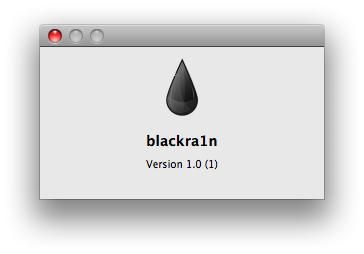
1. Download the blackra1n tool and double-click to open it.

blackra1n-mac-1

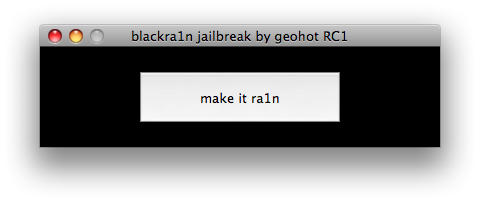
2. Make sure your iPhone / iPod Touch is attached to the Mac / PC and click ‘make it ra1n’. NOTE: This will NOT unlock your iPhone (enabling it to be used with other carriers).
blackran1n-mac-3

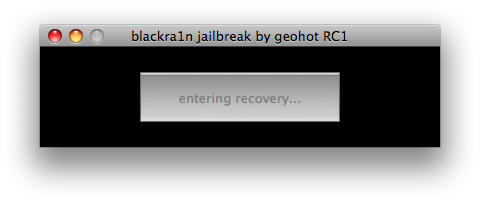
3. Blackra1n will tell you that the device is booting into Recovery Mode. Check the device’s screen and it should turn off and then show an iTunes logo with cable, indicating it is in Recovery Mode.
blackran1n-mac-4

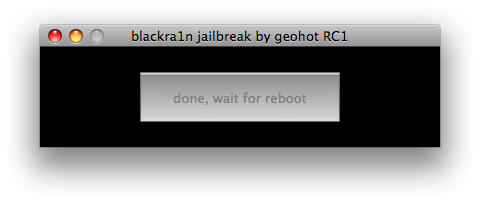
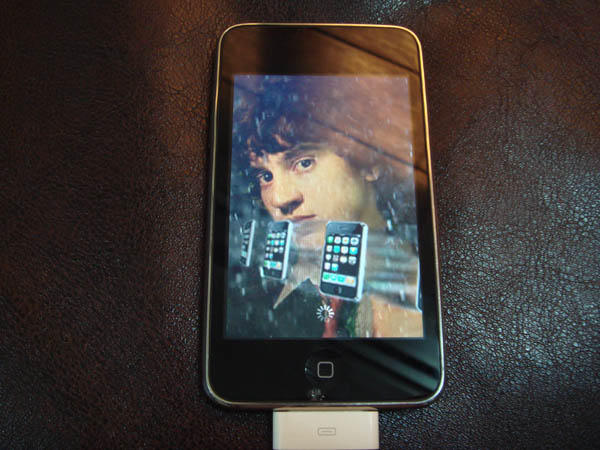
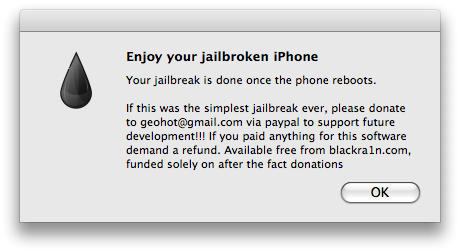
4. A few seconds later, you will get an image of GeoHot on your device’s screen. The Blackra1n program on your Mac / PC will request you to donate to GeoHot, click ‘OK’. Now it will tell you to wait, till the device reboots. You can now close the program.
DSC02689

blackran1n-mac-5

blackran1n-mac-6

5. After the device reboots, make sure you have an active internet connection on it.

blackran1n-mac-7-1

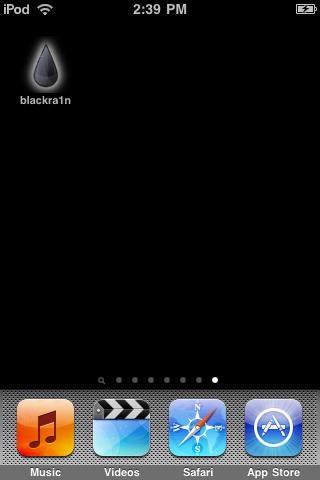
6. Navigate to the last page of the device’s springboard and open the blackra1n app.
blackran1n-mac-7

blackran1n-mac-8

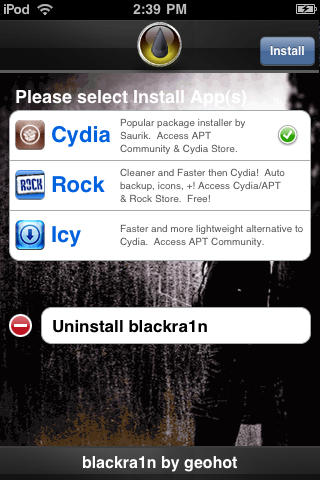
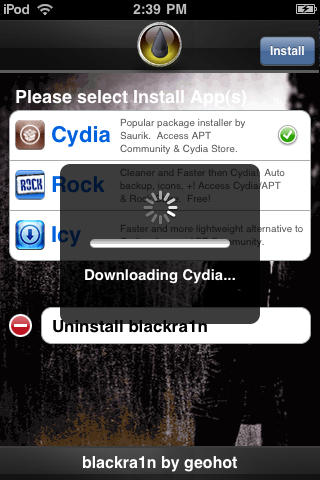
7. Now select any or all of the three installers and tap on ‘install’ button in the navigation bar. It will now download the desired application(s) and then re-spring (refresh).
blackran1n-mac-9

blackran1n-mac-10

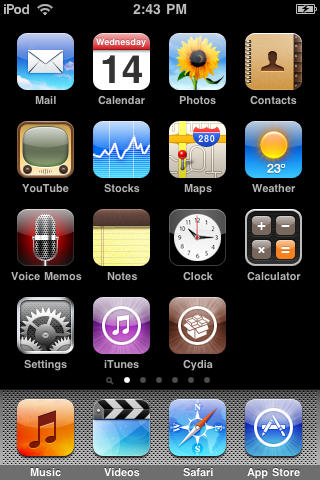
8. After the device re-springs, you will have the selected application(s) installed. Congratulations! You’re now successfully jailbroken.

Optional:

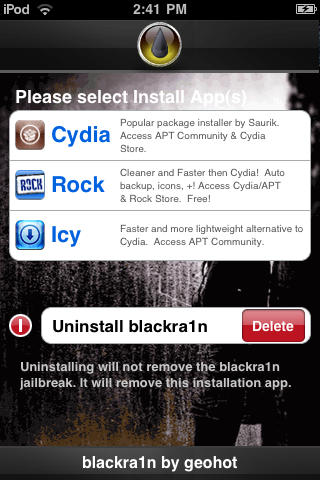
9. If you want to remove the blackra1n application from the device, open the application again and tap ‘Uninstall blackra1n’, this will NOT undo the jailbreak by any means. The device will now re-spring and you will no longer have the application.
blackran1n-mac-11

blackran1n-mac-12

All the credit for the great tool goes to George Hotz a.k.a GeoHot.

About the author

Sayam Aggarwal

Sayam Aggarwal is a 16-year-old student living in India who has been an Apple fan for almost 5 years. He has worked with ModMyi, one of the leading iPhone communities, as an author for more than a year. He spends most of his free time on the Internet fetching the latest news regarding Apple and its entire product range. Follow him on Twitter!


Email the author | Read more posts by Sayam Aggarwal.

103 comments

    My iPhone gets stuck on the recoveryscreen with the iTunes logo, am I doing something wrong? How do I fix this? Thanks

    Interesting to post this 4 minutes after the article saying that updated GS iPhones can no longer be jailbroken. :-) _

    @Alex what device are you using? An iPhone 2G / 3G or 3GS? If 3GS, was it purchased within this month? (http://www.cultofmac.com/new-iphone-3gs-model-updates-bootrom-blocks-jailbreak-completely/18619)

    I understand this does not unlock your iphone, but is it possible to use Blackrain to jailbreak, and still unlock by other means.

    I guess what im saying is can i jailbreak my iPhone with Blackrain…what happens next, how do i unlock? Other software?

    Would be nice to add to the end of this article a small how-to on unlocking the device after the jailbreaking is complete, just for those users who are interested :-)

    @Andrew If you have baseband of a 3.0.x firmware, then you can jailbreak using blackra1n and unlock using ultrasn0w.

    Ah i see, thank you very much Sayam.

    I have a 3G, bout 6 months old. everytime i run blackrain it just freezes on the recovery screen. any ides?? please help me out

    @Adam make sure that when iTunes pops-up telling you that the device is in Recovery Mode, click ‘OK’. Though it isn’t that necessary but that might be the problem in this case.

    I’m having a problem with my 3G (purchased in February of this year). I’m getting as far as step 3, with my iPhone’s screen showing the iTunes logo and USB cable, but iTunes (the program itself) is telling me that “iTunes has detected an iPhone in recovery mode. You must restore this phone before you can use it with iTunes.” It gets stuck at that point and I have to restart my phone before I can interact with it again. Any tips?

    @Shawn did you see what I told Adam? Does it work for you? Please let me know.

    Also, when I close iTunes and try to run Blackra1n again, I get a spinning beachball when Blackra1n says “entering recovery…”, and I have to force quit and manually restart my iPhone. I’m gonn a just go ahead and say that Blackra1n doesn’t work on anything above an iPhone 2G and forget about jailbreaking it with this method. Beware! This method will cause nothing but frustration.

    @Sayam – no, there’s no popup dialogue saying anything ither than what I posted above. When I click OK, nothing further happens, save for iTunes expecting me to click the Restore button. Very frustrating, as I don’t want to restore my phone.

    @Shawn, you should try unplugging and then plugging it back in (when stuck in recovery mode)… This sometimes helps solving the issue as it did with purplera1n and redsn0w in past :)

    BTW, it worked without any glitch on my 3G and a friend’s 3GS. Therefore, it DOES work.

    @Sayam – I should have said it doesn’t work on iPhone OS above 3.0, or something. What happens when I unplug the phone is that the dialogue box saying “Enjoy your jailbroken iPhone” pops up. So then I plug my phone back in (where it’s still frozen at the iTunes/USB cable screen), and click OK in that dialogue box. Nothing happens – the phone stays frozen and the “done, wait for reboot” dialogue box in Blackra1n never goes away, requiring me to force quit Blackra1n again and manually reboot the phone.

    Is there a step that you’re not listing, or that seems obvious to you, therefore you’re leaving it out? Something’s happening in a lot of non-recent iPhones that’s making this jailbreak method not work.

    I don’t even have iTunes open when I attempt a jailbreak. Is it necessary to have iTunes open?? I haven’t tried the replug idea. As Shawn said is there any steps being left out. Also I’m already upgrade to 3.1.2 OS. Is that a problem. Thanks to everyone for the help so far.

    does my ipod touch 2g have to be fully updated or can i still jailbreak it with 3.0 or do i have to be at 3.1 firmware?

    I didn’t have iTunesHelper.app running, and it wouldn’t work, maybe that’s the problem with some folks here.. You can find iTunesHelper.app in iTunes.app (right click the icon of iTunes in the FInder and choose ‘Show Package Contents’), Find it by using spotlight to search the iTunes.app folder, doubleclick it, let iTunes run, run Blackra1n again and see if it works! Hope It helps!

    Tried downloading and opening but said it wasn’t supported on this architecture. I am running 2.2.1 on the iphone cos I jailbroke that with pwnage and was happy with it until now (cant run many new apps cos are 3.0 only). I am used to the pwnage method where you don’t upgrade to the new version before, do I need to update to 3.1.2 first and then run blackra1n?

    This doesn’t work

    I am currently have a jailbroken ipgone 3Gs on 3.0 OS,
    How would I go about using Blackra1n to Jailbreak my device so that I can have the 3.1.2 OS and still have a jailbroken device?

    I am currently still using OS 3.0 as I refused to update till it was possible to jailbreak 3.1.2 OS.

    Also could some one tell me how to find my baseband verison #?
    Or am I to assume that because im still using a 3.0 OS my Baseband is still 3.0.x?

    ok ran blackra1n everything goes well but i dont have the blackra1n app that i need to install cydia

    also i never saw geohot
    i have an ipod touch 2G with 2.2.1 firmware do i need to upgrade through itunes first?

    guys when i look at the blackrain window it says “done, wait for reboot” but my ipod is not rebooting. Can anyone help?

    Btw i have an ipod touch 3.0 if that helps:)

    Unfortunately, it doesn’t work for me! :(
    I’m using MackBook unibody 2.4 that running Mac OS X 10.5.8 and I tried blackra1n to jailbreak iPhone 3G 3.1.2 officialy unlocked, but it didn’t work for me, it’s stuck in itunes screen on iPhone! :(
    Anyone have any idea how to fix that?
    Please, I need a help on that :(

    Hey Sayam, I seem to be having the exact same problem as Shawn and I have tried all of your recommentations so far with no result. Anything else it could be?

    You have to make sure that iTunes Helper it is not running for this to work.
    I just terminated the program and now it is working. I hope this helps.

    hi can u plz tell me how can unlock my iphone 3gs 3.1
    i have now blackra1n on my iphone what should i do next?

    @p28oly, it wont unlock ur cell, but it will let u install other non related apps? u shld look into the redsn0w hack.

    i used the jailbreak everything went as said(good+fast)

    But when i run IfunBox (to install my custom theme) it reads the device as still jailed anyone know the way around this…

    I had to restart my MacBook Pro for blackra1n to work.

    I have the same issue as Nick and Tony: it doesn’t reboot. Is there something I need to do, or is it supposed to reboot automatically?

    Yo, I Have a 3.1.1 3rd Gen Ipod Touch.
    First time I used the Mac app. It was stuck the first time
    Reconnected, itunes opened up, pressed ok to the recovery prompt and then closed itunes. Ran blackra1n app. off the computer again, everything booted up as it should now I have blackra1n app. on my ipt3rd gen. havnt installed Cydia or any of the options yet

    hi there..

    i did my first jailbreak with blackra1n 2 days ago.. it all worked fine but now i have the trouble that i cant get a internet connection anymore…

    i have a iphone 3g 16 gb .. i checked the servername of my provider and thats ok.. i can get internet over wifi.. i somehow deleted sbssettings.. could taht be an issue?.. if not can i restore my iphone over itunes and retry a jailbreak?…

    thx for answering— please write to thomas.leitner@hotmail.com

    I have a 3GS running 3.1.2OS that i picked up 48 hours ago. I used blackra1n to jailbreak my phone on my PC running XP. It took about 3-4 sec and it rebooted and now works great. I didn’t turn off iTunes helper nor did i have iTunes opened. Just plugged phone in started program and it was done.

    i installed the jailbreak br and also installed icy, cydia, and rock at the same time. i cannot get cydelete to download and work. i acts like it is installed and i have something blocking access to the program working. any idea’s how to get icy off the jailbreak?
    thanks

    itunes freeze here as wll!

    So follow the guide and hope for luck or use davids script and away you go!!!!!!!!!!!

    I have been trying to get my iphone 1st gen to jailbreak for over 3 hours and then I copied and pasted the text into a text file and renamed and saved it as “helper.bat”

    THIS SOLVED EVERYTHING!

    I had tried everything and was about to give up but just try davids bat script and make sure your phone is completely totally off. Then press down that power button and home button after clicking make it rain and away you go!

    FINALLY I AM JAILBROKEN ON APPLE FIRMWARE 3.1.2

    SAWEEET!!!!!!!!!!!

    I seem to be having the same problem that most people are having. I run blackra1n, app says ‘entering recovery mode’, phone goes to the screen with the itunes logo and usb cord but freezes there. I’ve tried all the steps above, nothing seems to work. Any thoughts?

    i closed itunes and it worked perfectly. try closing itunes then trying it again if you havnt already

    had problems when i loaded all three at once. Loaded cydia and rock ok. DO NOT LOAD ICY at same time.

    Make sure you don’t run blackra1n in XP Compatibility mode. Blackra1in was hanging at “entering recovery” and iphone displayed itunes/usb image and I thought i had to restore. I ran blackra1n again without compatibility and it worked just fine…

    i did every thing perfect can any one please let me know how to install those cracked applications

    Just kill itunes helper!
    That solves everything.

    I haven’t found anyone having the same problem I am.

    I am on OS X 10.4.11 but every time I try to open Blackra1n, I get a message saying I cannot open it with this version of OS X.

    Yes, I downloaded the correct file…. Anyone know why it wont work for me???

    All these issues are the reasons I don’t support this hack crap!

    This doesn’t work…tried everything everyone suggested…it just isn’t possible.

    Worked great on my 3G, running a recently upgraded 3.1.2 version of the OS.

    I did have some of the issues at first (i.e., the iTunes and Cable sat there, nothing else). However, I unplugged phone, killed Blackra1n, re-plugged in the phone and restarted Blackra1n. Worked perfectly. I’m now running a jailbroken 3.1.2. iPhone.

    However, remember, this WILL stop you from UNLOCKING the phone. It will Jailbreak.. but NOT unlock.

    Hang in there guys.. this isn’t a perfect science. And remember.. You didn’t pay a dime for it. Can’t complain if you don’t pay.

    I had hte same problem as everyone else and nothing was working.

    after messing around with it and gettin fustrated i tried turning it off and hten running blackra1n.

    here is what i exactly did
    turned off phone
    ran blackra1n and clicked on “make it ra1n”
    then turn on your phone holding down the hold button and manualy putting it in restore mode
    it then worked, and i saw geohots face on my iphone

    Hope This helps

    i have the same problem as curtis anyone have any ideas?

    I believe I have done everything correctly but still no result

    Tried it the other day on 2.2.1 (my ipod touch 2nd gen)
    It would reboot, but i never got the image or the blackra1n app

    Today i tried it after installing 3.0.1 and it rebooted, then the screen went to a white. All of the screen. I’ve tried holding down the power button, the home button, a combination of buttons. But nothing seems to be working.

    Anybody else have the same problem?

    Eventually the battery should just die out and i’ll just recharge it. Hopefully it works then.

    Thanks guys!!

    I have tried this jailbreak after mistakingly doing the 3.1 upgrade which got rid of my redsnow jailbreak. Blackrain though just gets stuck in the connect to i tunes screen.
    Tried this about 6 times now.
    Blackrain is junk if you ask me.

    Hi im just trying to double check something so this does work on ipod touch 2G with any software even up to like 3.0.1?

    i had no problems with blackra1n on my iphone 3gs but on my wife iphone 3g, I have this problem,”My iPhone gets stuck on the recovery screen with the iTunes logo” . Here is what i did to fix it:
    turn off iphone
    run blackra1n and click on make it ra1n
    connect iphone to computer.
    iphone boots up automatically and blackra1n takes over and your done.

    hope this helps

    Guys, for all facing the freezing problem.

    If you are a windows user;
    Download the blackra1n file AGAIN and save it on the desktop.
    Restore the iPhone with the 3.1.2 firmware AGAIN.

    open run, and type services.msc, look for Apple Mobile Device, right click and then click on restart.
    That should restart the Apple Mobile Device service in windows and so it will detect the iPhone while in the recovery mode and do the jailbreaking.

    if you dont have the Apple Mobile Device item in the services, then you should look on how to install it on your computer, refer to mac support.

    Let me know if it worked please…

    Kamoly

    No, I’ve tried all combinations of restarting and disconnecting, at at one time praying ! I can’t get it to work, it keeps freezing at the ITunes/USB screen when ITunes reports its in recovery mode.
    Tried restarting Apple Mobile Device but no improvement.

    Help appreciated, as I’m about to throw the laptop and phone through the window !

    (turn phone off do not connect yet)
    1. Launch Blackra1n, and click make it rain
    2. Hold down the home button and connect to usb cable – keep holding the home button down until you see GeoHots ugly mug
    3. Wait, will be done in about a minute

    I’ve tried everything i read on all the forums… it didn’t help
    i spent 10 hours unsuccsessful and i hope there is a way against this freezing
    i’m really close to give up

    im having the same problem as curtis ! WHY WONT IT WORK ?! IS THERE SOMETHING WRONG WITH MY VERSION OF MY COMPUTER !?

    PLEASE HELPPPP !!!!

    For those who are stuck with “it’s stuck in itunes screen on iPhone!”
    try using RUN AS –> Administrator feature in WinXP

    hey. i have an iphone in australia, my itunes is now updated to 9.0.1, and my iphone has the latest update. im on windows. my iphone currently on a plan with vodafone, but its expiring soon.

    can u explain how safe this is, and how easy it is to get new apps on my iphone with a jailbreak. also, does it keep all my original apple iphone apps? im sorry but im a jailbreak virgin, but this looks simple enough. is there anything else i need to know?

    Same as Curtis could someone please help??

    I have the iphone 3g 2nd gen (about 1 year old) Blackra1n works but was brutal. It took me a few tries the first time but once I got it, I unbundles all three apps at once and they became corrupt…same corruption occurred when I did my son’s ipod touch. His was easy enough to re-break but my iphone took many tries again. I have read all of the postings and none of them worked but what I finally did was delete blackra1n, restore my phone, REBOOT my computer and start from scratch…worked first try! I dont know if I got lucky or what but I am not complaining as I was about to blow a gasket due to frustration! I hope this helps someone else as well.

    *******Oh yeah…load apps ONE AT A TIME!!! better safe than sorry and the time spent is definitely worth the frustration saved******

    Didn’t work on Mac OS, so i tried on XP. Still didn’t work. then i ran as administrator. worked

    :)

    keep trying.

    Can this be undone?
    Just incase anything gos wrong
    i mean can i restore it back to normal?

    Ok everyone if you don’t like it we don’t care. My cousin who didn’t even know what wifi was until last month used backra1n Saturday to unlock a new 3g on a 4yr old emachine with windows xp. If he can do it so can you. Now for us mac users with 10.4.11 who can’t even get blackra1n to open, what do we do? It says that it cannot be opened on this mac os x.

    Of course, you can undo it, by restoring the firmware…
    I really dont know what made it work for me… but a newly restored windows and a newly DOWNLOADED version of Blackra1n and a newly installed version of iTunes plus restarting the Apple Device Support service in windows should make it work… I guess…. it took me like 20 tries to finally get it work… and on another phone it worked from the first time… I guess its luck…!!!!!!!

    I have the same problem as Curtis. It says not compatible with this version of mac os x.

    I really need to undo this jailbreak!!!! HOW!!!!!!!!!

    Please tell me in laymans terms since I suck at computers thx

    solved with me!!!!!!
    when the iphone shows the restore itunes screen>>>>> just run blackra1n again and it worked !!

    try and tell me
    good luck

    Thx I’ll try

    I must say that my jailbreak experience was very confusing and frustrating.

    Brand new unlocked iPhone 3GS with firmware version 3.1 on a Macbook Pro:
    Pwnage 3.1.4 could not enter DFU mode. I could not get past “connect device to USB”. Even if I manually entered DFU mode, iTunes 9 would not install my custom IPSW complaining of error 1600, even on my iMac.

    Tried blackra1n for Mac. After clicking “make it rain”, I saw geohot’s face, and the message that after reboot, the iphone would be jailbroken. ITunes kept interrupting blackra1n multiple times through its procedure, stating that a phone in recovery mode had been detected. Right after the iPhone reboot, an apple logo appeared and was promptly replaced by a connect to itunes logo / graphic, which went on indefinitely. I had to restore the firmware to a stock 3.1.2 IPSW.

    Booted in Windows XP (no itunes installed). Ran blackra1n and clicked on “make it rain”. In the process of blackra1n working, an annoying error message stating “iTunes could not run” because of some missing files kept popping up again and again. Saw Geohot’s face, iPhone rebooted, and STILL, the connect to iTunes logo appeared. Feeling that the jailbreak had failed, I proceeded to closing blackra1n’s message boxes, only to have blackra1n automatically run again, and received yet another successfully jailbreaked message! Blackra1n did this 1 or 2 more times (I couldn’t count, it was confusing), as if there was in a perpetual battle between blackra1n and the iTunes error message. All of a sudden, my 3gs’ connect to itunes graphic changed, showing the battery icon, and the blackrain app was in the first page. Heck, I don’t know if I’d ever want to experience that again.

    - Download and keep BlackRa1n.exe in your C:\
    - Right click on BlackRa1n.exe –> properties–> Compatibility -> check the run this program in compatibility mode for… XP and also check the Run as admin option.

    - Upgrade to 3.1.2 and restore with your latest back up(sync contacts etc etc)
    - Close itunes

    - Go to control panel (classic view)-> User Accounts ->Manage another account -> Create new account -> Select Administrator option and create a new account
    - Click on the newly created account and select Create password to set a password.

    - Shutdown your system
    - Boot your system
    - Login with your new admin account
    - Let the windows complete setting up your desktop

    - Now connect your iphone via usb
    - Right click on BlackRa1n.exe and run as admin ( though already set to run as admin in properties, just making sure.. this is what i did)
    - Click on ‘Make it Ra1n”
    - Sit back and relax.. (you have to click on a lengthy message from BlacRa1n during the process to say ‘OK’ ) GeoHot screen will appear and reboot ur iphone.. after that its all simple.. check ur iphone for blackra1n app..

    The blackra1n executable process hangs when iTunes detects the iphone in dfu mode and will open trying to restore it. But during the last step itunes will try to open.. but because of new user, it will get stuck on license agreement page..

    THANK YOU KAMOLY IT WORKED LIKE A CHARM

    Please can someone tell me! Can I unlock my iphone 3.1.2 (using blackra1n and instaling cydia to jailbreak). Please give me a link or tell me. I can’t jailbreak if i can’t unlock.

    One more question. I have instaled 3.0.1 to my 2G and 3GS. Do i need to upgrade to 3.1.2 from iTunes using updates or using restore.

    Thank You

    Actually, I decided I don’t need to! Sorry but thanks!:)

    Hi, how can I jailbreak my IpodTouch bought a few months ago with firmware 2.2.1.

    Cherios

    I have a 3g. I stopped iTunes Helper in task manager but still had the hang problem. However, in the middle of the hang, I right clicked on the Blackra1n Icon/properties/compatability and DEselected “run this program in captability mode. This fixed worked immediatly and the iPhone became unstuck and I got geohot’s background scree.

    I have 2nd Generation iPod Touch with a 2.2.1 firmware. I followed the first steps, and then when my iPod reboot-ed, it didn’t show the blackra1n icon. Help? T.T

    Oh, also, I had a different message after blackrain “jailbroke” my ipod.. it said: Your jailbreak is done once the device reboots. For tethered, run again to boot.

    I did run it again, nothing happened.

    PLEASE help ? ASAP?

    -Haya, from Jordan

    Hello, I have an Ipod touch 2G version 2.2.1.
    My home button stopped working…Dropped on water…damage screen which I changed.
    Now with the home button not working Im looking for solution without fix it as it goes expensive…then I read about jailbreak (with I could do because require DFU mode), and now I see the blackraq1n…My question is, I need to upgrade to 3.1 version before jailbreak ? Also I read about Ipod touch jailbreaked with blackra1n cant die batteries because it will be tethered…what that means ? Cant I jailbreak without this tethered problem ??
    Cheers

    worked for me, just run blackra1n after connecting ipod touch 2g (jailbroken and cydia installed) when it shows itunes and USB logo……….once reboots…..disconnect. Enjoy using jailbroken ipod.
    Thanks to Muslim David

    Well my Internet connection works but whenever I get to download Cydia (or Rock or Icy…) the bar fills up like a tiny bit but it never finishes no longer how much I wait. I tried more than ten times and yes I’m only downloading one at a time, but it always freezes at the exact same spot with that wheel spinning and nothing happening…. pls help.

    I used this, but my iPhone 3GS was unlocked and jailbroken on 3.0.1 It put my iPhone into recovery mode and now i can’t get it out. WHAT DO I DO????
    PLEASE HELP!!!!

    I am running OSX 10.4.11 on my mac. When I try to open Blackra1n, it says “You cannot open the application “blackra1n” because it is not supported on this system.” Why wont it work? Yes, I downloaded the right file, I have downloaded it from 2 or 3 different sources to make sure that I got the right one. Every time, it says the same thing. Someone help!

    hey i am using a mac and when i download blackrain it says there is not an applacation that will support this…. uhm can someone help?? ]

    thanks

    !!! Solution to freeze at iTune logo and plug

    Thank you Chin, I tried your solution and it worked on my ipod 2g, 3.1.1

    Quote -
    “i had no problems with blackra1n on my iphone 3gs but on my wife iphone 3g, I have this problem,”My iPhone gets stuck on the recovery screen with the iTunes logo” . Here is what i did to fix it:
    turn off iphone
    run blackra1n and click on make it ra1n
    connect iphone to computer.
    iphone boots up automatically and blackra1n takes over and your done.

    hope this helps.”

    Well everything went right, and I got the mesage saying simplest jailbreak ever, although my ipod doesnt have the blackra1n app on it?
    and I have tried doing it over?

    I am also struck with the usb and itunes logo issue. My phone is 3GS 31.2 Firmware. For my phone, it was just a breeze no issue at all. When i jailbreak my friend’s phone, i was successful. But when ever i restart his phone, struck with usb and itunes logo, then need the irain to boot it.

    Is there is a way to fix that issue. But, my phone doesn’t have any reboot issue.

    i need blackra1n 1.0 for my ipod touch but i cant find it so can u help me?

    I have the same problem as jay. Is there a way to cure this issues as though blackra1n RC3 is out and still no sign of getting rid this rebooting bug. Thanks

    i dont have the new itunes and i cant download it. will this jailbreaking work with the old itunes

    hi i finally jailbreaked my iphone 3gs 3.1.2 on mac leopard after facing the same problem of recovery screen with itunes logo

    here it is :
    when you get the recovery screen with itunes logo just quit itunes and the rest shall be ok

    pls check if you can do or not

    For all those using mac (intel) having problems being stuck in DFU mode:
    - start blackra1n (iTunes can be running or not)
    - make it rain, etc…
    - iTunes pop-up indicating that iPhone is in DFU mode, forcing restore -> hit OK
    - iPhone showing cable pointing to iTunes
    - quite blackra1n and start it again (make it rain)
    - you will see the blackra1n wallpaper on iPhone
    - iPhone reboots
    - everything should now work fine (blackrain app should show up)

    i just now tried to jailbreak my 2G itouch and it seemed like it worked but none of the blackrain stuff was on my ipod. i think i might have not downloaded somethin.

    i uninstalled blackra1n, winterboard and cydia because it was messing up my ipod, but it wont let me get rid of rock… how do i get rid of ir??

    THE ABOVE METHOD WORKS!!!!!
    (Brand new 3.1.2 iPhone 3GS + Macbook Pro /w Snow Leopard)

    - start blackra1n (iTunes can be running or not)
    - make it rain, etc…
    - iTunes pop-up indicating that iPhone is in DFU mode, forcing restore -> hit OK
    - iPhone showing cable pointing to iTunes
    - quite blackra1n and start it again (make it rain)
    - you will see the blackra1n wallpaper on iPhone
    - iPhone reboots
    - everything should now work fine (blackrain app should show up)

    it says its waiting for it too reboot
    but its NOT !
    itunes is saying that it is in its recovery mode and all that
    his face shows up and the spinning thing comes uup

    This works but everytime i turn my ipod touch off and turn it on again, i have to plug it into my computer if not it won’t go back to the main page! why is this so?

    after those frustration and reading from post above, i close all apple service by alt+cltr+del (windows) and tried n it works! but…..the iphone screen will eventually switch back to the itunes logo+usb screen, close the blackra1n and run again eventually u will see geohot face back, hope that helps!

    my ipods getting stuck on the recovery screen

    after i hit make it rain it did everything fine and jailbroke it, but when i go to open the icon i keep getting “please check internet settings”. The wifi is working it shows full bars. i reset network settings still keep gettting same error message. please help.

    I brought my iphone 3gs yesterday, will this work.

Add your comment

Name(Required)

Mail (required, but not published)

Website

Comment

Buy Inside Steve's Brain Buy from Amazon.com Buy from Barnes & Noble