
How-To: Complete Guide to Unlocking and Jailbreaking the iPhone and iPod Touch
11:59 pm, September 27th, 2009, Tim Cox
With Apple’s recent ridiculous app store refusals, now is the perfect time to free your phone. Jailbreaking your device might seem too difficult to take on, but by following the steps below you can easily add a video camera to your 3G, or tether your Macbook to your 3GS. This How-To will guide you through jailbreaking your specific device using either Pwnage Tool or Redsn0w. Also included are simple instructions to unlock your device, letting you use it with different carriers.
Note: 3GS, 2nd gen and 3rd-gen iPod Touch owners who have recently updated to firmware 3.1 cannot jailbreak their phones unless they revert back to 3.0.1.
Why Should I Jailbreak?
Most iPhone owners know about jailbreaking, but they don’t know why it’s awesome. I mean, they gave Buzz Aldrin a rocket and told him he could take it for a spin around the earth a couple times and he took it to the effing moon. You have a tri-corder in your pocket, and you’re going to play Cro Mag Rally?
Tweaks like app switching, downloading videos from YouTube.app, sharing photos straight from you photo album, and customizing the look and sounds of your iPhone make jailbreaking seem like a no brainer. The initial hassle of spending some time following the steps below will be more than worth it when your JesusPhone realizes its true potential.
More Notes: If you jailbreak, don’t ever update your device firmware through the Apple software update ever again. Always use the updated Pwnage Tool to create a custom firmware bundle — then use iTunes to update your phone with the custom bundle. Your model of iPhone or iPod Touch doesn’t change the steps to jailbreaking but it does change which version of firmware and jailbreak software you should download. The links listed are for the latest jailbreak version at the time of posting. For updates refer to the Dev-Team Blog.
Ingredients
- USB Cable
- iTunes latest version
- Pwnage Tool
- The proper and current version of firmware for your device typically found here: ~/Library/iTunes/iPhone Software Updates/ or ~/Library/iTunes/iPod Software Updates/
You could Google this stuff for yourself, which is a great habit to get into, but I’m the one writing an exhaustive tutorial so here are the ingredients for each device:
iPhone
iPhone 3G
iPhone 3Gs- Caution: This is a 3.0 firmware jailbreak which is the only safe jailbreak for the 3GS. If you update to firmware version 3.1 you may never be able to use your phone on a carrier other than AT&T which is a fate worse than hell.
iPod Touch 1st Gen
- Pwnage Tool 3.1
- iPod Firmware
iPod Touch 2nd and 3rd generation jailbreak isn’t ready for version 3.1.
Preparation For iPhone and iPod Touch (Not iPhone 3GS)
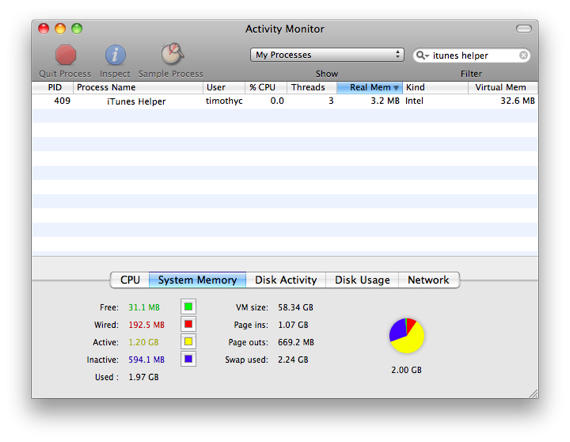
Before you do anything, quit iTunes and iTunes helper. To quit iTunes helper, open up Activity Monitor (Applications>Utilities) and type iTunes helper in the search bar. Highlight the process and click “Quit Process.” If nothing shows up when you search, you don’t have the helper running. I’m not saying this is a necessary step, I just run into less bumps when I get iTunes out of the way.
Make sure your device is not connected to your computer.
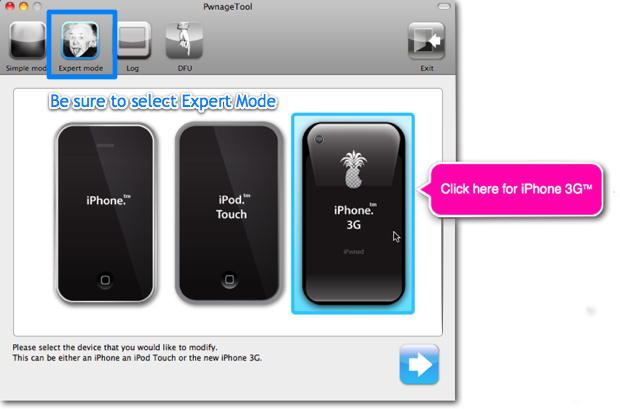
Open Pwnage Tool and make sure you’re in expert mode. Select your device and click the next button in the bottom right corner.
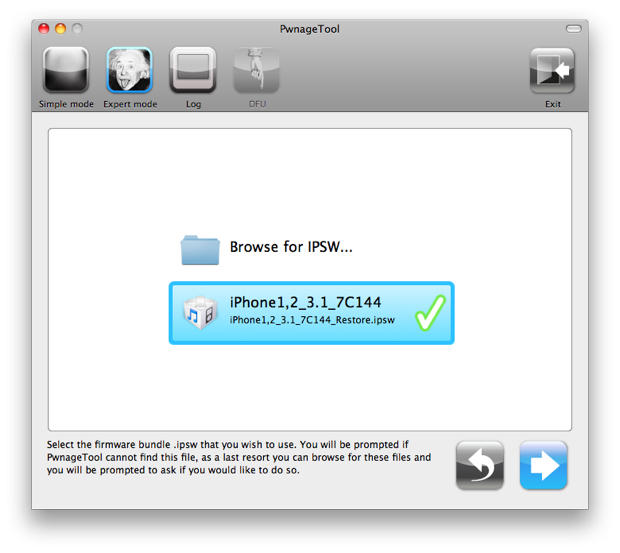
Pwnage Tool will now look for the official firmware bundle (ipsw). You should see the proper firmware pop up since you used the links above to download the correct version. Highlight your bundle and click the continue button.
Click on the general option in Pwnage Tool and then the continue button.
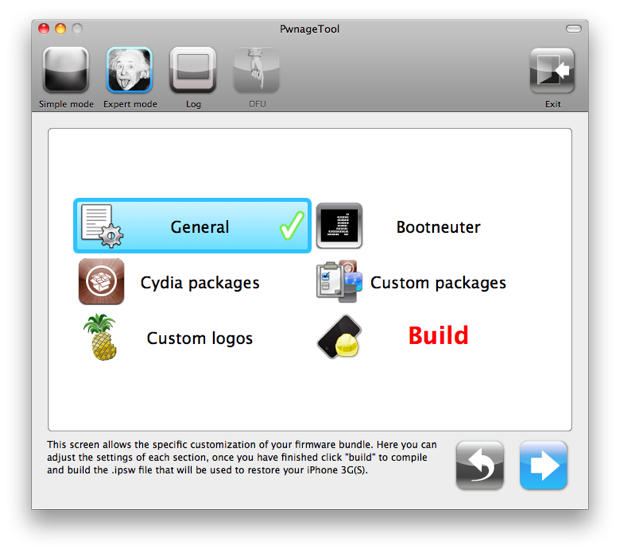
You don’t need to mess with most of these settings, but there are a few you should concern yourself with. On the first screen, you must uncheck the “Activate the phone” option.
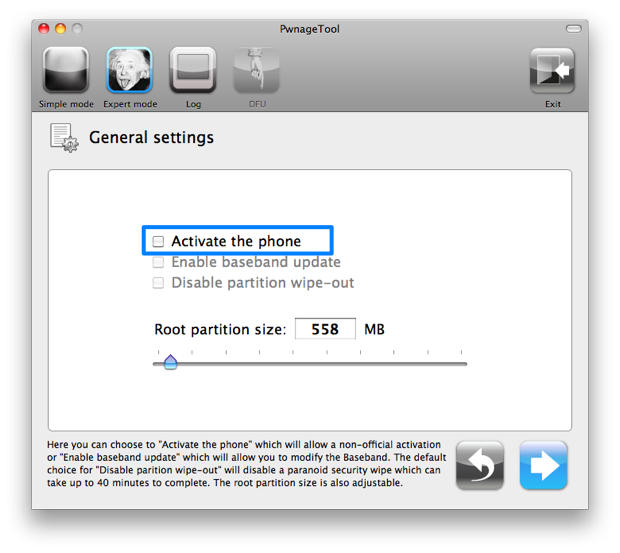
After you do this, continue through to the “Custom Logos” section. You can insert your own logos here, but I just use the default iPhone logos. Once you’re through the option screens, you’ll have to select the big bold red “Build” option and then continue to begin creating your custom bundle.
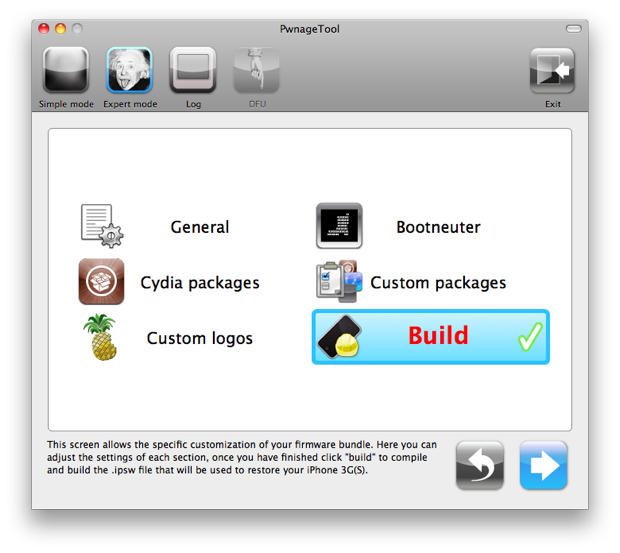
Pwnage Tool will ask you if this if the phone has ever been jailbroken. Say no and it will assist you in putting the phone into DFU mode. You’ll need to put your phone into DFU mode to make your device open to the custom firmware bundle that Pwnage Tool created.
If you don’t want Pwnage Tool to guide you through the DFU mode process, you can follow these steps:
- Turn off your device
- Connect your device to your computer via USB
- Open iTunes
- Press and hold the Power and Home together buttons for ten seconds.
- While still holding the Home button let go of the Power button until iTunes recognizes a device that is connected in recovery mode.
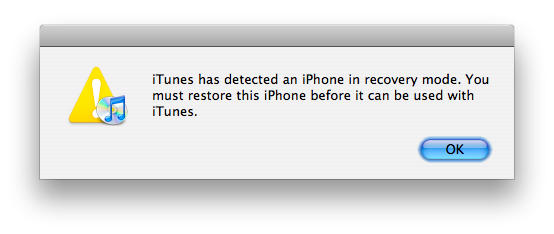
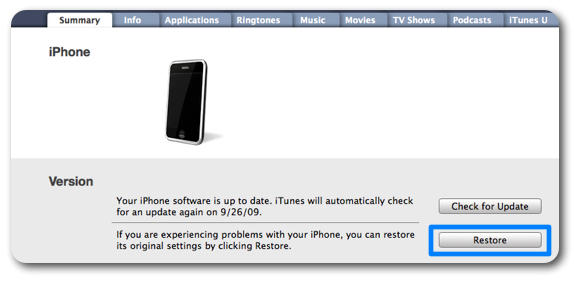
Navigate to your device’s summary window in iTunes and press option while clicking on the “Restore” button. Direct iTunes to your custom firmware bundle and open the file. Your device will then be updated with the new firmware. If you want to restore your device from a previous back up, you can certainly do so and you’ll still retain your jailbreak status.
If you’re working with Redsn0w for the 3GS these steps are a little different and are listed for you on the next page.
Next: Unlock Your iPhone 3GS With Redsn0w
Posted by Tim Cox in How-To, Top stories, iPhone, iPhone 3G, iPhone 3G S, iPod, iPod Touch | Comment on this article
If you enjoyed this article:
Subscribe via RSS or email, or follow us on Facebook and Twitter


Tim Cox is the social media and communications coordinator for a private university in the Los Angeles area. He has written for a number of online and print publications and has presented on technology and social media at the national level. One of his greatest accomplishments was networking a Mac Plus with a Mac Pro. In his spare time he writes music, poetry, and trains for Street Fighter IV tournaments. He is married with 5 beautiful kitties. He encourages you to 


I have an Iphone 3G with 3.1 software. I unlocked it using the same instructions above
However, the phone is still searching for a signal. Is the Ultrasn0w not ready for 3.1?
Radesh Ganeshkumar, on September 28th, 2009 at 1:21 am
Slow news day
Fat Gorilla, on September 28th, 2009 at 1:56 am
@Radesh = Ultrasn0w will not be able to unlock on 3.1. Check the Dev Team blog for more details.
Kevin, on September 28th, 2009 at 6:36 am
t think many and many people are sick of apple and at&t.
apple need to open all iphone because the sale more in itune store.
i`m thinking, seriusly back to my blackberry because my iphone is locked w/ 3.1
i`m sick of apple trick, i hate at&t because price.
apple loock like slave of AT&T, because lock the iphone, person whoo pay mony, for have a device, now apple wanto to obligation this person to go AT&T, NO WAY.. person love apple, but hate AT&T.
alberto, on September 28th, 2009 at 7:34 am
wow, there’s some balls. lets post information that might actually be illegal to disseminate but then really get ballsy and not post a warning that using said information voids all warranties so if the phone ends up hosed Apple will basically tell you to piss off. I would think CoM would want that warning if only to cover their own butts.
got brass balls?, on September 28th, 2009 at 8:51 am
Please… go ahead and jailbreak. Its your warranty and life.
But stop trying to form the impression that the percentage of users who are ‘outraged’ over Apple’s ‘fascist’ policies towards apps is any more than a handful of bored basement jockeys.
GQB, on September 28th, 2009 at 10:04 am
As for fretting about what Apple will or will not do, warranty-wize, one can always restore the firmware. No one will be able to tell that your device was at any time jailbroken. Whether jailbreaking is illegal or not hasn’t been decided yet. It is YOUR device — that much is certain. Can you mod your car? Paint your house a different color? Can you burn a book you just bought?
Frank Lowney, on September 28th, 2009 at 3:54 pm
Got an old iPhone for the camera… no sim card… won’t do anything but let me dial an emergency call…. anyone know how to bypass this? I just want(ed) an iTouch with a camera.
Thanks
Steven, on September 28th, 2009 at 4:40 pm
I disagree with some of the comments above. If you have a 3GS and use 3.1, you cannot “always restore the firmware”. apple is no longer signing signatures for 3.0 or 3.0.1 making downgrading to them almost impossible. If I am wrong please (gently) correct me…
The Digital Alchemist, on September 28th, 2009 at 7:23 pm
Steven, you are going to have to have a sim card in the slot or it won’t ever get past that screen. it can be a dead sim but it has to have something. and if you update the firmware it will have to have that sim back in the slot for the update.
Charli, on September 28th, 2009 at 7:36 pm
I have a 1st gen iPhone. It was jailbreaked on version 2.1, but my wife connected the iphone to the computer on usb to recharge and clicked yes to upgrade to version 3.1
Now, as you expect the fone boots up but only allow us to make emercengy calls (screen shows that connect to itunes image), it does recognize the rogers sim, but i can’t do anything but emergrncy calls. I’ve tried to jailbreak it again w/o success. I put it on DFU mode but always get error 1600.
Any ideas ? Thanks in advance to you all.
Alex.
Alex, on September 28th, 2009 at 9:38 pm
I have a 1st gen iPhone. It was jailbreaked on version 2.1, but my wife connected the iphone to the computer on usb to recharge and clicked yes to upgrade to version 3.1
Now, as you expect the fone boots up but only allow us to make emercengy calls (screen shows that connect to itunes image), it does recognize the rogers sim, but i can’t do anything but emergrncy calls. I’ve tried to jailbreak it again w/o success. I put it on DFU mode but always get error 1600.
Any ideas ? Thanks in advance to you all.
Alex.
alexandre, on September 28th, 2009 at 9:51 pm
So i have 1st gen iphone. downloaded the pwnage tool. made a package. restored with that package and it still says the sim isnt supported. what should i do?
leonel Chavez, on September 29th, 2009 at 2:27 am
i can downgrade from 3.1 but keep the baseband does this mean i can unlock my phone if go to 3.0.1 or even 3.0 any help let me no
johnny M, on September 29th, 2009 at 1:53 pm
… my wife connected the iphone to the computer on usb to recharge and clicked yes to upgrade to version 3.1 Now, as you expect the fone boots up but only allow us to make emercengy calls
Any ideas ?
Alex.
er….divorce her??
chris, on September 29th, 2009 at 3:54 pm
currently have iPhone 3GS running 3.1, can I use redsn0w to downgrade to jailbroken 3.0? no plans on switching out of ATT anytime soon so unlock not important at all.
Debo, on September 30th, 2009 at 12:15 am
Hi guys I need help I downgrading my iPhone from 3.1 to 3.0 and I jailbreakEd the phone with ultrasn0w but I have no signal at all any ideas why? Pls some help thanks u god bless
Evan, on October 1st, 2009 at 9:12 am
PkNiLV I want to say – thank you for this!
lilikindsli, on October 4th, 2009 at 2:01 pm
So how do I downgrade my 2nd gen ipod touch to 3.0 or 3.0.1?
Doug, on October 9th, 2009 at 7:13 pm
Could someone tell me why the whole world of pain to actually do this, as well as risking bricking your phone, is worth it. Is an unlocked iPhone ‘that’ good ?
joe, on October 16th, 2009 at 11:01 am
The article was useless. I downloaded the pwnage tool and the firmware file. The tool could not find the file and when I browsed to the file I could not select it at first. When I finally did select it, I got an error message saying it was the wrong file. Waste of time.
Mike Riley, on October 16th, 2009 at 1:44 pm
I have not read it all yet but looks great (btw is there any way to jialbreak my ipod without any program??)
Me, on October 27th, 2009 at 4:07 pm
Im thinking about to jailbreak my ipod touch but im a little scared… I saw a video on youtube about a guys who has jailbroked hes ipod and it was f*cked up… Just wanna be sure that it wont completely smash my ipod if i jail break it..
Me, on November 8th, 2009 at 4:02 pm
I held out as long as possible before getting the new Iphone 3Gs. Mostly becasue of At&t’s very over priced service. For a decent plan it will cost you 165.00 per month. How is it that Sprint can charge 99.00 for unlimited? Ok I’ll change the cost issue for a min. If you pay for unlimited web access why do they want to charge extra if you tether to your phone from a laptop? Right there is reason enough to jail break your phone you will save enough over 1 year to buy the phone outright. Most of the Apps on the Itunes App Store are for children!!! There are a few good ones that adults can use but you have to pay for them and most have an additional monthly charge. Still not convinced, Turn your Iphone into a wireless router access point, imagine what you can do with that if you travel alot liek I do. No more hotel fees, for internet, not paying for hot spots at coffee shops and airports. Yes there is a danger of bricking you Iphone, but if your carefull and know what your doing the savings are definitly worth the efforts. Why pay extra for a feature your phone already has. Apple should wake up and smell the millions of phones they could sell if they left the phones unlocked. It will happen as soon Apple needs market share. This is all you need:
http://www.iphonedownloadblog.com/2009/11/03/tutorial-jailbreak-iphone-3-1-2-blackra1n/
I wish I knew this before I switched from Verizon they have much better coverage cost is all most the same but the service is much better.
-Cheers you now have a choice
Ajax315, on December 14th, 2009 at 11:24 pm

