Top stories

Journalists Cover Microsoft, Using Macs

It’s not an easy time for Microsoft — with Steve Ballmer having to field questions about being “buffoons” and an “evil empire”  at the shareholder’s meeting (.doc) — so when they get together “the world’s most influential technology pundits and online writers” (nb: we weren’t invited) for Mobius to discuss super-secret mobile tech you’d think [...]

Guide To Black Friday Apple Bargains: Cheap MacBooks, iPods and Accessories Galore

Here’s a guide for finding the best bargains on Apple-related gear during the infamous Black Friday sales on November 27. We’ve compiled a comprehensive list of gear from leaked photos of sales flyers and descriptions of sales.
The bargains include a 2.26 GHz MacBook + $150 gift card at Best Buy for $999.99 ; a 32GB [...]

Review: Voices Is Today’s Best Thing Ever, Grab It Now While It’s Cheap

New on the App Store is Voices from the clever folk at Tap Tap Tap. You can guess what it does.

Open it up, pick a silly voice. Helium is pretty silly. A microphone appears and the app even clears your throat for you (try it, you’ll see what I mean). Now speak your brains, and [...]

Review: Sony Walkman S540 Series Video MP3 Player

Press releases, you will hardly be surprised to hear, are rarely very interesting. But one arrived in my inbox a couple of weeks ago that made me double-take.
“Sony’s S Series Walkman,” it chattered, “is a serious challenger to the iPod Nano.” Gosh, really? Perhaps the Cult had better have a look at one, then, despite [...]

Getting More iPhone Home Screens – And Keeping Them

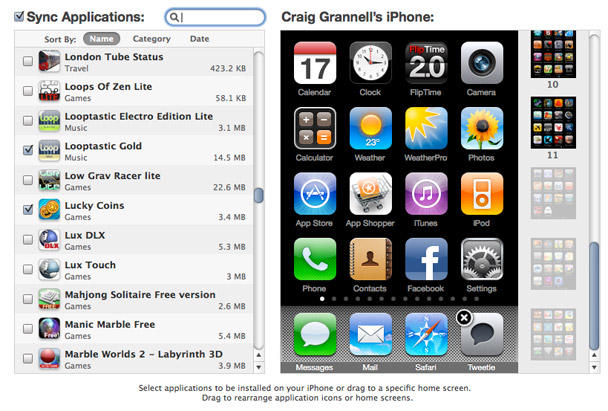
Extra iPhone screens in iTunes.

Extra iPhone screens in iTunes.

A couple of weeks back, I wrote Temporarily Get More iPhone Home Screens Via Cunning Bug Exploit, but had heard staying away from the iTunes Applications tab within my iPhone was probably a Very Good Idea. Reader Larry Pressnell noted that since the most recent iTunes update, his extra screens have been accessible in iTunes.

Since I needed to add some apps to my device, I decided to take the plunge earlier and, sure enough, my experience mirrored Larry’s: 11 home screens were shown, and extra ones were dimmed—see the grab above. Interestingly, items could be dragged from these ‘extra’ screens to the standard ones, with no problems, and a full sync didn’t find my extra pages vanishing into the ether. Whether this has anything to do with Voice Memos (the app used to get extra screens in the first place) being the last app on my final page, or the fact I’ve yet to update my iPhone OS to the latest point release, I’ve no idea.

Are you having fun with extra pages and managing to successfully rearrange your apps in iTunes? If so, let us know in the comments!

About the author

Craig Grannell

Craig Grannell is Cult of Mac's designer and an occasional contributor. He also runs iPhoneTiny.com, a Twitter-driven reviews site for iPhone apps and games. Follow Craig on Twitter @CraigGrannell and visit his website, Snub Communications.

Email the author | Read more posts by Craig Grannell.

2 comments

    Upgraded to 3.1.2 yesterday and was pleasantly surprised by how well app arrangement through iTunes worked. IPhone 2G

    I’ve been adding apps, getting the greyed out pages for the extras, but when I sync, I get voice memo pushed to home screen 2 on its own and all the other screens pushed down. It’s only when there’s a blank spot on one of the other pages that it stops doing that, it adds voice memo to that blank spot. Hope that makes sense. It’s a better visual than a description. It’s frustrating and very weird. I don’t use voice memo and wouldn’t miss it if it disappeared (which stocks seems to have), but it wants to stay accessible no matter what I want to do.

    Any ideas?

Add your comment

Name(Required)

Mail (required, but not published)

Website

Comment

Buy Inside Steve's Brain Buy from Amazon.com Buy from Barnes & Noble

