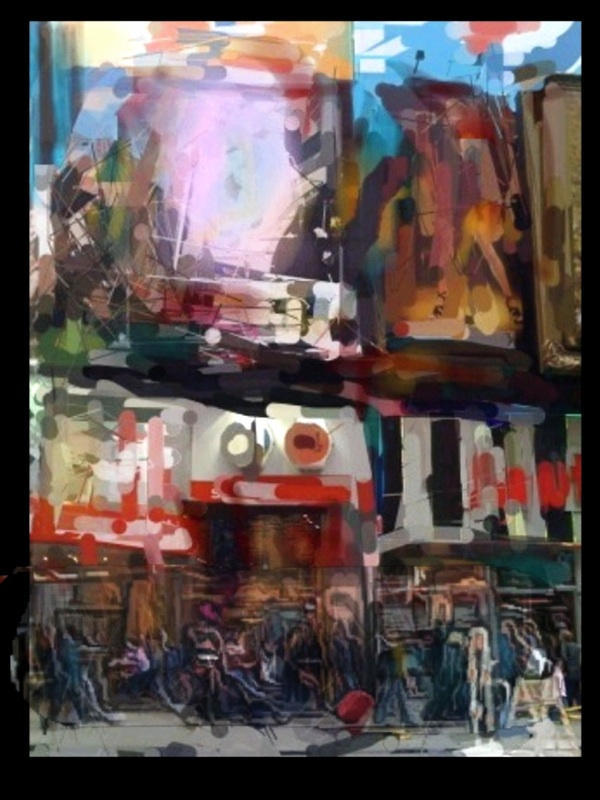
David Leibowitz is a veteran fine art photographer who’s lately been making some pretty amazing art using his iPhone.
Based in NYC, Leibowitz’s pictures of the city look like a French Impressionist painted the scenes (hit the jump for more pictures). There’s nothing to indicate they were made using his iPhone and about $40 worth of apps from the App Store.
Leibowitz has a long history of using digital tools to make art. He started in the ’80s with a Polaroid camera. He’d hand manipulate the emulsion to create photographs that look also look like Imrpessionist paintings. But now he’s discovered the iPhone, and the results are not your typical iPhone art.
Hit the jump for some of Leibowitz’s latest pictures and an interview explaining how he makes iPhone art.
Interview by Nicole Martinelli.
CoM: I love what you’re doing with iPhone art, it’s very different from a lot of what we’ve seen — how did you get started?
Leibowitz: I started taking photos when I was 12, but didn’t consider myself am “Fine Art Photographer” till 1980, when I started showing my Polaroid SX-70 work in an annual Soho exhibition that continued for 16 years. (Google Polaroid SX-70 art)
The transition to digital tools happened In ’91, when someone showed me the smudge tool in Photoshop 1.0, and I’ve lived on the Mac platform ever since. I did make a portfolio of artwork on some “Big Iron” computers back in the early to mid-nineties, the Shima Seiki 480 SGX workstation, but other than that, it’s been a long progression of Apple computers.
What are you using to create these effects?
Leibowitz: My tools are Photoshop, Painter, Poser, & Bryce, and I’ve been on all of them since version 1.0., and I designed my website, Leibo.net, as a keyword searchable window to my soul.
This brings us to July ’08, iPhone 3G, and the opening of the App store where Collage, Juxtaposer, Face Melter, ezimba, PanoLab and Photo Lab became my new tools to create with. Every day, as new apps appear in the App store, anything remotely connected to altering images found their way to my iPhone, and into the process of making art on this new computer platform. The freedom of making art on the go, wherever I was, spontaneously, brought me back to my old SX-70 days.
Here’s an updated list of apps I’ve purchased, and use to make iPhone Art on a daily basis:
Collage
Juxtaposer
ezimba
PhotoLab
Gesture
DXP
Magic Touch
Face Melter
Brushes
PanoLab
Photonasis
Kaleido
iDoodle2
iFractal
OilCanvas
ArtCamera
PhotoFx
ArtistsTouch
ColorSplash
Polarize
MoloPix
CamBag
PhotoWizard
MyPaint2
MagiCrop
iKalied
Am I the dream App store customer, or what? The total amount spent on Apps is about $40, a figure I can live with.
CoM: About how long does it take?
The length of time to create art on the phone varies, as I usually work an image many, many times before I come up with a “final”. My standard answer is “somewhere between 35 years, and 5 minutes.”
CoM: Where are you drawing your inspiration from?
My inspiration is drawn from New York City, and it’s energy, or the Orchid blooming in my living room, all the Museums nearby, travel, or my work in Film production. Whatever, wherever the moment DEMANDS to be photographed. From there, it has now become, what app did we find today, and what will it do?
CoM: What’s next — do you plan to show them, sell them etc.?
I have showed a portfolio of the work to MOMA, and the Whitney without results, and would love to find Gallery representation, but
that is easier said than done. Maybe someone seeing this article will know someone interested.
I will continue to make Art for it’s own sake, as I have always done, Work is available for sale at www.Leibo.net, and the latest iPhone Art is always posted on my Photostream at Flickr.

Leander Kahney is the editor and publisher of Cult of Mac.
Leander is a longtime technology reporter and the author of six acclaimed books about Apple, including two New York Times bestsellers: Jony Ive: The Genius Behind Apple’s Greatest Products and Inside Steve’s Brain, a biography of Steve Jobs.
He’s also written a top-selling biography of Apple CEO Tim Cook and authored Cult of Mac and Cult of iPod, which both won prestigious design awards. Most recently, he was co-author of Cult of Mac, 2nd Edition.
Leander has been reporting about Apple and technology for nearly 30 years.
Before founding Cult of Mac as an independent publication, Leander was news editor at Wired.com, where he was responsible for the day-to-day running of the Wired.com website. He headed up a team of six section editors, a dozen reporters and a large pool of freelancers. Together the team produced a daily digest of stories about the impact of science and technology, and won several awards, including several Webby Awards, 2X Knight-Batten Awards for Innovation in Journalism and the 2010 MIN (Magazine Industry Newsletter) award for best blog, among others.
Before being promoted to news editor, Leander was Wired.com’s senior reporter, primarily covering Apple. During that time, Leander published a ton of scoops, including the first in-depth report about the development of the iPod. Leander attended almost every keynote speech and special product launch presented by Steve Jobs, including the historic launches of the iPhone and iPad. He also reported from almost every Macworld Expo in the late ’90s and early ‘2000s, including, sadly, the last shows in Boston, San Francisco and Tokyo. His reporting for Wired.com formed the basis of the first Cult of Mac book, and subsequently this website.
Before joining Wired, Leander was a senior reporter at the legendary MacWeek, the storied and long-running weekly that documented Apple and its community in the 1980s and ’90s.
Leander has written for Wired magazine (including the Issue 16.04 cover story about Steve Jobs’ leadership at Apple, entitled Evil/Genius), Scientific American, The Guardian, The Observer, The San Francisco Chronicle and many other publications.
Leander has a postgrad diploma in artificial intelligence from the University of Aberdeen, and a BSc (Hons) in experimental psychology from the University of Sussex.
He has a diploma in journalism from the UK’s National Council for the Training of Journalists.
Leander lives in San Francisco, California, and is married with four children. He’s an avid biker and has ridden in many long-distance bike events, including California’s legendary Death Ride.
You can find out more about Leander on LinkedIn and Facebook. You can follow him on X at @lkahney or Instagram.

