
Gallery : 10 of the Most Beautiful iPhone & iPod Touch Apps
6:59 am, October 1st, 2009, Lonnie Lazar
With over 75 gazillion apps in the iTunes App Store now having generated more than Umpteen billion downloads, it might seem a tad preposterous to try and pick the 10 with the most beautiful GUIs.
But we’ve never let being a tad preposterous stop us before and we’re not saying these are the 10 most beautiful apps in the App Store — we’re just saying these 10 are beautiful. In almost every case, too, they have other redeeming features that make them worth checking out if you don’t have them already.
And don’t forget to let us know in comments if you’ve found something useful and beautiful that we may have missed here.

Classics is the, uh, classic reader app that lets you experience some of the greatest works of literature ever produced — in a digital format that’s so natural and so obvious, it just feels right. Meticulous care has been given to the typography and illustration of works such as Alice in Wonderland, The Art of War, Paradise Lost and many more, with sensual touches like realistic 3D page flips, a satin bookmark to remember where you left off reading and a beautiful woodgrain bookcase to store your collection.
Convert ~ the unit calculator — 99¢
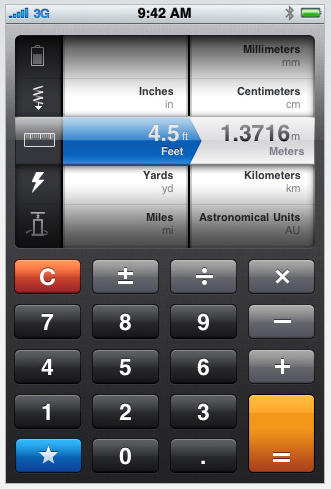
It’s OK you never learned the metric system, it really is. There are a ton of apps that make it OK (and help those of you in the rest of the world who are forced to wrestle with Imperial units of one measure or another), but none perhaps with a more elegant and intuitive interface than Convert from tap tap tap. Quickly and easily figure area, angle, force, pressure, distance, weight, energy, temperature, time, typography, currency and many more measurements with the easy-to-read built-in calculator and innovative disclosure picker. With a ton of information available but displayed in a simple, uncluttered UI, this conversion app is a true one buck beauty.
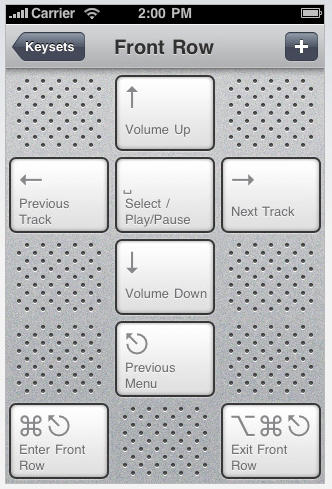
With a wireless network connection, Keymote turns your iPhone or iPod Touch into a universal remote for just about anything running on your Mac. Control Front Row from across the room, refresh your Twitter stream, play songs from iTunes — without ever touching your computer. Gorgeous UI screens fit beautifully with current Mac hardware and new keystroke sets are added daily for free download. You can customize keysets for the apps you use most and share the keysets you create for others to enjoy. This could be the only iPhone remote you’ll ever need.
Posted by Lonnie Lazar in News, Quickies, Software, iPhone, iPod Touch | Comment on this article
If you enjoyed this article:
Subscribe via RSS or email, or follow us on Facebook and Twitter


Not Tapbots stuff in there? For shame, Mr Lazar.
Craig Grannell, on October 1st, 2009 at 7:13 am
hi
take a look at opps! artist edition!
http://www.yellowapp.wordpress.com
ut matt, on October 1st, 2009 at 8:25 am
The first couple where good. The rest where pretty crap. should have reduced your list to 5.
Talhah, on October 1st, 2009 at 8:30 am
Very nice roundup. I’ve also been impressed with the design behind Keymote, and also iQuarium, although there are a bunch in here (Ancient Frog?) that I think are pretty visually impressive as well.
Also, I have to tip my hat to putting more than one on a page with some nice lovely screenshots before having to click the next button to move to the next two or so apps. Much better than 10 discrete pages.
phoenix, on October 1st, 2009 at 8:42 am
Y O U
H A V E
S H I T
T A S T E ! ! !
me, on October 1st, 2009 at 9:55 am
@Craig – I kinda thought the Tapbots have been overdone but when you’re picking 10 out of 75 gazillion, you’re bound to leave a few good ones out.
@Tallhah – suggestions please.
@ut matt – yes! that opps! artist edition is way cool; thanks for the tip.
@phoenix – thanks; trying to get the hang of the gallery thing.
@me – you’re not very helpful and your caps lock appears to be stuck on ‘engage’.
Lonnie Lazar, on October 1st, 2009 at 10:20 am
More desperate pleas for web page hits by breaking up an article into multiple pages. I’m not going past page one. Fix this!
OlsonBW, on October 1st, 2009 at 11:19 am
I’ll take a well-functioning UI over a pretty-looking UI any day. This is the main problem I have with too many Apple products: Eye candy takes precedence over functionality.
Why not suggest apps that WORK WELL, rather than those which merely look good? Are you really that easily distracted by bright, shiny stuff?
iGenius, on October 1st, 2009 at 11:36 am
@iGenius – if you read the intro and the copy to each entry you’ll notice these apps all also do well what they purport to do. seems to me there’s not a one among the bunch that’s there just as ‘eye candy.’ when you can work well and look good doing it – then you’ve really got it going on.
Lonnie Lazar, on October 1st, 2009 at 12:11 pm
I guess the title threw me off: “Ten Shiny and Colorful Toys”, or something like that.
Had it been entitled “Ten Useful and Well Designed Apps (that happen to Look Good Too)” I may have been more interested.
Sorry if the look of the apps was not your main criteria. I guess I missed your real intent in selecting these apps to showcase.
iGenius, on October 1st, 2009 at 1:26 pm
@lonnie – if you’re going to be so bold to call an article “10 of the Most Beautiful iPhone & iPod Touch Apps” and you picks exhibit your acute sense of shit taste, you’re going to get bold responses… especially ones that are capped to show everyone who reads this article your amazing lack of insight.
me, on October 1st, 2009 at 11:23 pm
I am with OlsonBW on this…nuff said
sooper8, on October 2nd, 2009 at 1:51 am
> It’s OK you never learned the metric system, it really is
No it’s not. It’s a sign that you’re part of a history of american cultural imperialism and ignorance.
The rest of the world is metric. You asses should convert.
Darcy McGee, on October 3rd, 2009 at 11:20 am