Mobile menu toggle

Cats on the Prowl: The Evolution of Mac OS X [Gallery]

By

evolutionlion

The release of Mac OS X Lion culminates a decade-long software development process. Back in 2001 Apple introduced a new (and long awaited) replacement to the Classic Macintosh System Software, Mac OS X. How far we’ve come in ten years. As Lion goes on the prowl, we present a brief look back at Apple’s Big Cats over the years and review the Evolution of Mac OS X.

Mac OS X 10.0 “Cheetah”, 10.1 “Puma” (2001)
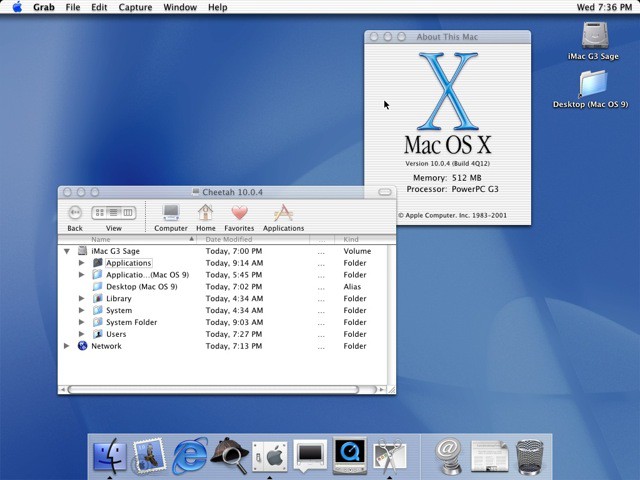
10 0 4 Cheetah

After several abortive attempts, a succession of CEOs and the acquisition of NeXT, Apple finally shipped their next generation operating system in April of 2001. Codenamed “Cheetah”, Mac OS X 10.0 was more a proof of concept than a useable OS, but it put a Macintosh GUI on top of UNIX and told the world that Apple was serious about moving ahead. The 10.1 “Puma” release brought needed stability and more complete capabilities like CD recording and DVD playback, and was provided as a free upgrade.

Aqua was the lickable new visual theme for the system, with blue scrollbars, squishy buttons and a new gadget called The Dock. Mac OS 9 ran as Classic Mode, which was necessary since little native OS X software was available at this time. Internet Explorer was the web browser, Sherlock handled Find, and iTunes and iMovie were carried over from OS 9. The Chess application which debuted with Cheetah has changed little in ten years!

10.1 was also the last Mac OS release which used the Happy Mac face on startup; the more serious but less fun Apple icon with the spinning gear debuted in Jaguar.

Mac OS X 10.2 “Jaguar” (2002)
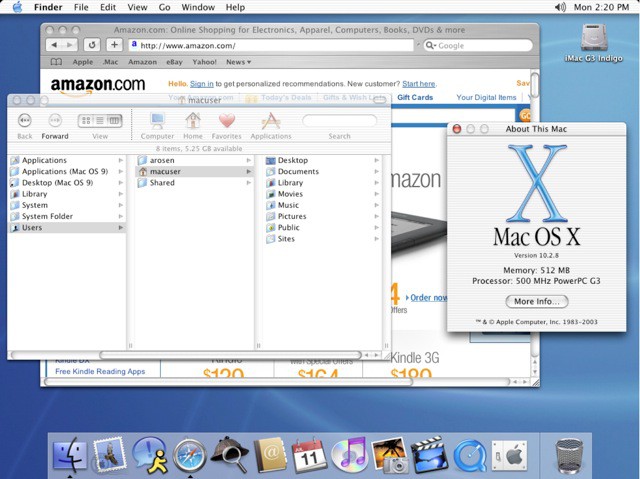
10 2 8 Jaguar

Jaguar was the first truly popular Mac OS X release, and most longtime Mac users made the jump to OS X with this version. 10.2 was the default boot choice on new Macs, and was the first to publicly use the development code name for marketing – the name “Jaguar” leaked out before launch, and people liked it, so Apple capitalized on the term. Big cats have been with us since.

Jaguar offered notable performance improvements, better printing options, and introduced Quartz Extreme graphics. Rendezvous appears with this release, a TCP/IP equivalent of AppleTalk. The iLife suite and Digital Hub concepts made their debut as this time, the iPhoto icon was added to dock and the iTunes icon changed to purple.

Safari, Apple’s new web browser, was introduced as an alternative if Microsoft discontinued Internet Explorer for Macintosh; shortly after release, Microsoft killed Explorer for Mac. The look and feel of the OS also started to evolve at this time, with Apple utilizing a mixed use of Aqua’s striped transparency and iTunes’ Brushed Aluminum themes.

Mac OS X 10.3 “Panther” (2003)
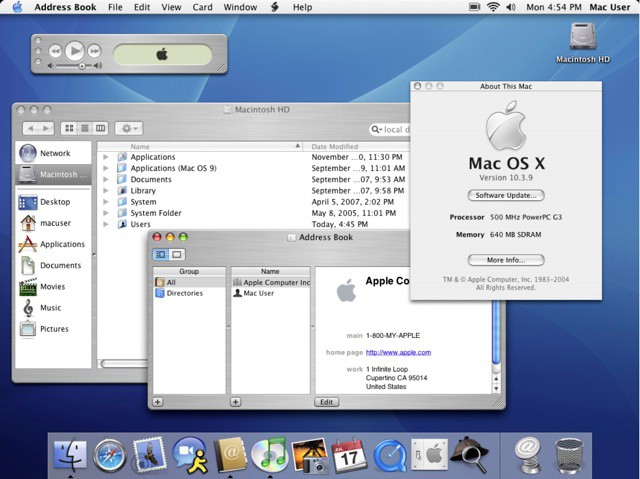
10 3 9 Panther

Panther was perhaps the first OS X release which truly began to feel faster than Mac OS 9. The OS was very snappy and useable, and most early filesharing and networking issues were finally resolved. The sidebar appeared in the Finder to assist with disk navigation, and the original Aqua look and feel began to wane. Brushed Aluminum would dominate for years to come, both onscreen and with Apple’s products themselves.

Fast User Switching was implemented in Panther, along with Exposé shortcuts and Filevault disk encryption. Rendezvous was renamed as Bonjour (some kind of rights issue), iTunes went green and the iTunes Music Store was born. iChat AV also appeared at this time, perhaps foreshadowing Apple’s move into more advanced communications technologies like the iPhone and FaceTime. But no one was (publicly) thinking that way at the time.

  • Subscribe to the Newsletter

    Our daily roundup of Apple news, reviews and how-tos. Plus the best Apple tweets, fun polls and inspiring Steve Jobs bons mots. Our readers say: "Love what you do" -- Christi Cardenas. "Absolutely love the content!" -- Harshita Arora. "Genuinely one of the highlights of my inbox" -- Lee Barnett.

48 responses to “Cats on the Prowl: The Evolution of Mac OS X [Gallery]”

  1. Chris Brunner says:

    It’s awesome to see this OS post OS9 and how far it’s come! We “should” be able to add the Lion chapter tomorrow. This only begs the question, “What comes after the Big Cats?”. Only time will tell…

    -Chris
    http://friendsofmac.net

  2. miralize says:

    The future is x64 no?

  3. Sean Ivins says:

    The ‘controversial’ iTunes logo was not redesigned with Snow Leopard. It was redesigned with the release of iTunes 10 less than one year ago: http://www.macrumors.com/2010/

  4. Adam Rosen says:

    Yes you’re correct.  It made its appearance in the Snow Leopard era.

  5. djrobsd says:

    Screw Apple.  They aren’t forcing me to do away with my file system.  I have 50,000 mp3 files, 20,000 photos and 5,000 videos scattered across 3-4 external hard drives and there is no way that they can dictate where my files go or how I organize them.  I sure hope there is a way to switch to classic finder view…  

  6. djrobsd says:

    Screw Apple.  They aren’t forcing me to do away with my file system.  I have 50,000 mp3 files, 20,000 photos and 5,000 videos scattered across 3-4 external hard drives and there is no way that they can dictate where my files go or how I organize them.  I sure hope there is a way to switch to classic finder view…  

  7. SSD says:

    I think you are over reacting just a bit.  Lion doesn’t prevent you from clicking on the Finder icon in the dock, getting a Finder window, and navigating around just like you did in Snow Leopard.  The filesystem is still there, but they are slowly guiding people towards a different way to access and manage files.  It will still be a filesystem underneath, but the way you interact with it will change over time.  The fundamental idea of storing files in directories (folders) in a tree filesystem goes back to the late 1960s/early 70s.  It may be time to find a better way of accessing our data.  A tree filesystem where any app running as your user ID can access, modify, or delete any file has significant security implications.  A model like iOS has for file access is much more secure, but more limited. Lion isn’t there yet, and may never get to quite that level, but there are advantages to that approach.  It will be interesting to see how it evolves over the next few years.

  8. Adam Rosen says:

    Yes, in Lion you can still use the Finder the way you have been to browse the filesystem.  It’s the default views which have changed, search is now first and foremost in the list.  The hard drive icon can be restored to the desktop, and you can click on a hard drive or folder icons in the sidebar.

  9. sdotbailey says:

    dinosaurs?! bears?

  10. Ryan Warner says:

    Very true. And I like and agree with the way others have been putting it lately. The filesystem will go the way of the command line interface: still there if you really really want it (and for some people, it will be the “faster” and “more powerful” way to do things) but most definitely not the dominant way most users utilize their machine.

  11. Hampus says:

    A pretty good theory and if that is the way things end up going I won’t be complaining, as long as the option is still there for the more advanced users to access the filesystem I’m OK.

  12. Hampus says:

    And with Lion the last few ugly blue parts of aqua will be gone! Wohoo! :p

  13. Sheldon Stokes says:

    I feel your pain.  For grandma with 17 files that they actually authored, maybe search is a good thing for them.  But I’ve got files on my hard drive dating back to 1985.  I’ve got thousands of data files from grad school, significant source code etc in many languages, about 1200 CDs worth of ripped files, plus about 15000 geotagged pictures.  There’s 25 years of projects across many different hobbies and such.  No way is spotlight going to take the place of a directory structure for any serious user.  

  14. martinberoiz says:

    “the boot disk (internal hard drive) no longer appears on the desktop by default” What? I still have it in Snow Leopard, and I can’t get rid of it, how do you do that? I never use it.

    Edit: Nevermind, I found it in Finder preferences.

  15. devunish says:

    ahh yes!

  16. marioyohanes says:

    x64 is the present, future? maybe x128 LoL

  17. Karolis Makrickas says:

    never use spotlight, don’t think it’s useful tool :)

  18. blueleaves says:

    Brushed metal. The horror. The horror.

    Fast forward to Lion – is leather the new brushed metal?

  19. jordanx5 says:

    In Knowing Your Value: Women, Money and Getting What You’re Worth, Mika Brzezinski borrows from her experiences as co-host of a morning talk show and interviews a wide range of professional women such as director Nora Ephron, Facebook’s Cheap Jordan Shoes Sandberg, and broadcaster Joy Behar about their experiences in moving up in their careers. Knowing Your Value also blends personal stories with the latest research about women in the workplace. The end result is a brutally honest and Jordan shoes cheap witty exploration of the roadblocks and pitfalls that are unique to women. Brzezinsky provides an in-depth look at how professional women achieve recognition and financial success in an unbalanced workforce that often overlooks their worth Michael Jordan Shoes.

  20. TekDoo says:

    Wow, pretty amazing story bro.

    http://www.real-privacy.no.tc

  21. Paul Gilligan says:

    Dinosaurs, yes. that’d be cool, if they ever go to 11.
    Mac OS XI 11.3 “Triceratops”
    Mac OS XI 11.5 “T-Rex”
    Mac OS XI 11.6 “Raptor”

  22. Chris Brunner says:

    I used the Terminal to “fix” the buttons back to the way they were in previous iTunes versions.

    -Chris
    http://friendsofmac.net

  23. Abram Lloyd Siegel says:

    yeah, not sure I’ll ever be cool with not being able to get to the filesystem. That’s the main thing I don’t care for in iOS. Guess I’m just old-fashioned.

  24. Kyle Edewaard says:

    if they ever turn it up to eleven, I think a SpinalTap nomenclature is a must:
     
    Mac OS XI 11.3 “Big Bottom”
    Mac OS XI 11.5 “Sex Farm”
    Mac OS XI 11.6 “Stonehenge”

  25. mai duc chung says:

    The usual idea is that you would use NFC to set up the link between the two devices and then do an automatic hand over to a different protocol for doing the actual transfer of data – eg Bluetooth,iphone 5

  26. dieppon says:

    This post needs and update :)

    Web Design

Leave a Reply

