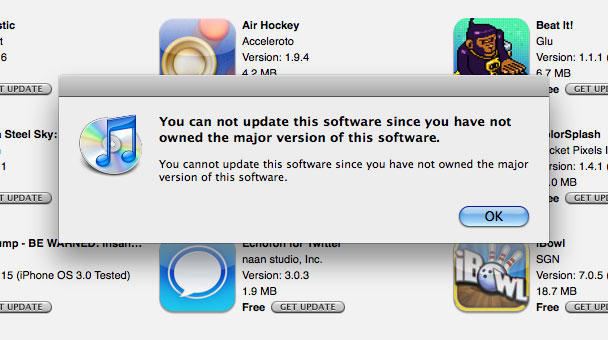
Apple Breaks Multiple App Store Account Updates – ‘You can not update this software since you have not owned the major version of this software’
By Craig Grannell (6:12 am, Mar. 10, 2010)

A dialog mind-bogglingly bad in explanation and copywriting and it's from Apple. Very sad.
Boom! Apple broke App Store accounts for many users with multiple accounts recently. On checking for updates and clicking the helpful ‘Download All Free Updates’ button, iTunes rather unhelpfully states: ‘You can not update this software since you have not owned the major version of this software’. Whether this is a bug (which we hope) or a change in App Store policy is unknown at this time. However, since writing about the subject on my own blog and Twitter, it’s clear the issue is widespread, and Apple support has yet to supply any kind of insight regarding a fix.
Previously, App Store updates for users/Macs with multiple accounts were awkward in UI terms but at least logical. You signed into an account, selected Applications, checked for updates and then downloaded what was available. If you noticed a number next to Applications after apps had been updated, that meant updates were available in another account. So you’d sign into that one as well and repeat the process.
Now, all available updates for all accounts are displayed at once, but iTunes isn’t intelligent enough to figure out which apps belong to the active account. Therefore, you try to update everything, iTunes realises some apps it’s showing are tied to a different account, and it throws up the appallingly clumsy dialog error ‘You can not update this software since you have not owned the major version of this software’.
At present, the only solution is to click on every single Get Update link individually, dismiss the dialog if it appears, and when you’ve gone through every app, sign into other accounts and repeat the process.
Perhaps Apple’s cracking down on people with multiple accounts in different countries (although most people I know who do this keep a US account for promo codes, since Apple’s still inexplicably restricting them to the US store). That said, I’ve had emails from people stating that they get the same error with multiple accounts from the same store on a single machine. Therefore, this is most likely a pretty big bug that needs squashing, but if so that’s only indicative of how one of Apple’s most important pieces of software needs some serious TLC, as Pete noted on the 4th.
I currently have a (second-line) support call logged with Apple on this, and will update if I get a response. If you’re also having this issue, please post in the comments.
Posted by Craig Grannell in News, Opinions | Comment on this article
If you enjoyed this article:
Subscribe via RSS or email, or follow us on Facebook and Twitter


I wouldn’t be surprised if Apple decides to makes apps only usable by one account per user.
Typical greedy controlling apple.
Monster, on March 10th, 2010 at 6:16 am
Yeah – happened to me last night and I was peeved to say the least – I have three accounts and it was a PITA before but now… there should be an easy fix for multiple-store account holders, we are after all supporting more commerce….
Priscilla, on March 10th, 2010 at 6:26 am
That is happening to me. I have 3 accounts, US, Brazil and Argentina. Worse of all, there are 2 Apps which I can’t update on neither account.
Marcus Rodrigues, on March 10th, 2010 at 6:36 am
This happened to me last night. I have my default accoutrements which is a gmail, and I hve an old MobileMe account which I canceled, but still update apps with. I had 40 updates, and went through each one individually. Both of my accounts are US too.
Nathan, on March 10th, 2010 at 7:16 am
I have the same problem. I hated how iTunes handled this multi account update thing, but this is even worse.
I really regret that I have 2 iTunes accounts. I would like to unify my 2 accounts, but Apple doesn’t allow that too. And I don’t want to cancel any one of them, because I have spent considerable amount of money in each. Sometimes I feel like a total idiot, because I chose to buy my stuff legally and not just jailbreak/torrent.
It’s maddening, that Apple – company with such cash, talent and ‘it just works’ arrogance, can’t get one of their most important pieces of software right.
Sandstorm, on March 10th, 2010 at 7:58 am
I ran into to this yesterday. The solution for me was to update the app(s) from my secondary account from my iPhone (which required just the entry of that account’s password). Luckily, there was just one app on that account that needed updating. Then I sync’ed, and was able to update the balance as normal. Still a little bit of a pain, but doable.
Don, on March 10th, 2010 at 8:18 am
I haven’t seen this yet, but does anyone know if it will affect Home Network / Shared libraries? The workaround would clearly be for (the owner) to update and then move the app from the shares again, but what a pain. Worth it, however, in the case of TomTom and such …
perkiset, on March 10th, 2010 at 11:38 am
@perkiset: Shared libraries are unaffected in a general sense (as in the apps still work), but everyone’s affected regarding updating the apps. It’s a real PITA.
Craig Grannell, on March 10th, 2010 at 11:48 am
Yup, the same problem here. The thing is that we are forced to register in Croatia (1st account) and then we can’t access a lot of software that is US App Store only. Then, we have to make a 2nd account… and now it’s broken.
Davor Pasaric, on March 10th, 2010 at 7:48 pm
I just updated Itunes at their suggestion and when I started iTunes and tried to update some apps all at one download I received the message “you can not update….” I only use iTunes on one machine. So, they have screwed me up also. I can update each app individually. Hope they clear this sillyness up soon.
C. Wallace, on March 12th, 2010 at 9:47 pm
I have the same issue, and it gets me angry and upset at Apple’s approach of policing and parenting its customers. May as well become the Microsoft moment for Apple… My workaround was to do the updates on the iPhone itself, while being connected to my wireless network, and then it seems to work, at least for those apps that are installed on your iPhone. This at least beat’s the single update approach for those apps that are on your phone.
The Apple store at the Palisades Mall/NY was for once extremely unhelpful, and their “solution” was to call the Apple Care support line.
Daniel R, on March 20th, 2010 at 4:57 am
I too have the same problem. I’m using two different accounts and now I can’t update my app’s, both on my iPhone and in iTunes.
Apple please do something about this very soon.
T. Rangler, on April 7th, 2010 at 9:10 am
Don’t buy Apple products. Problem solved!
Harry, on May 3rd, 2010 at 12:24 pm
Ok so this has happened to me but on my phone!! Deal with tech support now on this. Apps that i have bought on my account but asking for my wife’s password to update, via iphone. No problems if i do it all on itunes. My wife is the account holder through AT&T and i have my own log in. THis just started about 2 weeks ago for me. Stuff i have bought more than a year ago and it is asking for her login info!
Waiting for Authorization tech now. (3rd tech support on this)
Athanasios, on June 15th, 2010 at 11:24 pm
Having this issue but on my iPhone update. Tries to update based on japan account but the origional is USA account. Any help?
Rich, on August 31st, 2010 at 10:42 pm

