UPDATED: A Needlessly Complex Way to Get Free iPhone Ringtones on a Mac
10:11 pm, June 24th, 2009, Pete Mortensen

Update: Yes, my Google Fu was off yesterday. Before you clue me in, I was aware of GarageBand as a solution (was before I wrote the story, but it requires iLife 08 or better) and internal iTunes editing (omits tools for ringtone characteristics like looping and delay). The free online solutions and free Mac solutions were not in evidence, buried under a whole lot of spam content and endless rehashes of the iTunes method. Googling “make iphone ringtones free” doesn’t bring up Rogue Amoeba’s excellent Make iPhone Ringtones app.
I still think it’s funny that this kind of work-around even exists and stand by the humor category, even if the iPhone knowledge is weak.
For two years now, Apple has had an incredibly dumb official system for handling ringtones on the iPhone. Rather than allowing you to just convert any song in your library into a ringer, Apple restricts you to only music purchased from the iTunes Store, and then charges 99 cents a song, at that.
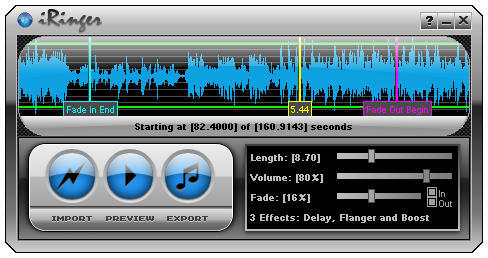
Now, there is an elegant shareware solution to this problem, iPhone Ringtone Maker from Efiko, which costs $7.50 at the moment and can generate unlimited new tones for that initial purchase price. Which is nice, but what do you do if you just want one song in your library made into a ringer for life? Unfortunately, there is no free solution for Mac. Windows has iRinger, a serviceable (if ugly) app that does the trick for free.
And in the current era of virtualization, that suggests an incredibly kludgy solution in the making. Here’s a free (not-so-easy) 9-step process for turning any MP3 into an iPhone ringtone on your Mac. And yes, I actually did this, although I installed VirtualBox and Windows 7 for other reasons months ago, so I could at least leave that out.
1. Install VirtualBox from Sun on your computer.
2. Download and install the Release Candidate of Windows 7, following these directions.
3. Launch your Windows 7 environment in VB.
4. Direct a Windows web browser to the iRinger page, and download and install it.
5. From your Mac environment, e-mail the audio file you wish to convert to yourself.
6. Launch a webmail site in the Windows environment and download the song.
7. Import the song into iRinger, trim to just the portion you want, and export.
8. E-mail ringtone back to the Mac environment and import to iTunes.
9. Add it to your iPhone and select it.
And that’s it! Total time with downloads and installation…36 hours. Maybe you’re just better off spending $7.50, huh?
Posted by Pete Mortensen in Humor, iPhone | Comment on this article


um, i do believe there are atleast two other ways to get free iphone ringtones. One using garageband and the other using iTunes itself, no third party software required. google, its your friend.
mr.obvious, on June 24th, 2009 at 10:14 pm
Actually, this way is faster, if you already have virtualization installed. This is the “easy” iTunes 8 method, but it’s 19 steps: http://www.intomobile.com/2008/10/07/iphone-ringtones-create-free-iphone-ringtones-using-itunes-8.html
GarageBand is fine, but only if you have iLife 08 or later (a lot of people don’t). This is the speediest method for the truly cheap.
Pete Mortensen, on June 24th, 2009 at 10:47 pm
Audiko.net is free, and easy. It makes iPhone ringtones from your mp3 files which you can trim etc.
Chris Pirillo did a review on it a few months back…
Nate Buchar, on June 24th, 2009 at 11:10 pm
just download the ITONER application on ur mac. Get the free trial. I guarantee fast easy ringtones for your iPhone!!!!
Eric, on June 24th, 2009 at 11:12 pm
Actually Pete – a lot of people DO have iLife 08 or later – I use to work for Apple and not only does it come free on any Mac you buy, TONS of people updated to the most recent versions. I was tech so I saw hundreds of systems a day. The ONLY people who did not have one of the more recent versions of iLife were rocking older Macs (iBook was the most popular) and had no iPhone or interest in creating ringtones.
There are a few tools out there – Rogue Amoeba makes a free tool for ringtones (the file must be in AAC format – which is an easy conversion in iTunes) that works fine.
It undermines your article when you act like these options do not exist. It Fox News level sensationalized journalism without any real research.
Erick, on June 24th, 2009 at 11:28 pm
http://audiko.net/
Bruno, on June 25th, 2009 at 12:00 am
Or just use iRingtunes. A native OS X app with very easy operation and a decent interface.
http://www.purpleghost.com/index.php?q=iringtunes
Mercury, on June 25th, 2009 at 12:07 am
I followed the steps in this cnet video when I made my free iPhone ringtone: http://cnettv.cnet.com/create-free-iphone-ringtones-using-itunes-8-0/9742-1_53-50003920.html
monogodo, on June 25th, 2009 at 12:15 am
Pete, you’re kidding yourself.
I do not know a single person with an iPhone and a Mac that does not have iLife 08.
But thanks for the lesson in how technically savvy you are
Pmoes, on June 25th, 2009 at 12:17 am
from just perusing the site, any windows version would work, so why not just use XP? It runs better in VM anyway. Or in my case, just install it on your PC, which oddly enough, has iTunes installed as well, and that being where a majority of my music is stored anyway, it is just a matter of installing iringer, click the mouse a couple times, and plug the device into the PC. @Pete Mortensen: The TRULY TRULY cheap used to own Dells. Yep, I am one of those. haha
Jay, on June 25th, 2009 at 12:36 am
I totally agree, this method is needlessly complex. Try MakeiPhoneRingtone instead:
http://www.rogueamoeba.com/freebies/
ximon, on June 25th, 2009 at 1:22 am
I found the whole article a little ridiculous. It is not that hard to turn songs into ringtones though you may have to un-DRM old iTunes songs first.
Rogue Amoeba has a free utility called MakeiPhoneRingtone (http://www.rogueamoeba.com/freebies/) that will turn any AAC file into a ringtone.
I also use two of their other excellent programs. Audio Hijack Pro for capturing audio and Fission for audio editing. Audio Hijack Pro will allow you to skip the burn/rip step required to un-DRM old iTunes music or capture streaming audio.
For those who prefer free software Audacity is a good choice for audio editing. (http://audacity.sourceforge.net/)
Disclaimer: I am not affiliated with Rogue Amoeba in any way except as a happy customer who thinks they should charge more for their stuff! I bought my copies years ago and continue to receive free upgrades. Well worth the money IMHO.
Brent, on June 25th, 2009 at 1:31 am
This “DRM-Only” thing is not true at all. I have never purchased a song from the iTunes Store and I have converted about 15 songs to ringtones using just iTunes and they work just fine on my iPhone.
I’m seeing this as another “It doesn’t work because someone said it wouldn’t”, like when those falsities were floating around in the beginning of the iPod, saying only music bought from the iTunes Store could be played on an iPod…………
zibberwiff, on June 25th, 2009 at 1:54 am
Come on, seriously, you should have done some research first.
You only need a max. 40seconds AAC song, change the extension to “m4r”, open it in iTunes and voilà. And you can use whatever application you want to create a 40seconds mp3 file and then convert it in iTunes to AAC or use GarageBand or whatever.
majipoor, on June 25th, 2009 at 1:55 am
There is no free solution for Mac? How about using MakeiPhoneRingtone from rogueamoeba?
Lance N., on June 25th, 2009 at 2:01 am
I can make ringtones fine for free in Garageband, from any song?
Kev Robinson, on June 25th, 2009 at 2:42 am
Yep. There is definetely a FREE way of making ringtones right in iTunes. And it actually only takes about 45 seconds to create each tone. Who is really going to pay $7.50 when there is a super easy and free way to do it without wasting download space on your precious mac?
Alia, on June 25th, 2009 at 2:46 am
Why would Apple provide a facility to assist people violate an artist’s rights?
The 99 cent charge is a royalty to the artist for use of their work as a ‘ringer’.
Fair enough too.
%$#@!
Grawlix, on June 25th, 2009 at 2:52 am
This looks like terrible advice. 3 inelegant tools needed to do the job of one, poorly. I agree with Obvious, use garageband, skip this junk.
Marco, on June 25th, 2009 at 2:55 am
You could just right click in itunes, put the file into garageband trim to 25 seconds, export as iphone ringtone is then an option in garageband…
Mat Boyd, on June 25th, 2009 at 2:57 am
Im surprised that cult of mac lets stuff like this through. Everyone has known Garage Band resolved the ringtone issue for Mac Users….
Spammed, on June 25th, 2009 at 3:45 am
any “this is the easiest method for creating an iphone ringtone” advice for those who drive a 1982 opel cadet? what are you talking about?
+ simonas, on June 25th, 2009 at 3:58 am
Just open the audio files in Garageband, edit it and save it as a ring tone. works for me
scott, on June 25th, 2009 at 4:01 am
Have used the method, pete mentions in his comment and have to admit its the easiest version i’ve found so far. once i had got the hang of it, i was able to create a raft of ringtone in about 10 minutes.
David, on June 25th, 2009 at 4:38 am
Yeah, I use garage band. Just drag n drop your mp3 there, and cut the piecies you want. Could be easier (itunes should do it) but it isnt. too bad.
Celso Dantas, on June 25th, 2009 at 5:11 am
I unerstand the point that some people dont have iLife 08 or later…but I would be a bit surprised if big time Cult of Mac writer Pete Mortensen did not have a copy of iLife he could just chop up any song with and export it right to iTunes.
Nick, on June 25th, 2009 at 5:58 am
Actually, no, this method is not easier. It retardedier. It is easier to use itunes to trim the song, convert to aac, copy to desktop, change extension to a m4r and copy back to itunes.
Sergio, on June 25th, 2009 at 6:04 am
Now that iTunes sells DRM free music, GarageBand is actually a lot cheaper to make songs on a Mac anyway. If it’s a PC, your out of luck other than what this article says you have as options.
Shawn Ward, on June 25th, 2009 at 6:05 am
GarageBand is SIMPLE and works on ANY song. Simply drag, drop, edit, done! The aforementioned article is outdated and ridiculous! DO SOME RESEARCH GUYS!
Joey, on June 25th, 2009 at 6:14 am
You could always open an iTunes song in GarageBand, set the cycle region to under 40 seconds, and click Share / Send Ringtone to iTunes.
It works fine with iTunes Pro purchased songs.
Joel Davies, on June 25th, 2009 at 6:34 am
Why go this veeeery long way when we can just use iTunes (both Mac and Win)
Guide at Cnet:
http://cnettv.cnet.com/create-free-iphone-ringtones-using-itunes-8-0/9742-1_53-50003920.html
Asger, on June 25th, 2009 at 6:44 am
Yeah – I 2nd Garage band… been using it to make ringtones for at least a couple years… I thought everyone on a Mac knew this.
d
Don Walton, on June 25th, 2009 at 7:01 am
Just select the song u want to use as a ringer and edit start and stop times to the portion you want for a ringer. Create an AAC copy of the song (will be the ringtone version.) Drag to desktop and rename file to *.m4r. Re-import to ringtones in iTunes. Works on Mac and Windows. Go back to original song and clear out the start and stop times.
veder24, on June 25th, 2009 at 7:03 am
GarageBand is really easy. You may want to clarify that with iLife 08 and beyond that you can make ringtones very easily in your article. Just a suggestion.
Nathan, on June 25th, 2009 at 7:14 am
Are you kidding me, making ringtones really isn’t that hard at all.
You can make em in garageband very easily and it shares the ringtone directly into iTunes for you.
If anything you have to get rid of protection off you iTunes protected music but there’s plenty of software, or tricks out there to do that. You even just burn a wav format CD of all the songs you want to turn into ringtones, import the files into Grarageband, edit, share with iTunes, sync iPhone.
Just because it’s not dummy proof, doesn’t mean it’s hard!
Ryan, on June 25th, 2009 at 7:16 am
just drag a tune into garageband, under “share,” select “send ringtone to itunes,” adjust the length of the selection and then send it it to itunes again. it’s simple, free and easy.
nicky longlunch, on June 25th, 2009 at 7:45 am
Totally agree that there is no easy way to convert MP3 on Mac to ringtone for your iPhone. The others have allued to the answer, Garageband. Can’t remember the exact steps, but only about 4.
Import to Garageband
Find section that you want to be your ringtone
Create
Export to desktop (or maybe straight to iTunes)
Was very easy and took about 4 minutes to make and have on my iPhone.
Google is you friend in this case
William, on June 25th, 2009 at 7:46 am
Or…. You could just use iTunes to make a free ringtone. Why install and pay fir new software?
Step 1: Go to get info of song (Highlight and press CMND+I or CTRL+ right click > Get info).
Step 2: Select a start and stop time for your ringtone in the songs option tab.
Step 3: Convert to M4A
Step 4: Open newly converted M4A and change extension to .M4R make sure you save the new extension when it asks. Re-open the M4R file in iTunes.
Step 5: Done.
Patrick Thompson, on June 25th, 2009 at 7:56 am
Pixel Research Labs recently release Ringer for the Mac which makes it pretty easy to create ringtones from many types of media. You can try it for free at http://pixelresearchlabs.com/ringer.
Jon Steinmetz, on June 25th, 2009 at 8:01 am
Just drag it out of itunes into Garageband:
http://lifehacker.com/software/how-to/create-custom-iphone-ringtones-the-free-and-apple-way-334073.php
Russ, on June 25th, 2009 at 8:42 am
Is this a joke? Am I reading the Onion?
Just take your mp3 in iTunes, check the propertoes, set the playback marks to any 40seconds, then convert that song to AAC. Copy that file to your desktop, rename the extension to .m4r, remove your 40second snippet in iTunes, and drag and drop your new .m4r ringtone into iTunes.
Don, on June 25th, 2009 at 8:53 am
or u just use myxer.com you can upload any song and make an iphone ringtone for free
as apposed to COMPLEX and free, its EASY and free
oik, on June 25th, 2009 at 8:59 am
$7.50 is still a rip off. Ringtones should be free. And they are if you download Fission and find a serial for it. Edit, crop, fade in/out… and in the latest version there’s even an option for “Save as iPhone Ringtone” and it loads it right into iTunes ready to be synced. One app does it for me.
Justin, on June 25th, 2009 at 9:29 am
Here is full instructions for making your own ringtones using a song from your iTunes library, and iTunes itself to convert it.
Right click on the song in iTunes and select “get info”
Go to the “options” tab
Type in start and end point ie (0:00 – 0:30) the tune cant be any longer than 30 secs then click OK
Now the song will only play that section in iTunes, now go upto the top of iTunes and select the “advance” tab and “convert selection to AAC” this will now creat a new file under the original song of the ringtone clip that you want.
Drag that new clip onto the desk top (or folder) and delete it from itunes library (this is important) select move to recycle bin.
Now go to the clip you have dragged and change the extension from “ringtone.m4a” to “ringtone.m4r” and you will notice the file will change and now be a ringtone clip.*****
Double click on the file and it will automatically appear in the ringtones tab in iTunes.
To be able to use multiple tracks on the iphone you must now right click on the on the ringtone in the ringtone tab and select “get info” and clear all information in the “info” and “sorting” tabs, only leave the ringtone name, get rid of all track numbers etc and also remember to set genre to none.
You can now add as many custom ringtones onto your iphone as you wish. All you now need to do is remember to reset the time in the original song you used or it will only play that 30 sec clip.
*****You should be able to change file extentions by just highlighting over whatever file extention it is and replacing it with the one you want.
To do this just right click on the file, and click on properties on the pop up menu. then where you see the name of the file just hightlight and change the file extention which is the .XXX on the end. Windows does however hide the file extention by default so if you can’t see the file extention on the end of the name then you need to change your settings.
Go into control panel > folder options> view> and under the advanced settings, clear the ‘Hide extensions for known file types’ check box, and then click OK. This then allows you to display file extensions, and can therefore be changed as described above.
Graeme Hood, on June 25th, 2009 at 10:22 am
Is VirtualBox as good as Parallels or Fusion?
Church of Apple, on June 25th, 2009 at 11:27 am
Not really. It lacks some drivers that Parallels and Fusion include that make it less useful if you need to do serious computing. For silly computing like the aboe, however, it’s more than up to the task — and free.
Pete Mortensen, on June 25th, 2009 at 12:42 pm
I’ve done the iTunes method (actually, using an external audio editor, but the same thing) to make what is, for me, the perfect ring tone: the sound of an AT&T Model 500 electromechanical rotary desk phone. The ring tone is exactly 6 seconds long, to correspond with the correct US landline phone cadence: 2 seconds on, 4 seconds off. (Those four seconds actually contain sound: the trailing-off fade of the bells.)
It’s a telephone. It’s supposed to *ring*. As God and Ma Bell (R.I.P.) meant them to ring. Not bleedle, not bleep, not feep, not to play music at me.
So it makes me an audio Luddite.
the narf, on June 25th, 2009 at 3:45 pm
Didn’t read every comment and I am sure someone has said it already, but What about GarageBand?!! Thats the Best Free Solution! Duh
KaL MichaeL, on June 25th, 2009 at 4:10 pm

