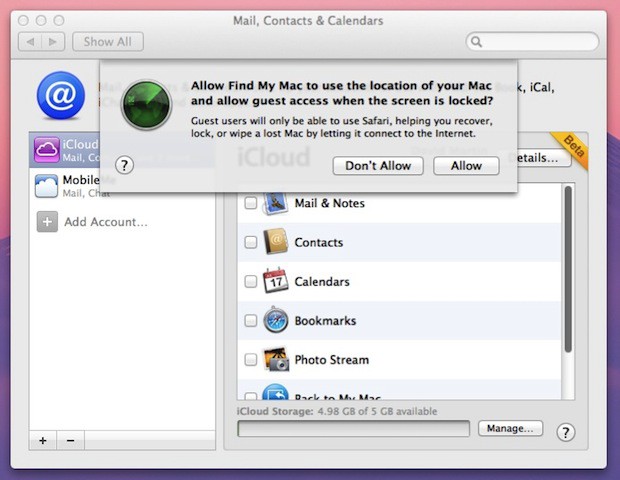
Here’s a look at Find My Mac configured in iCloud on Mac OS X 10.7 Lion. It works just as you would expect it to with the Find My iPhone app on your iPhone, iPod touch, or iPad.
Only Guest users will have access to Safari which will aid you in the recovery, locking or wiping of your Mac.
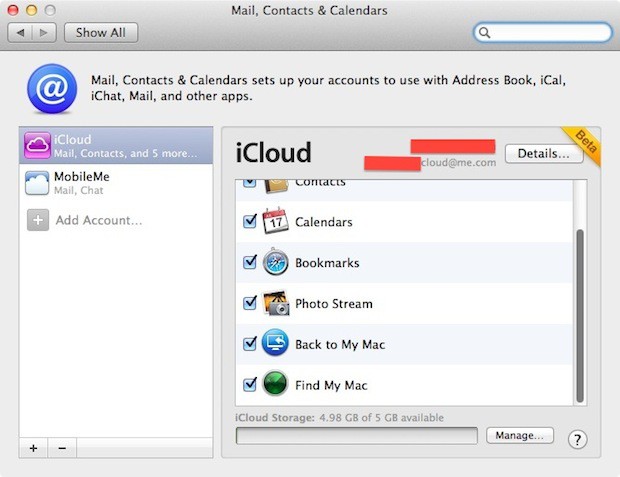
iCloud Sync Settings for Mac OS X 10.7 Lion
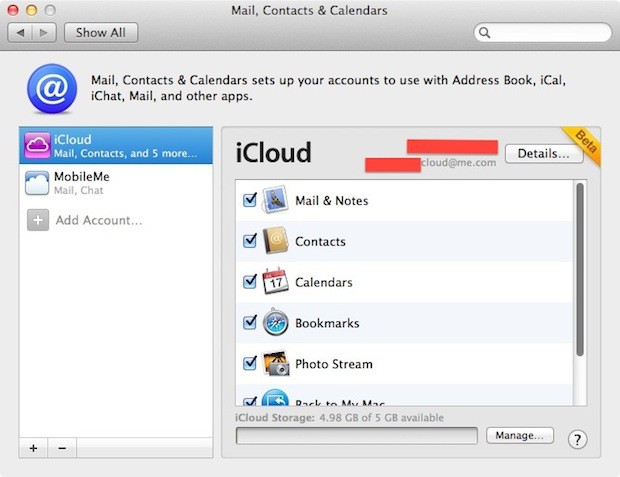
iCloud options are nearly the same as MobileMe except in this view Photo Stream is new.
Here you can see the Back to My Mac and Find My Mac settings for iCloud.
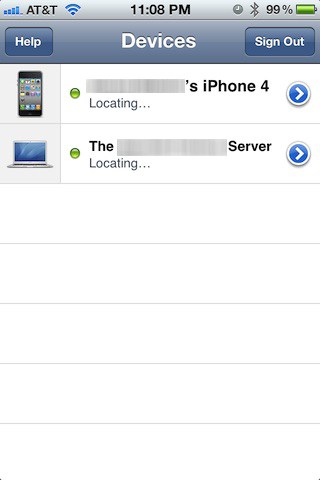
Locate Your Mac On Your iPhone
Device list on Find My iPhone.
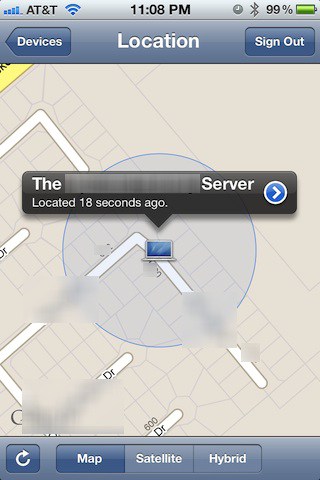
Close GPS approximation of a Mac OS X 10.7 Lion server.
Options You Have For Controlling Your Stolen Or Lost Mac Remotely
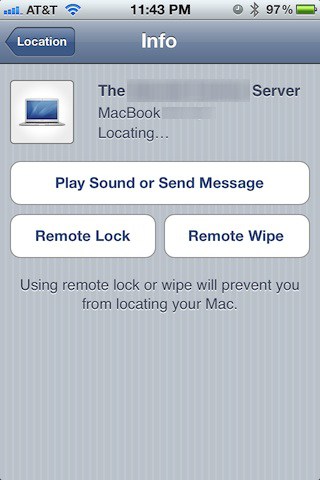
Options you can use to help recover your lost Mac.
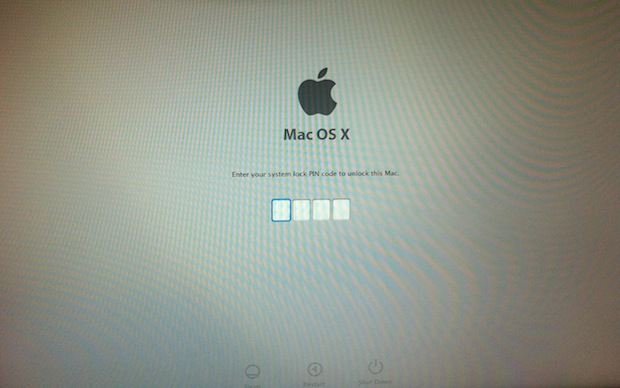
Mac OS X Lock Screen With Pin Prompt
Remote lock a machine, it reboots, relaunches Mac OS X and prompts for the pin number you selected when locking it.
What’s Missing
There isn’t a feature that allows you to activate your Mac’s built-in iSight camera. So you won’t be able to see an alleged notebook thief sleeping on his couch. Maybe Apple will add that feature sometime between now and the release of Lion and iCloud later this year.
David W. Martin has more than 20 years of experience in the industry as a programmer, systems and business analyst, author, and consultant. David has written for CNET’s iPhoneatlas.com, MacLife.com, CultofMac.com, BYTE.com and recently for aNewDoman.net. He comes to Cult of Mac’s website with deep knowledge and passion for the all things Apple. Follow David on Twitter @david_w_martin or see what he’s up to now at davidwmartin.com.

Subscribe to the Newsletter
Our daily roundup of Apple news, reviews and how-tos. Plus the best Apple tweets, fun polls and inspiring Steve Jobs bons mots. Our readers say: "Love what you do" -- Christi Cardenas. "Absolutely love the content!" -- Harshita Arora. "Genuinely one of the highlights of my inbox" -- Lee Barnett.
If they do the iSight camera (and do the cameras on iPhones/iTouches too!), I’ll be SO excited! Poor companies that do this though. Surely most of them will be dead just with the current fratures
Heaven: Get the ***** so and so who has nicked your computer.. :-)
Hell: I do SO hope – REALLY hope – OK Paranoid – about the ability to lock, wipe or ‘remote view’ is COMPLETELY unhackable! Can you imagine a virus or hacker locking up / wiping / your computer / or remote view me and my family …??? :-(
…. although me first thing in the morning might rate as expecting Kate Beckinsale and getting Alien :-)
Interesting that they seem to have removed a number of syncing options (unless they are somewhere else in system preferences) that MobileMe has.
On MobileMe I am able to keep: Dashboard Widgets Dock Items Keychains Mail Rules, Signatures And Smart Mailboxes General Preferances
In Sync between my iMac and my Macbook Pro. Made things very easy. You’d think they would want to keep these services so that you could log into any Mac you own with your Apple ID and have access to your stuff waiting for you.
Someone with a dev version of Lion… Please put my fears to rest! Are we going a few steps back with the step forward of iCloud?
Also: Is it as easy to turn off Find My Mac as it is to turn off Find My iPhone? You don’t even have to enter your apple id password to turn off Find My iPhone in iOS5, yet I still have to put it in to buy apps from the store. A weird contradiction.
Does anyone know how or where I could get the iCloud add-on without being a dev? I have iOS 5 for both my iPhone and iPad 2 and Mac OS X Lion DP4 for my MacBook pro but I need this add-on to get the full effect of iCloud not just between my iPhone and iPad…so does anyone know of a way to get it or is it possible for someone to even give it to me? I have been all over the place asking questions and looking for links to no avail…please somebody help a fellow cult of Mac member!
It also opens up a huge risk for a privacy law suit. Or what about if someone turns on the camera and the 14 year old that has the laptop is getting undressed/dressed and is snapped naked. That’s now child porn.
I can’t seem to find any option to add iCloud as an option on the Mail, Contacts, Calendars…just the usual Mobile Me, AOL, etc. Can someone guide me as to how to add iCloud ?
Ok i checked “find my mac” on my macbook air but how can i “locate my mac on my iphone 3gs? i have version 5.0, bluetooth is on, found my macbook air, but not connected :(( any help please? I want my phone to say “devices” like the pic above :/
Hi, i’m Wilson and i’m a novice one. Well, i want to ake you if i lost my iphone that i configured it to locate my mac, and someone else found it, n block it. how can i retrieve those password, like whe it aske me to enter my system lock ping code, and by the way if forgot my firware password either, what can i do to retrive then, or how to hard reset them? Because i could not use “cmd + s”, “cmd +shift+s” and others either what should i do to boot it in command line?
26 responses to “iCloud’s Find My Mac Locates Your Mac With Find My iPhone [Gallery]”
If they do the iSight camera (and do the cameras on iPhones/iTouches too!), I’ll be SO excited! Poor companies that do this though. Surely most of them will be dead just with the current fratures
This feature will certainly pays off the upgrade for Lion!
This is a heaven or hell situation …
Heaven:
Get the ***** so and so who has nicked your computer..
:-)
Hell:
I do SO hope – REALLY hope – OK Paranoid – about the ability to lock, wipe or ‘remote view’ is COMPLETELY unhackable!
Can you imagine a virus or hacker locking up / wiping / your computer / or remote view me and my family …???
:-(
…. although me first thing in the morning might rate as expecting Kate Beckinsale and getting Alien :-)
Interesting that they seem to have removed a number of syncing options (unless they are somewhere else in system preferences) that MobileMe has.
On MobileMe I am able to keep:
Dashboard Widgets
Dock Items
Keychains
Mail Rules, Signatures And Smart Mailboxes
General Preferances
In Sync between my iMac and my Macbook Pro. Made things very easy.
You’d think they would want to keep these services so that you could log into any Mac you own with your Apple ID and have access to your stuff waiting for you.
Someone with a dev version of Lion… Please put my fears to rest! Are we going a few steps back with the step forward of iCloud?
Also: Is it as easy to turn off Find My Mac as it is to turn off Find My iPhone?
You don’t even have to enter your apple id password to turn off Find My iPhone in iOS5, yet I still have to put it in to buy apps from the store. A weird contradiction.
Locationgate 2 is inevitable.
i like the purpose of this, especially after my apple products rip a whole in my product i want to make sure they are there till i hit the grave
Does anyone know how or where I could get the iCloud add-on without being a dev? I have iOS 5 for both my iPhone and iPad 2 and Mac OS X Lion DP4 for my MacBook pro but I need this add-on to get the full effect of iCloud not just between my iPhone and iPad…so does anyone know of a way to get it or is it possible for someone to even give it to me? I have been all over the place asking questions and looking for links to no avail…please somebody help a fellow cult of Mac member!
Apple should implement the iSight feature as its a great feature included in PREY software.
It also opens up a huge risk for a privacy law suit. Or what about if someone turns on the camera and the 14 year old that has the laptop is getting undressed/dressed and is snapped naked. That’s now child porn.
I downloaded the add on an i am not a dev.the torrent link is…..http://http://www.torrenthound.com/torrent/f..., http://www.torrenthound.com/ha…
I can’t seem to find any option to add iCloud as an option on the Mail, Contacts, Calendars…just the usual Mobile Me, AOL, etc.
Can someone guide me as to how to add iCloud ?
How do you reset the password from the remote lock ?
Ok i checked “find my mac” on my macbook air but how can i “locate my mac on my iphone 3gs? i have version 5.0, bluetooth is on, found my macbook air, but not connected :((
any help please? I want my phone to say “devices” like the pic above :/
use find my iPhone app on the iPhone that logs onto ur cloud account and locates it
Hi, i’m Wilson and i’m a novice one. Well, i want to ake you if i lost my iphone that i configured it to locate my mac, and someone else found it, n block it. how can i retrieve those password, like whe it aske me to enter my system lock ping code, and by the way if forgot my firware password either, what can i do to retrive then, or how to hard reset them?
Because i could not use “cmd + s”, “cmd +shift+s” and others either what should i do to boot it in command line?