WiFi-Only iPad 2 Gets GPS When Tethered to iPhone

WiFi-Only iPad 2 Gets GPS When Tethered to iPhone

One of the drawbacks of the cheaper, WiFi-only iPad 2 is that it doesn’t have GPS — so it can’t run any of those beautiful fullscreen navigation apps.

GPS is limited to the more expensive 3G iPad models. But if you own a GPS-enabled iPhone, you’re in luck. The WiFi-only iPad 2 inherits GPS functionality when it’s tethered to an iPhone.


This was discovered by Kyle Carmitchel on a recent road trip.

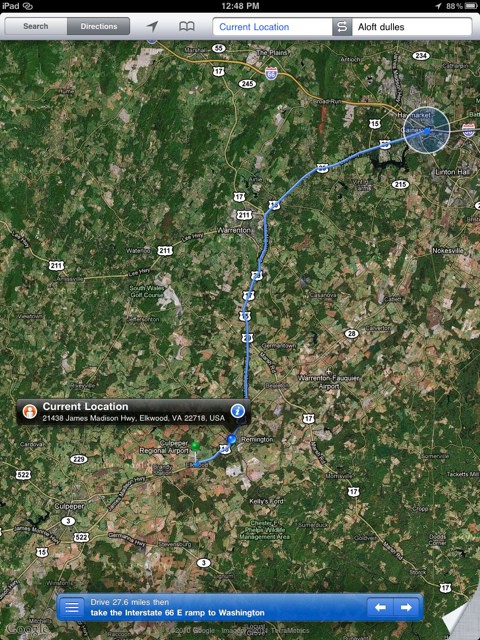
While his iPad 2 was tethered to his iPhone, Kyle fired up the iPad’s Maps app. To his surprise, the iPhone began passing GPS information to the iPad.

As we got closer, I decided to get some directions to make sure we were on track. I launched the iPads maps app, expecting to navigate the old fashioned way without GPS assistance — knowing full well that GPS only comes in the 3G iPad models. Imagine my surprise when my iPad pinpointed exactly where we were on the road.

Kyle has been using the Personal Hotspot feature on his iPhone 4. As he notes, Apple’s WiFi-only iPads and iPhones have for years been able to find their location awareness via a WiFi location service. The service notes the MAC addresses of nearby WiFi hotspots and looks them up in a database of router locations, which gives an approximate location.

However, Kyle says his iPad is getting genuine GPS location information, and it’s coming from the iPhone:

It is clear I am being fed GPS information from the phone, at what appears to be an interval of once a minute or so between refreshes (likely they didn’t do real time updating so as to go easy on the phone’s battery).

So if you’ve been looking at a 3G iPad for the GPS, you might consider the WiFi-only iPad. If you have iPhone tethering, you can use it on the go.

Can anyone test this with earlier models of the iPhone and iPad? Does it work with a first-generation iPad tethered to a 3GS?

Here’s video of it in action:

DON'T MISS
UK Parliament Spends $26,000 On iPad Experiment

Apps you might like

  • http://twitter.com/danndroid Dann Bautista

    Same goes with iPod touch and my Nokia E71, tethered using Joikuspot.

  • Astericky

    Um it did that with the old iPad too.

  • Kevin C

    This guy’s iPad1 got GPS from his Mifi Hotspot: http://themacscreencastguy.com/blog/2010/3/24/mifi-gps-the-ipad.html

  • Miguel M.

    I used to do this with a Verizon MiFi and a first generation iPad Wi-Fi. Same thing, refreshed it’s location about once a minute.

  • http://twitter.com/tmadel tmadel

    Not clear he’s actually getting the GPS info and not the triangulation info from WiFi. Show me an app like TrailGuru and the exact GPS coordinates and I’ll be a believer.

  • 1234me

    I’m thinking its either using cell tower triangulation based on the the wifi sharing device (tethered phone, mifi) or maybe it actually does have a gps chip but needs help with the initial lock? Based on the fact that it seems to work with mifi that does not have gps, you can safely assume its cell tower triangulation or take a step further and assumed there is some sort of gps chip

  • wei

    wow, so basically any modem/phone an iOS device is tethered from will simply draw its gps co-ordinates from (provided its turned on)?

  • http://www.facebook.com/SpiderEternity Alex-Spider Hewitt

    Would this work if an Ipad 2 was connected to a mifi? I don’t want to have to shell out the extra money for a 3G model when a mifi is cheaper and is cheaper to keep up a data contract on than both my iphone and ipad together.

  • Doug

    This was working for me on the first generation iPad while using my EVO 4G as a hotspot for the iPad. It works just as well for the second generation iPad.

  • Brianmcbride99

    I can confirm this works on a jailbroken iPhone 4(CDMA) as well. Though the location refresh rate is slow ~ 1 minute or so.

    • Brianmcbride99

      Through the mywi app

  • Floorsrob

    I just tied the Hotspot tethering with my 1st gen wifi only iPad and iPhone 4, the gps works wonderfully on the iPad……nice!

  • http://twitter.com/jreuschl Jason Reuschlein

    But it isn’t real time.. so there’s no new info here. What good is a GPS that updates itself every few blocks?

    My iPad 1 + Mifi or my EVO does the same thing, so nothing new. If you have a 3G iPad then the GPS works.. like a GPS should.

  • http://www.facebook.com/esbentheisjensen Esben Jensen

    Actually works when using the iPhone as a hotspot for your Mac as well. So firing up google maps in Safari will let you look up your location when tethered to the iPhone.

  • Dan

    It has always worked this way. I use my wi-fi only iPad with both a 3G and 4G phone and it has always had the ability to pick up the GPS when tethered (via jailbreak).

    • http://pulse.yahoo.com/_WTRLIS7XR2KVVONVSIK4MYOEDI Jack

      then why didnt you let the masses know?

      • DeeMar

        Yeah — certainly seems odd that this feature is absent from Apple’s product pages…

  • exertia

    Would this mean that Augmented Reality / Virtual Reality apps should also work fine e.g. using an iPad over Wi-fi hotspot inside a museum, checking out details of painting/sculptures?

  • http://stephenhouston.com Stephen Houston

    Works fine when tethered to the htc desire too

  • Ainkor

    Has anyone actually tested this in an area where there is no other wifi signals? I just did and it doesn’t work with an iPhone 4 on VZW and a wifi iPad 2.

    • Anonymous

      Testing right now via wifi tether from my iPhone 4 to my iPad 2. GPS is on and I am receiving no signal, the locate me icon just keeps spinning. I am on an interstate HYW as I type this from my iPad.

    • Anonymous

      Testing right now via wifi tether from my iPhone 4 to my iPad 2. GPS is on and I am receiving no signal, the locate me icon just keeps spinning. I am on an interstate HYW as I type this from my iPad.

  • http://twitter.com/imhike London Snoward

    Need real-time GPS so unless there is some option or jailbreak for that, then its iPad 2 3G for me

  • http://www.facebook.com/profile.php?id=714239645 Shawn Tavassoli

    Did this back when the 1st ipad was out. MyWi on a iphone 3G + wifi Ipad = lagy GPS

  • Listing888

    Just install Navigon or TomTom, it works perfectly on non-3G iPad 1 and iPad 2. Cuz thats what i did and doing since iPad 1, nice huge GPS with very accurate location calibration(both Navigon and TomTom).

    • Rodriguez

      are you sure about that?

  • Sina_B78

    Tether your laptop or netbook to your phone of any kind and you’ll see your position on google maps. It’s not because of GPS. It’s based on the position of the phone connected to internet. You’re actially tracked based on where you’re using internet. It will work even if your turn your phone’s GPS off.

  • Amis69

    Yes this also works on a jail broke iPhone 3GS with MyWi, but not while on a cell com data card.

  • http://pulse.yahoo.com/_WQKVSOQ5KD5GTHIEHD3RWKMN2M Wayne

    I think it’s not just iphone. I tethered it using my wife’s android smartphone, and my ipad 16 wifi does locate itself on the map fine. I then tethered it using my own dumbass phone (sonyericsson tm506) via bluetooth, and the positional service still works! using mapquest app for phone. One more find – not sure if it’s just my unit, but it does locate itself even when it is not tethered, as long as you are within the map’s range that has been cached into memory. so, it seems like ipad 2 wifi only model does have gps unit built in.

About the author

Leander Kahney

is the editor and publisher of Cult of Mac, and author of three books about technology culture: Inside Steve’s Brain, the New York Times bestseller about Steve Jobs; Cult of Mac; and Cult of iPod. Leander has written for Wired, MacWeek, Scientific American, and The Guardian in London. Follow Leander on Twitter @lkahney and Facebook.

(sorry, you need Javascript to see this e-mail address)| Read more posts by .

Posted in iOS, News | Tagged: , , , , |

