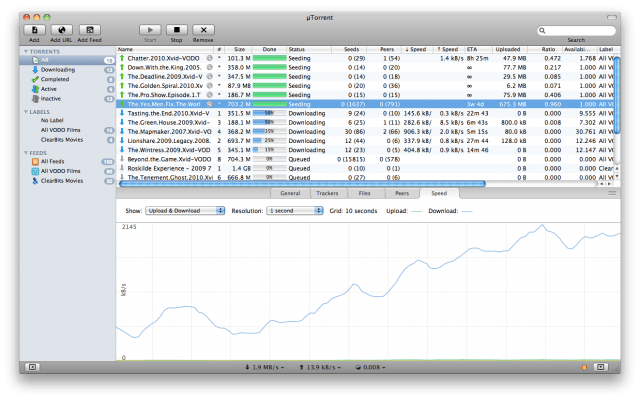
µTorrent has long been the best Bittorrent client for Windows, and for my money (nothing, since the app’s free), it’s been the best Bittorrent client for Mac since its debut as well. Historically, though, the Mac version of µTorrent simply hasn’t been as full-featured as the PC counterpart… but that’s all changed with the latest beta, which is available to download now over at the official site.
The latest beta of µTorrent brings over to the Mac many of the most widely requested features on the PC. Here’s what is new:
• µTorrent Remote: Simple, secure access to µTorrent from anywhere. No complicated network configuration required. Add and manage your torrents from any browser, mobile browser and even an Android native app (but where’s the iOS version?)
• Feeds: Subscribe and follow torrent RSS feeds right inside µTorrent. Set up Smart Feeds to auto-magically fetch torrents and start downloads for you.
• Scheduler: Now you can set µTorrent to start, limit and stop activity at regular intervals throughout the week. This is a valuable feature for those of you stymied by metered and shared networks.
• Advanced controls and info: Want more control and information about what’s happening behind the scenes? Upgraded logging features include much more detail. Also, feel free to access the double-secret-super-advanced preferences (they’re hidden behind CMD+OPT+,). Use sparingly and wisely.
As befitting the official Bittorrent client, uTorrent is a fantastic app and well-worth the download if you do any torrenting at all. You can grab it for free here.

John Brownlee is a writer for Fast Company, and a contributing writer here at CoM. He has also written for Wired, Playboy, Boing Boing, Popular Mechanics, VentureBeat, and Gizmodo. He lives in Boston with his wife and two parakeets. You can follow him here on Twitter.


12 responses to “µTorrent for Mac Gets Updated With Remote, Feeds, Scheduler And More”
Anyone know how to get a Windows like dialogue to show up before the torrent file goes into uTorrent. Having to remove files from the torrent is a B!+$# in the Mac version.
In transmission, it pops up (to accept the download) with the file list so you can untick the files you don’t want.
I’m sure once the download is added to the µtorrent list, right clicking on the file and selecting properties you can un-tick files (but there is no pop up dialog when accepting the download in µtorrent.)
you can get transmission at http://www.transmissionbt.com
it has a gorgeous UI => http://www.transmissionbt.com/…
The new preferences icons are terrible. Low contrast with a whiff of Windows about them. uTorrent isn’t as polished or Mac like as Transmission, but it’s fast and doesn’t choke your connection.
Why would u want to use utorrent?
on Windows its amazing, but when I tried it on the mac
its just complicated and simply doesn’t make much sense, it has a weird way of working.
Transmission is free, simple, works fantastic , and there is no reason to look for a different torrrent app
I have no problems with utorrent since I downloaded it from http://www.torrentoff.com quite the contrary transmission was not so good
You can also test automatic download of files from RSS feeds and torrent scheduler with Folx 2.0 Beta. It can be requested from Eltima site for free http://mac.eltima.com/download…