Make Your iPhone or iPod Touch a Stop Watch, Too

Make Your iPhone or iPod Touch a Stop Watch, Too

You’ve got to love Japanese developer Yuki Yasoshima, whose free stopwatch app hit the iTunes AppStore this week. The version of the app on sale in the US store is “English,” but nowhere in the AppStore description is a word of it actually in English, just the same Japanese character information found on Yasoshima’s website, which is also in, yes, Japanese.

Now, that’s confidence in your product!

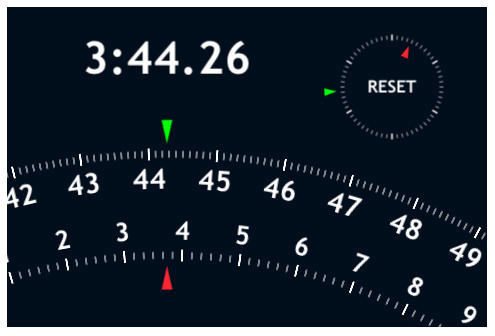
Fortunately, Big StopWatch is dead intuitive. Not to mention elegant, graphically boss and accurate to the 100th of a second.

If any of our Japanese-savvy readers want to take a shot at Yasoshima’s app description, it’s appended after the jump. Please let us know what we’re missing in comments.

最新バージョン : 1.0

DON'T MISS

60分計の積算式ストップウォッチです。緑色の針が秒、赤色の針が分を指し示します。

画面全体がスタート・ストップボタンになっています。タップすると計測をスタートし、もう一回タップするとストップします。ストップしているときに右上に現れるRESETの文字をタップすれば0秒に戻り、それ以外の部分をタップするとそのまま計測を再開します。

About the author

Lonnie Lazar

Lonnie Lazar is a writer-musician-web designer-attorney. He writes about Apple for Cult of Mac and Mac|Life, and about VoIP and telecommunications for Voxilla. Follow Lonnie on Twitter @LonnieLazar, join the Cult of Mac on Facebook, and find Lonnie's photos on Flickr.

(sorry, you need Javascript to see this e-mail address)| Read more posts by .

Posted in iPhone, iPod Touch, Reviews, Software |

  • doxa

    Translation:
    Latest version: 1.0

    This is a 60-minute count-up stopwatch. Green needle indicates seconds, red needle indicates minutes.

    The entire screen is the start/stop button. Tap once to start measuring, and tap again to stop. While stopped, tapping the word RESET that appears on top right corner will bring time back to 0 seconds, and tapping anywhere else will resume the timer.

  • Pinball

    You know the iPhone comes with a Stopwatch built in, don’t you? You just go to the native “World Clock” app and you click on the stopwatch icon. Gives you lap and reset options. Much easier than this POS.

  • Allison

    I much prefer the Engrish translation:
    “Up-to-date version: 1.0 It is the addition type stopwatch of 60 minute meters. The needle of green color the needle of second and red indicates amount. The whole picture has become start [sutotsupubotan]. When the tap it does, you start measurement, when already the one time tap it does, you stop. When having stopped, if the letter of RESET which appears with respect to the right the tap is done, when it returns to 0 seconds, the tap does the part other than that measurement is reopened that way”

  • http://www.chronme.com chronme

    In case you are looking for an online stopwatch

  • C. reaves

    The plain stopwatch is intuitive, but the preview shows it also doing lap/split times. I CANNOT figure out how to do this! Everywhere I touch on the screen either starts or stops the normal stopwatch function. Ther appears to be n way to activate the split timer.

    How do I get splits!?

  • Blaams

    For splits: look at the general settings of your iPhone. The app installs a settings-panel in the default settings-panel on your homescreen (under the Photo-settings). Hope this helps…

