
Why Is My Mac Running So Slow? [MacRx]

Why Is My Mac Running So Slow? [MacRx]

Macs are solid machines, but (like many of us) they have a tendency to slow down and get more lethargic over time.  Launching and switching programs takes longer, the dreaded Spinning Beach Ball appears more often, and soon even simple tasks become arduous.  What’s going on?

Many things can decrease performance, but several culprits are common: not enough disk space, not enough RAM, and running too many apps at once.  I see these in my consulting business regularly.

Not Enough Free Disk Space

Modern Operating Systems use the hard disk for temporary storage.  Cache files, temp files, and (most importantly) virtual memory swap files help the OS juggle finite RAM resources among the many apps and tasks which are running.

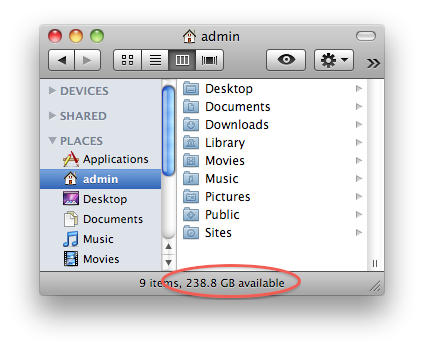
When your hard drive fills up too much, system performance suffers.  You can see how much space is left on your drive by looking at the bottom of a Finder Window, or clicking on your drive on the desktop and choosing File –> Get Info (or CMD-I).
Why Is My Mac Running So Slow? [MacRx]

A general rule of thumb is to keep at least 10% of your hard drive free at all times, with an absolute minimum of 5GB free (slightly less for PowerPC systems).  Drop under this and your Mac is wheezing up the stairs; with less than 1GB free it’s gasping for air on the floor.  When space completely runs out, accessing even non-boot drives becomes tricky.

To free up space delete unneeded data, including old downloads, installers and .zip archives.  There are several Gigabytes of files in your top level /Library/Application Support folder for things like Garage Band, iDVD, etc., which you can delete if you don’t use these applications.  You can also move files to external drives and delete the originals.

When you can’t clear enough to make room, it’s time for a bigger hard drive.

Not Enough RAM

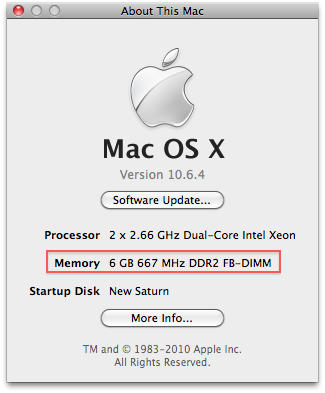
Your Mac uses RAM to store user data that the CPU is actively using; this type of storage is fast and efficient, but in limited capacity compared with slower disk storage.  The more RAM you have the more data can be made quickly accessible to the processor, with less need to read and write to disk. You can see how much is installed in your system under the Apple Menu –> About This Mac.
Why Is My Mac Running So Slow? [MacRx]

Apple ships most Macs with less RAM than you ultimately need. For Leopard and Snow Leopard on Intel-based Macs, 2GB is a good practical minimum.  For Tiger on Intel (yes, people are still using this), 1GB minimum is recommended.  More is always better.

PowerPC Macs generally have half the RAM requirements of Intel machines.  For Leopard on PowerPC, go with 1GB minimum; for Tiger, 512MB.  Anything older than Tiger or a G4-based Mac is impractical these days, particularly for internet access.

Running Too Many Applications

Compounding the demands on your RAM are the multiple programs we, the pesky users, run on our machines.  Generally the more things you run at once, the more RAM you should have.

This problem has become more common as people switch to the Mac from Windows.  Unlike on a PC, closing all the windows for a program does not quit the program on the Macintosh.  You need to choose File –> Quit (or CMD-Q) to exit the application.  If the dot is still glowing underneath a program’s icon in the dock that means it’s still running.

Why Is My Mac Running So Slow? [MacRx]

Another possibility is an unused app that has crashed in the background.  You may not see any visual indication of a problem, but the system may suddenly get very slow or erratic.  You can use the Activity Monitor app (inside Applications –> Utilities) to look for suspect processes.

Quitting unused applications will free up RAM and improve performance. I’ve come across clients complaining about bizarre behavior on their Macs, only to find thirty apps running simultaneously!  Quitting (or Force-Quitting) most of them substantially improves performance.  As does my last suggestion, which is probably the Most Often Suggested Tech Support Fix:

Reboot Once in a While

Rebooting your Mac is the computer equivalent of a good night’s sleep and a hearty breakfast.  RAM is cleared, processes reset, and you start with a clean slate.  Modern Macs run a version of UNIX and are very stable and reliable, but still do need a restart from time to time.

I generally tell my clients to reboot every few weeks, or whenever their system is acting strange.  This isn’t a hard and fast rule but going months at a time will most likely cause problems.  If your Mac doesn’t want to shut down or restart normally, other problems are likely looming.

These are some common causes of performance problems, not a comprehensive list.  

DON'T MISS
See How Much Storage Space Your iOS Apps Are Using On Documents & Data [iOS Tip]

Apps you might like

  • Poppa

    good tips but what I want to know is why my Mac’s wifi is so crap compared against other OS’s, always dropping signal randomly can not find server etc. etc.

  • http://log.tuananh.ws Tuan Anh

    this kind of posts are all over the web. nothing new !!

  • kirkmc

    The 10% rule is archaic, and dates back to when hard disks were measured in MB. The safe bet is to have at least 10 GB free – this will allow plenty of space for swap files, and for temp files that some apps use. Add to this if you have a lot of RAM and use RAM-heavy apps. But 10% of even a 250 GB drive is excessive.

  • http://istrategylabs.com/ Joseph Corbett

    Those were some fairly basic tips, I guess that makes them accessible to the majority of users. Anyway, you forget a very basic and important tip. Re-Indexing your hard drive. System Preferences -> Spotlight -> Privacy. Drag your Main Hard Drive to this list, count to 5 and then remove it. “Magically” your computer will rebuild the index for your hard drive. You should notice your computer being a bit snappier.

  • JasonL

    I’ve found that on some of the MacBook Pros, the Firewire has malfunctioned and needed to be disabled. I had a MBP that would take FOREVER to boot (FOOOOOORRRRREEEEEEVVVVVVERRRRRRRRRR – nearly 10 minutes).
    After some googling, i found a thread that stated that sometimes the Firewire was the culpret. I checked the logs and sure enough, there were errors on firewire (plus, i wasn’t able to use Firewire as a target boot device).
    So, i disabled it and remove from Library Extensions and suddenly my machine was running in tip-top shape.
    It’s just a matter of knowing how to interpret logs, i guess.

  • http://nthndesign.com NTHN

    Something that i just did that seemed to make a big difference for me is to start up in “Safe Mode” by holding down the shift key while starting up. Then simply reboot into regular mode. It sped my 2006 MacBook Pro Core Duo 2.0 Ghz up a lot. Bye Bye Beach Ball!

  • kirkmc

    Safe Mode deletes certain cache files that are then rebuilt after startup. You may find a difference for a while after doing that, especially because of a font cache file that can slow things down.

  • king

    I have a 160 GB, when only 28 GB was left, I noticed it was slowing up. I am confused. Some people say 5-10 GB is enough to keep the system running, others say the less storage the better.

    Second thing is RAM. I don’t use a lot of software together, will adding more RAM increase the speed of my mac? I got 2GB on 10.6.4 now. Expanding my ram is kind of expensive, its more like $100+ for a 4GB kit , I am not sure the results will be wroth it?

    • Chuck Robbins

      Currently I have 8 GB (2.6 GB free) and 1 TB hard drive (300GB free) in a 27 inch iMac. I never allow free space to drop below 25%. I have 18 applications open and only see the spinning beach ball on bad web pages.

      I have already purchased 2 TB hard and intend to upgrade the hard drive in the near future.

      I have only rebooted the iMac 3 times in 11 months of ownership. Once because my power went out for 5 hours in a storm. I really need a backup generator.

  • charli

    keeping in mind (as some seem to have forgotten) that MacRX is for non geeks, here’s a tip. Empty the Trash. I’ve had folks call me telling me that they have run out of disk space but they deleted everything they could and yet there’s the trash with 50 GB of stuff in it. They didn’t get that putting it in the trash doesn’t actually delete it (same as the ‘recycle bin’)

    Also, keep the desktop clean. Tons of stuff on the desktop will slow things

  • Sedulous

    The guy at MicroCenter said that cleaning out the PRAM (which apparently has a hardware inventory) often helps (kind of like doing registry cleaning on Windows). When you boot with the option to rewrite the PRAM, the mac reinventories its hardware and supposedly things go faster.

    With regards to bad internet connections, we found out that Apple products work best on the latest and greatest routers, with the latest firmware installed. (They probably work even better with AirPort routers. Have you ever seen a Mac at an Apple Store with a bad connection?) Our brand new iMac and MacBookPro were dog slow and dropping connections on the old Linksys router, but when I turned on the verizon FIOS router (1 year old) wi-fi, everything was nice and snappy (and happy!).

    • http://www.oakbog.com Adam Rosen

      Thanks for the good feedback folks. I’m adopting Twitter @name designations today (for a curmudgeon like me, this is a big step).

      @kirkmc – the 10% rule for free disk space isn’t hard and fast (and is old, yes); another common guideline is to have at least twice as much disk space available as you have installed RAM. The key thing is not to let available space drop too low. 5GB seems to be about the number which cripples many Macs.

      @king – adding RAM will solve many of the Spinning Beach Ball problems and delays when switching between programs. $100 for the upgrade from 2GB to 4GB is reasonable and will help future-proof the system.

      @charli and @Tuan Anh – MacRx is targeted at a general audience, yes, and covers the kinds of issues I actually see people wrestling with every week. Reminding people to “Empty the Trash” (both Finder and Email trash) is in fact a good tip, some people don’t realize this is necessary.

  • Lee

    Every couple of weeks, open terminal, and run these commands
    diskutil repairpermissions /
    sudo periodic daily weekly monthly

  • Church of Apple

    I’m surprised no one mentioned Onyx:
    http://www.apple.com/downloads/macosx/system_disk_utilities/onyx.html

    I had an issue with my new MBP not booting so I booted in safe mode, logged in as an admin and ran the Onyx automation. All better. =)

  • http://www.tinyurl.com/ichooser MSComputerVideos

    Great Tips and all, but not helpful. After all I have 100Gb left, reboot daily, and running safari with snow leopard on 1gb crawls. I also get a jumbled mess of pixels right before the login screen when I boot up. The screen goes gray, and the botoom goes black, and there will some massive black pixels on the screen for a few seconds before the login screen. Anybody know what might cause this?

    • http://www.oakbog.com Adam Rosen

      @MSComputerVideos – running Snow Leopard with only 1GB RAM will be sluggish, increase to 2GB or more

    • weatherguy

      @MSComputerVideos

      What model Mac are you using? The “jumbled mess of pixels right before the login screen when I boot up” is exactly what I’ve been seeing on my 27″ iMac since the “Snow Leopard Graphics Update”…. I took it to our local Apple store, and the Genius immediately took it in for a video card replacement. In addition to upgrading your RAM, you might have the Apple guys look at it…

  • Hilal

    While working on my iMac it suddenly shuts down. I took it a couple of time to the Apple store and they checked it inside out and said nothing is wrong with. All my power connections are ok. Went back home tried it and it worked. Few days later same incident happened. Took it again, and they gave me a new poer cord just in case and I bought a new surge protector. The problem still insists. All other devices plugged to the protector are working fine and non goes off. I have the Airport express, alarm clock and the modem. The other night I tried to turn the iMac on and wit would not. So I unplugged it and plugged again into the empty slot on the surge protector and it worked. What could be the reason it keeps shutting down or won’t turn on on occasions?

    • http://www.oakbog.com Adam Rosen

      @Hilal – sudden shutdowns are usually caused by a bad power supply in the computer

      • Hilal

        The folks at the genius bar at the Apple store said there’s nothing wrong with the power supply, that it could be the wall outlet itself. Hmmmm…. like I said I have other equipment plugged into the same surge protector, but they don’t seem to go off.

  • imajoebob

    One major factor left out: Updates. Each time you get an update or a patch it adds to overhead. Each update of Safari adds features or options, but it also adds to the load on your system. On my older PowerBook Ti Safari can sometimes suck up 80% of the processor resources. Just think what running Photoshop Help does to your system!

    If you have an older machine it’s now important to decide if these “improved” applications are worth the trouble. And I gotta wonder what the Universal versions are doing to my poor old machine.

  • jon g

    its running so slow because crapple makes sh*tty products, LoL.

  • imix

    Great tips, and comments. I recently downgraded my late 2006 mac mini core duo with 1 GB RAM back to Tiger and holy cr#p, it was like having a brand new machine again. I never really used spaces, time machine or any other so called Leopard/Snow Leopard “features”. I finally figured out that Moore’s law is directly and inversely related to Jobs law, ie, sure, every 18 months computer processing power doubles, but it also takes twice as much processing power to accomplish the same fracking task. I can also confirm that PowerPC macs have much gentler RAM requirements, and still can be very useful in the “modern” world. Browser support for PowerPC macs is starting to end (Firefox will not support PowerPC macs with 4.0), but some diehard open sourcers out there have already indicated they will keep us PowerPC holdouts supplied with non-official updates. A quad core G5 is still an incredibly powerful machine by any standard.

  • RJ

    RE @charli: Does keeping the Desktop clean mean minimizing the number of file/folder/resource icons visible on the Desktop, or does it mean minimizing the number of resources that can be accessed from a folder/resource icon on the Desktop?

    If I put all of the crap that’s on my Desktop now into a single folder called “Desktop”, could I expect any performance improvement?

    Thanks for anyone who can reply!

  • Jeff

    I just wish the memory for the original Mac Pro wasn’t so freakin expensive. Not to mention, it’s not readily available at Best Buy. When I first bought it it had Tiger on it and it was super fast with just the standard 1 gig. But when I upgraded to Snow Leopard, everything ground to a halt. Seeing as how the system is about 4 years old I might just sell it and put that money towards an iMac or even a Mac Mini. Right now my Macbook Pro can outperform my Mac Pro at certain things. Though it can’t touch it at video encoding.lol

  • Josh

    Those are all great basic ideas, but not what is affecting me. I have a 27″ imac, with a 2.66 GHz, 8GB ram, 1TB harddrive. I just rebooted it again, and have 460GB available, only using 2% of CPU and have 6.2GB ram free, but the computer is still running crazy slow. Any other ideas?

About the author

oakbogAdam Rosen is an IT consultant specializing in Apple Macintosh systems new and old. He lives in Boston with two cats and too many possessions. In addition to membership in the Cult of Mac, Adam has written for Low End Mac and is curator of the Vintage Mac Museum. He also enjoys a good glass of Pinot Noir.

(sorry, you need Javascript to see this e-mail address)| Read more posts by .

Posted in How-To, Mac, MacRx, Top stories | Tagged: , , , |

