Top stories

Microsoft’s My Documents Folder Makes Triumphant Return – On iPad

20100209-mydocuments.jpg

Earlier today, I was reading Infoworld’s article, The iPad questions Apple won’t answer. The first question they listed was “Can you save and transfer documents to the iPad?”, and their assumed answer was “No”; they suggested that the only way to do this would be to open a document from an email message.
I read that [...]

Top 5 Things To Check Out at Macworld 2010

Macworld 2010 opens today. It is the 25th annual gathering of Mac users. That’s right, 25 years!
But thanks to the absence of Apple this year, this “Mecca for Mac Heads” may be the last. So check it out while you can.

The show runs for 5 days. The Expo showfloor opens on Thursday at noon.
For the [...]

Opinion: MacBook, or iMac + iPad?

20100208-imacipad.jpg

The announcement of the iPad has done a lot of things: it’s stoked up excitement in the Mac using community, it’s got a bunch of developers feverishly coding exciting new stuff, and it’s got retailers and cell phone companies the world over drooling over the money they can make from it.
And it’s also somewhat upset [...]

In Depth: 30 Days with the Nexus One

It’s been a month since my review of Google’s “SuperPhone”, the Nexus One. Since that time, we’ve surfed, updated facebook, navigated, called, played endless hands of cribbage and even tried to freeze it to death on a trip to Dayton Ohio. Follow me after the jump to find out does the “SuperPhone” stand the [...]

4iThumbs iPhone Keyboard Overlay Adds Tactile Feedback

4ithumbs

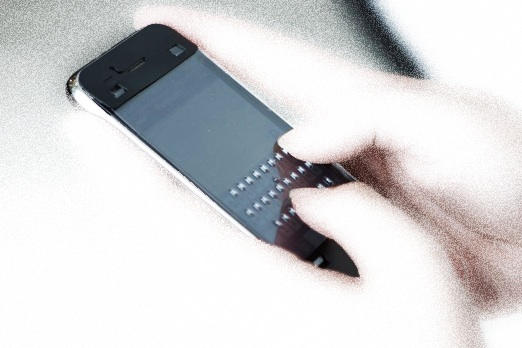
4iThumbs is a $14.95 overlay for the iPhone screen that provides tactile feedback when using the on-screen keyboard. It has little bumpers placed right above the virtual keys that provides the feedback.

If you previously owned a Blackberry, typing on an iPhone might be a pain for you. Even though the on-screen keyboard is pretty responsive, it lacks the tactile feedback that you get on devices like BlackBerry Storm 2 etc. Now with 4iThumbs, you can fill that gap. The company boasts that the typing experience should become much better within just hours of use. As an extra feature, it also acts like an anti-glare screen protector.

However, it doesn’t look like an ergonomic option. The overlay is required just while typing and becomes a hindrance when doing other stuff like playing games. Thankfully it’s removable but taking it off and putting back on every single time is even worse. Also, carrying an extra screen every time in the pocket isn’t something that people like.

Currently, it’s the only option if you are looking for a way to have tactile feedback from your iPhone keyboard. Even though their commercial depicts just the portrait version, a landscape version is also available.

via Engadget

About the author

Sayam Aggarwal

Sayam Aggarwal is a 16-year-old student living in India who has been an Apple fan for almost 5 years. He has worked with ModMyi, one of the leading iPhone communities, as an author for more than a year. He spends most of his free time on the Internet fetching the latest news regarding Apple and its entire product range. Follow him on Twitter!


Email the author | Read more posts by Sayam Aggarwal.

8 comments

    Terrible idea. Jonathan Ive must cringe just at the sight of that thing.

    Works for keyboard in portrait mode only. In other scenarios you have to put up with it. Hmm… Useless thing…

    I don’t like these novelty keyboards, they spoil the look of the iPhone and you can’t use it in landscape mode.I have never had a problem typing with a iPhone

    PLEASE Apple, please come out with an external BLUETOOTH or WIRED KEYBOARD for the iPhone!!

    I had them for years with my Palm Treo and BlackBerry.

    PLEASE APPLE PLEASE!

    Tat should be integrated with phone cover so that you could flip it over when needed. The cover could have two flips for vertical and horizontal keyboard.

    We at 4ithumbs would never do anything to hurt the look or function of the iPhone. You can keep 4iThumbs on most if not all of the time, without losing any of iPhone features. It may have to be taken off for some games.

    We consider 4iThumbs a trainer which you will eventually remove, the iPhone will look as good as new. To those that don’t need our product we ask to be one minded in your comments for those that do.

    Let me start of by saying that I’m a pretty big guy and my fingers are huge. I was curious to see if this would cure my lack of typing on the apple keyboard. I do have to say it has improved my typing and it’s changed everything. It’s only been a few days but this is a winner. Other then that it doesn’t do anything or for that matter change anything, I used my phone a usual.

    This overlay, despite the negative feedback from those who think it detracts from the sleek look of the iphone, is a good option for those with visual impairments who would like to access the iphone. I would assume that Jonathan Ive would not “cringe at an accessory that makes the iphone usable for a group of people with a disablity. Unless and untill Apple develops a method for blind and visually impaired people to use the iphone, this product is a very viable accessiblity tool.

Add your comment

Name(Required)

Mail (required, but not published)

Website

Comment

Buy Inside Steve's Brain Buy from Amazon.com Buy from Barnes & Noble